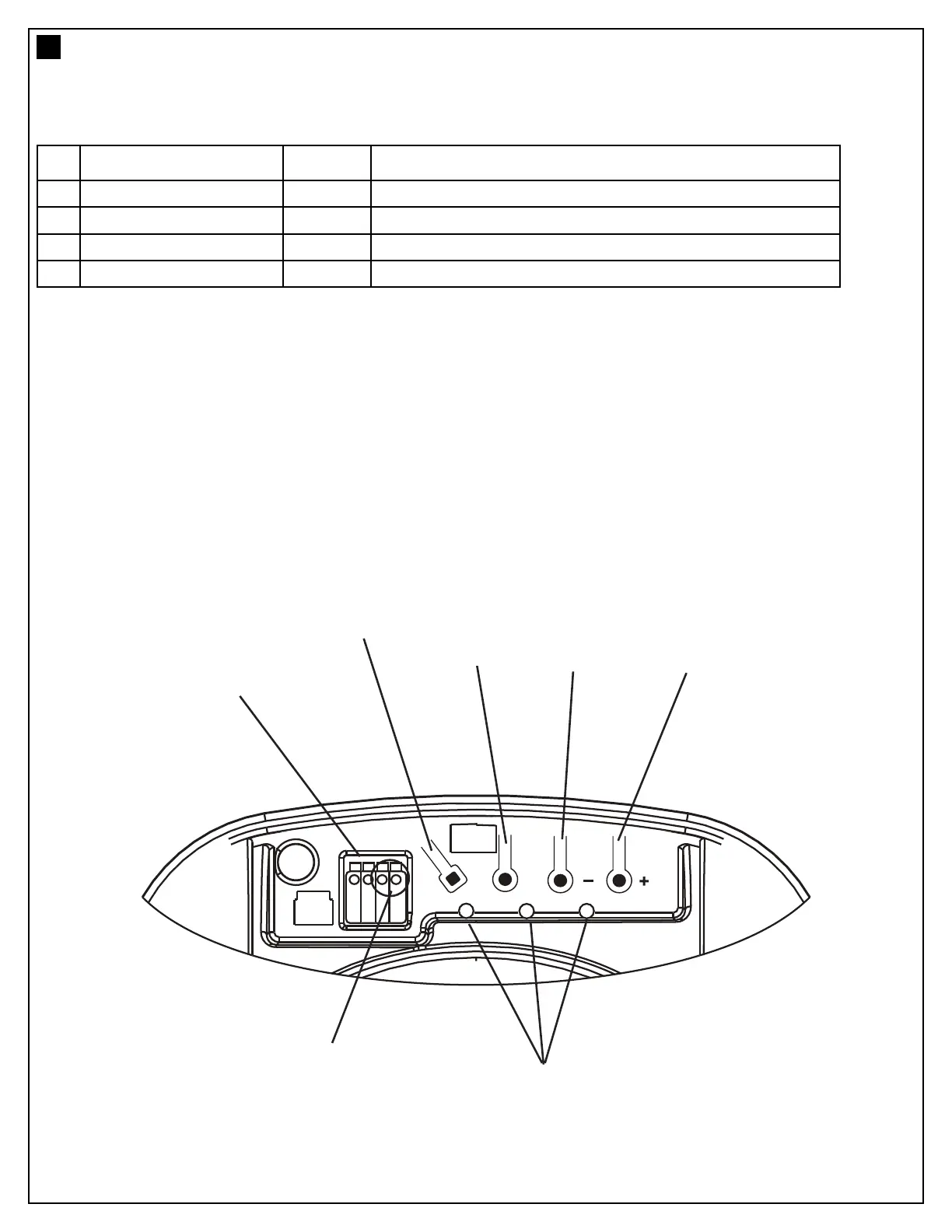
1. Terminal Block: used for external accessories (see chart below).
2. S Button: used to “SAVE” the REMOTE CONTROLS.
3. P Button: used to “PROGRAM” the DOOR LIMITS.
4. - Button: used to drive door DOWN.
5. + Button: used to drive door UP.
6. Green Button: used to activate the door when remote controls are not available. Open - Stop - Close.
7. LEDs: 1. Remote Control Indicator
2. Program DOWN indicator, Door Operating & Passpoint indicator
3. Program UP indicator
No Function Polarity Comment
1
Push button +ve
Dry contact input for push button wired wall controls:
2
Common -ve
Common terminal for push button and IR Beams:
2 Common -ve
Common terminal for push button and IR Beams:
3
IR Sensor +ve
Merlin IR Beam Input: (pulsing type only)
CONTROL PANEL (located under the lens cover)
5
7



 To Next Page