E2 SERVICE MANUAL REV D 09/12
27
FIRMWARE UPDATES
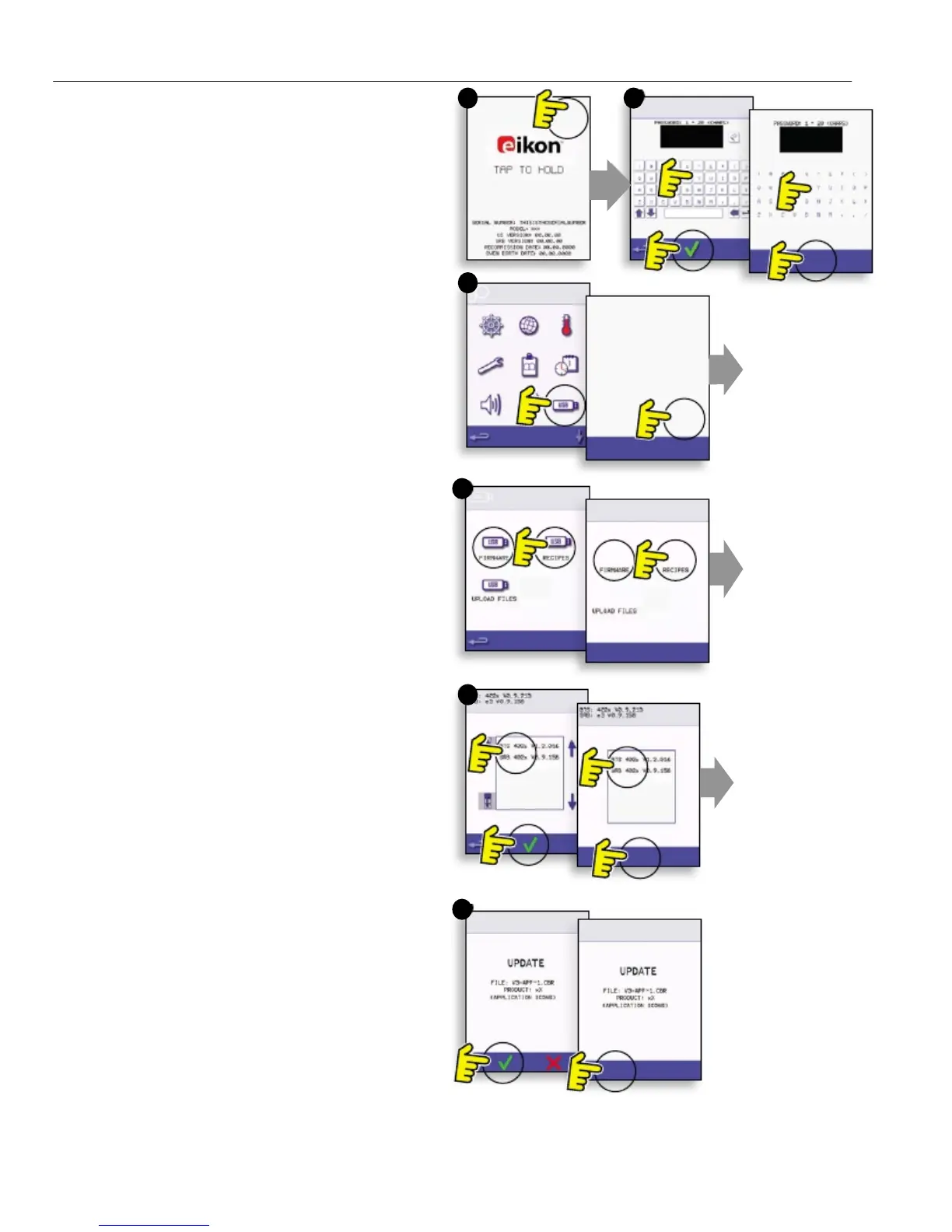
Note: if icons are not displayed on the screen,
press in the same positions on screen as the
missing icons to select.
1. Tap the top right of the screen (1) or the same
position if it is not displayed to bypass oven
preheat.
2. Enter a password (i.e. “Manager”) and select OK
(2) or the same position if the green tick symbol is
not displayed.
3. Select the USB symbol (3) or the same position if
it is not displayed.
4. Select one of the USB options (4) or the same
position if it is not displayed: ‘Firmware’ for QTS &
SRB updates and ‘Recipe’ for Icons. Install the
SRB update first, the QTS update second and
Icons third.
5. Select the firmware to install and select OK (5) to
confirm or the same position for the OK (green
tick symbol), if it is not displayed.
6. The update screen displays the file version and
product, select OK (green tick symbol) to confirm
installation (6) or the same position if it is not
displayed.
1 2
3
4
5
6


 To Next Page