6 Installation Page 18 of 25
COM200 module - Product Manual 1.0 MetCom Solutions GmbH
6.2 Signal strength & provider check
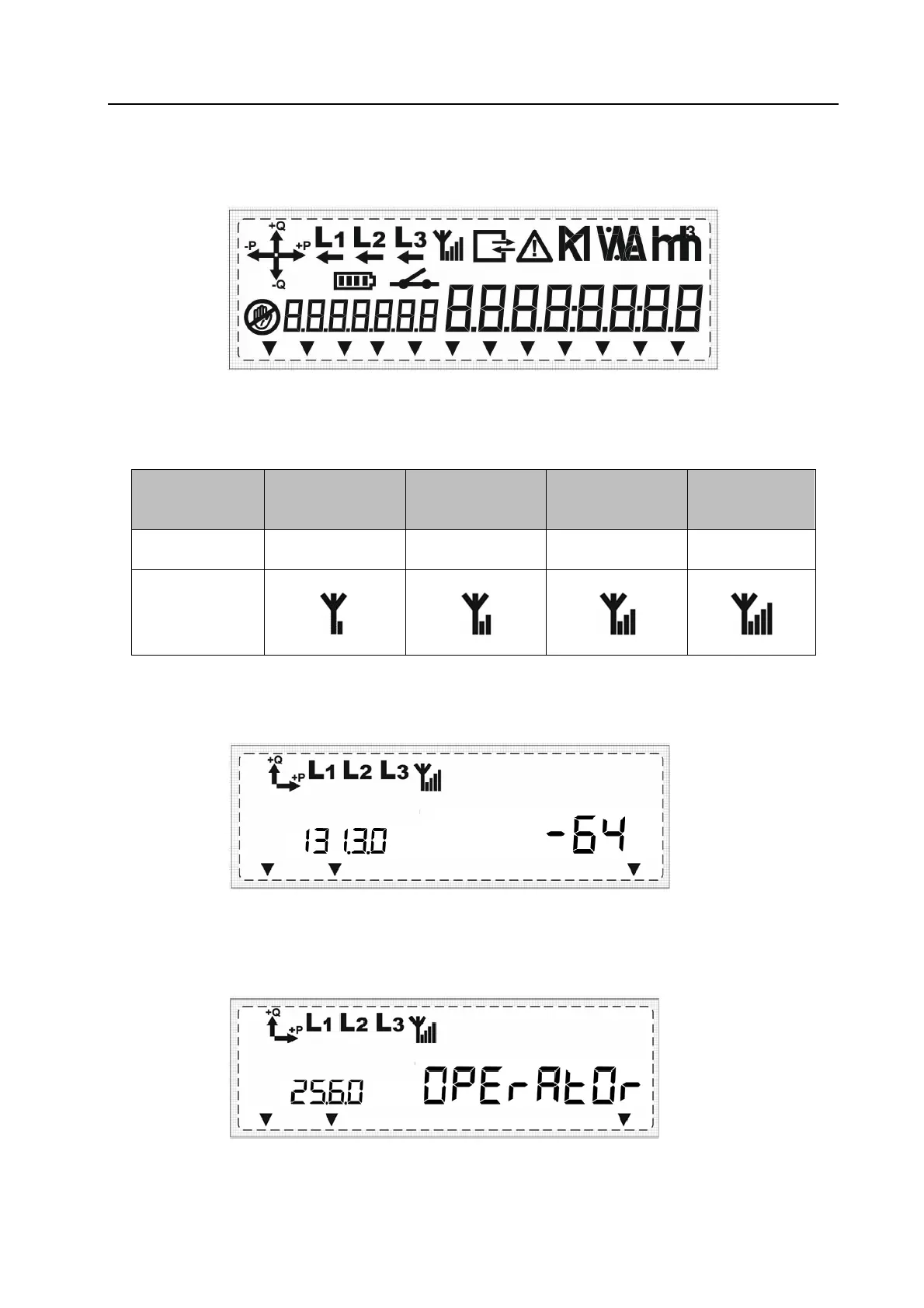
The GSM/GPRS signal strength can be checked during the installation process using s specific
icon on the meter LCD.
GSM/GPRS signal strength indication
Up to 4 signal strength symbols are used on the LCD to check a good reception:
Bar(s):
1
2 3 4
Signal strength
range:
-95 … -86
dB
-85 … -76
dB
-75 … -65
dB
>-65
dB
Icon in LCD:
Additionally, the signal strength of the communication module can be seen on the LCD under
the OBIS identifier: 131.3.0
Provider indication
Additionally, the provider of the GSM/GPRS communication can be seen on the LCD under the
OBIS identifier: 25.6.0
Node sayaç Çözümleri Ltd. Şti.
Metering Solutions



 To Next Page