8
OPERATION
2.2.2 CONNECT TO A NON-METER LOGGER
The TEROS 12 can be used with non-METER (third-party) data loggers. Refer to the third-
party logger manual for details on logger communications, power, and ground ports.
The TEROS 12 Integrator Guide provides detailed instructions on connecting sensors to
non-METER loggers.
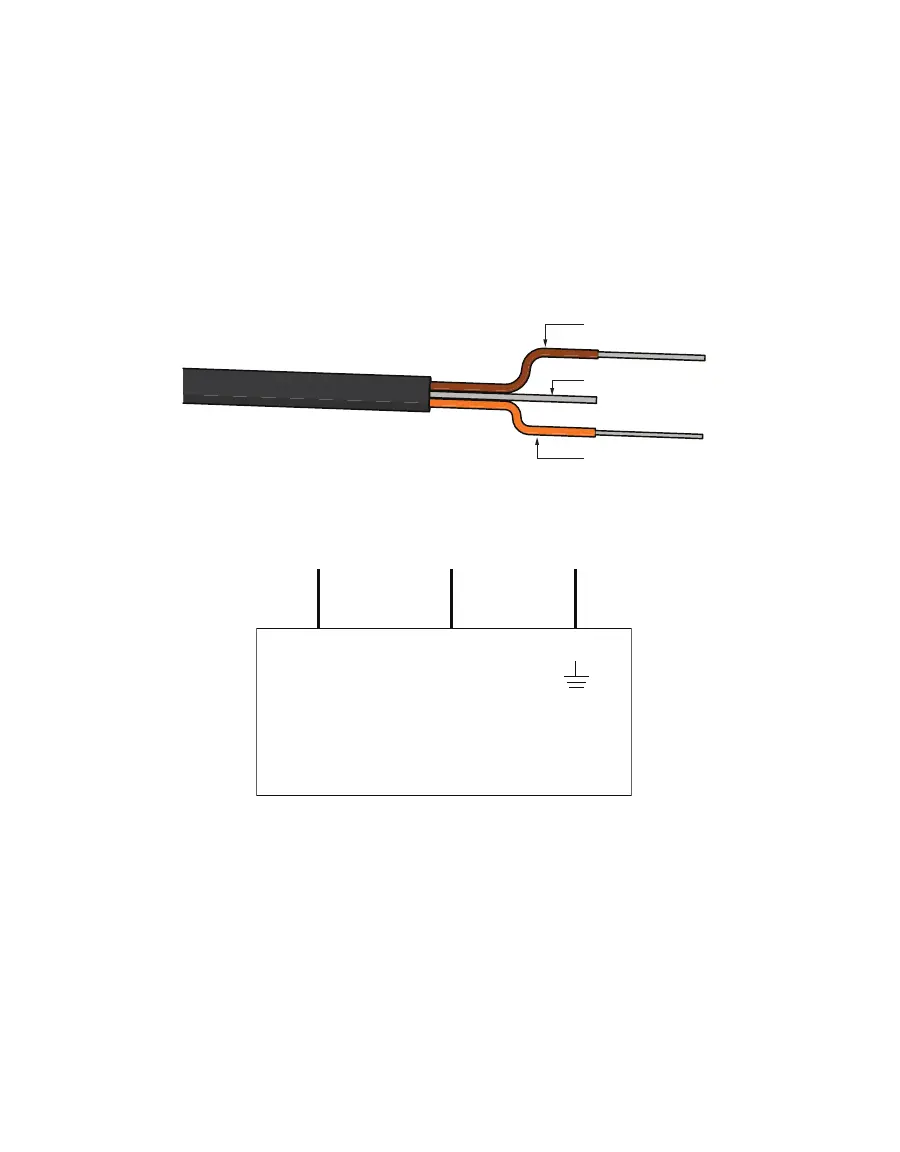
TEROS 12 sensors can be ordered with stripped and tinned (pigtail) connecting wires for use
with screw terminals. Connect the TEROS 12 wires to the data logger illustrated in Figure2,
with the supply wire (brown) connected to the excitation, the digital out wire (orange) to a
digital input, and the bare ground wire to ground.
Ground (bare)
Data (orange)
Figure2 Pigtail wiring
Switched
4–15 VDC
Digital
In
Data Logger
G
(orange)
(bare)
(brown)
Figure3 Wiring diagram
NOTE: The acceptable range of excitation voltages is from 4 to 15 VDC. To read TEROS 12 sensors with Campbell
Scientific, Inc. data loggers, power the sensors from a switched 12 V port or a 12 V port if using a multiplexer.


 To Next Page