REV. 9/12/2017 INST99-6525
7
SCREEN OPERATION
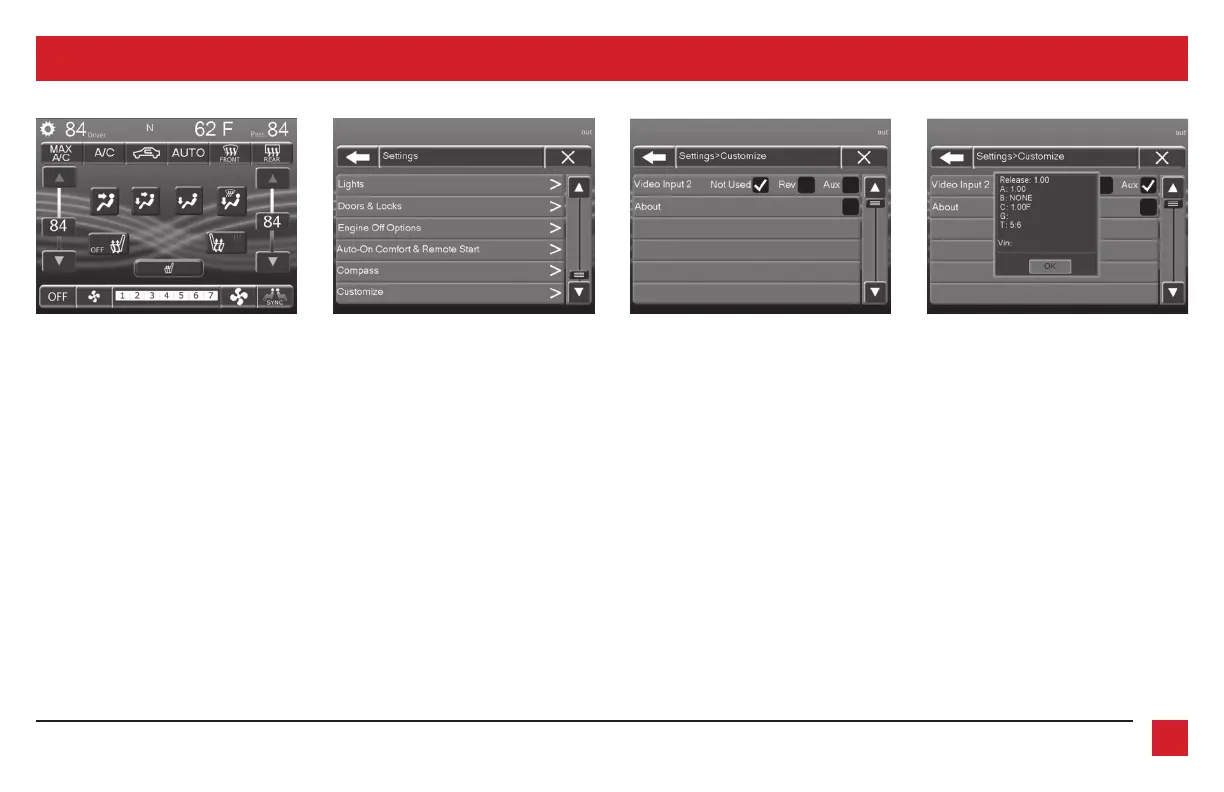
1. Enter the settings menu by tapping the
gear icon in the upper left corner of the
screen.
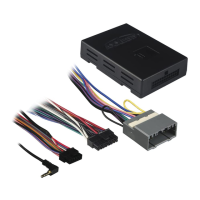
2. Once in the setting menu, scroll down
and tap the Customize button to enter the
customize menu.
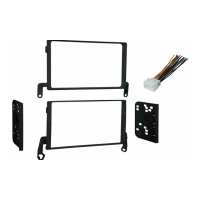
3. Once in the customize menu, you can
select to make the Video-2 input either
Not Used, a Reverse (Backup Camera)
input, or an AUX input.
Note:
The Reverse (Backup Camera)
input is controlled by data and will only
activate when you put the vehicle in
reverse.
Note:
The AUX input is controlled by
data and will only work while the vehicle
is in park.
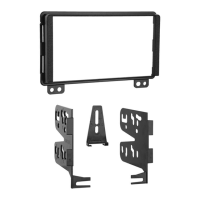
4. Tapping the About button will display the
current version number of the kit, and
the VIN number of the vehicle. Tap the
OK button to exit.
5. After you have made your selection, tap
either the X or Back (left arrow) button
one time to return to the previous menu,
or two times to return to the main menu.
Continued on the next page



 To Next Page