TeraOhm 5kV
19
Measurement procedure:
- Connect the test leads to the instrument and to the tested object.
- Select INSULATION RESISTANCE function using the rotary switch knob.
- Press the START key and release it, continuous measurement starts to run.
- Wait until the test result has stabilized then press the START key again to stop the
measurement or until set timer runs out (if enabled).
- Wait for the object under test to be discharged.
- The result (see the right figure above) can optionally be saved pressing the MEM
key twice, see the chapter 6.1. Store, Recall and Clear Operation.
Legend of displayed symbols:
INSULATION RESISTANCE
Name of selected function
Off (Fil1, Fil2, Fil3)
Filter type enabled, see the chapter
5.3. Configuration
1000V
Set test voltage
U=1056V
Actual test voltage – measured value
I=0.04nA
Actual test current – measured value
>1.00T
Ω
ΩΩ
Ω
Insulation Resistance – result
C=1.3nF
Capacitance of measured object
tm:00min 15s
Timer information – test duration
Bar
Analog presentation of result
Rmax=
Maximum value of result (only if timer
is enabled)
Rmin=
Minimum value of result (only if timer is
enabled)
Notes:
- If the timer is disabled then OFF is displayed instead of the timer value.
- During the measurement the timer information displays the time needed for the
completion of the measurement (tr) while after the completion the test duration (tm) is
displayed.
- A high-voltage warning symbol appears on the display during the measurement to
warn the operator of a possible dangerous test voltage.
- Value of capacitance is measured during the final discharge of the measured object.
Set-up parameters for Insulation Resistance:
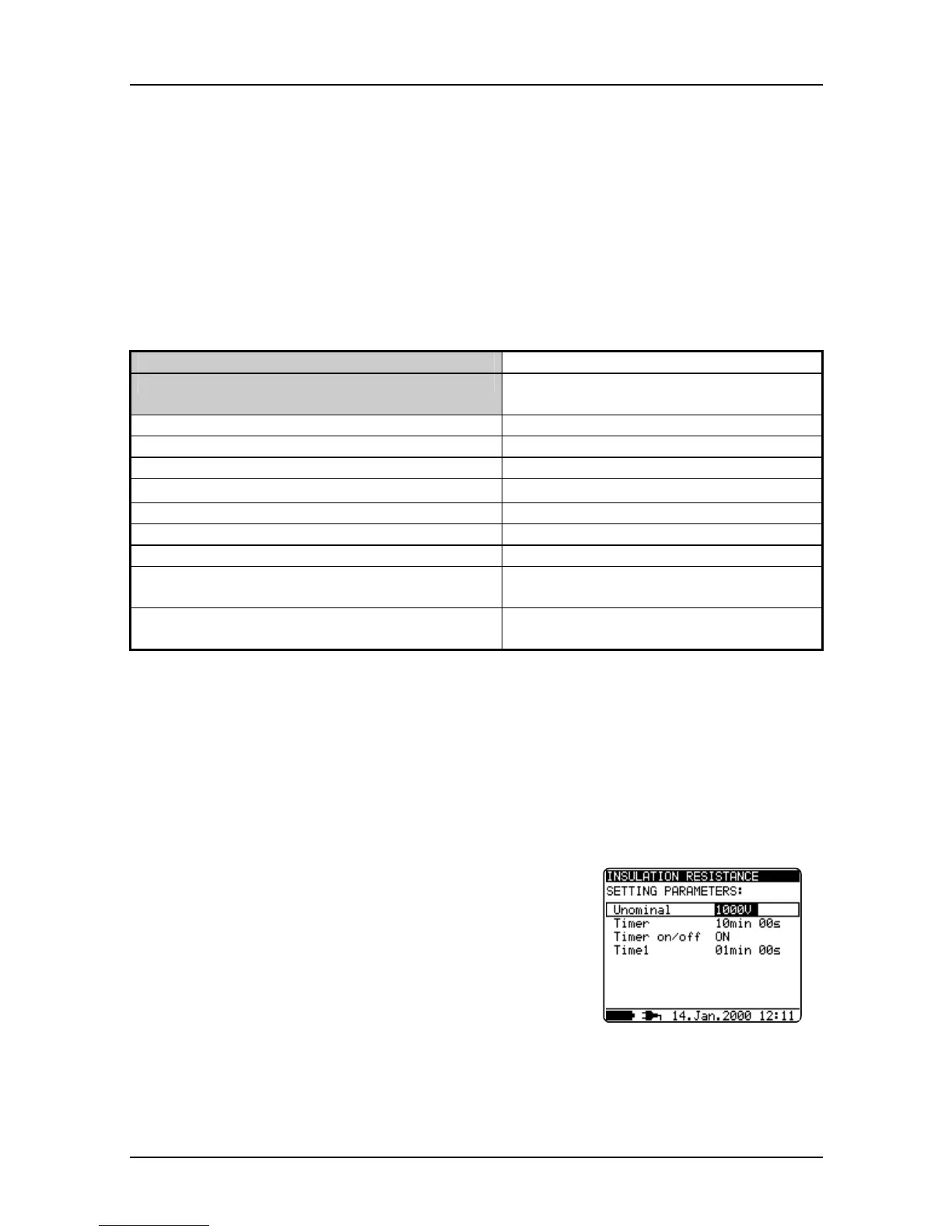
- Press the SELECT key, Set-up menu appears on
display, see the figure 10.
- Select parameter (line) to be set using the
↑
↑↑
↑
and
↓
↓↓
↓
keys;
- Adjust set parameter using the
←
←←
←
and
→
→→
→
keys. Skip
to the next sub-parameter by pressing the SELECT
key (if there are two or more sub-parameters) and
repeat the adjustment.
- Complete the set-up adjustments pressing either the
ESC key or START key (to run the measurement
directly) or changing the rotary switch position. Last
displayed settings are stored.
Fig. 10. Set-up menu in
Insulation Resistance
measurement




 To Next Page