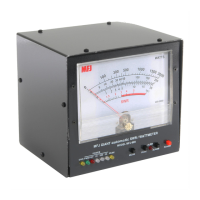
MFJ-868B Giant True Peak Reading SWR/Wattmeter 1.8-60 MHz
nstruction
4
SWR Measurement Settings
1. Set the SWR/PWR switch to SWR (in) for standing wave ratio measurement.
2. Set the SWR/SET switch to the SET (out) position in order to set the full-
scale deflection to measure SWR. (SWR/SET and REF/FWD settings share
the same switch.)
3. Set the radio transceiver to transmit mode and transmit the desired power
output.
4. Slowly turn the SWR SET knob clockwise towards MAX until the meter
point is at the SET position on the SWR scale. If the meter point goes past
the SET position, slowly turn the SWR SET knob counter-clockwise
towards MIN until the meter point is at the SET position on the SWR scale.
5. Set the SWR/SET switch to the SWR (in) position while transmitting. The
meter will now indicate the standing wave ratio. Note: The SWR SET knob
must be reset when the power level is changed. As you increase the power,
the knob will need to be turned counter-clockwise towards MIN. This will
maintain an accurate SWR reading.
SWR Measurement Scale
1. The MFJ-868B Giant SWR/Wattmeter has one standing wave ratio scale.
Refer to Figure 2 above for scale location and scale mark representation.
2. On the SWR scale, each tall picket represents 0.5 units below the 2 picket and
1 unit above the 2 picket.
3. The short pickets represent 0.1 units below the 2 picket and 0.5 units above
the 2 picket.
4. The red shaded area represents a SWR of greater than 3:1. It is not
recommended to operate within this shaded area of a SWR greater than 3.0:1.


 To Next Page