6
1. Go to Settings > Mi Account.
2. Sign in with your Mi account. If you do not have a Mi account, create one.
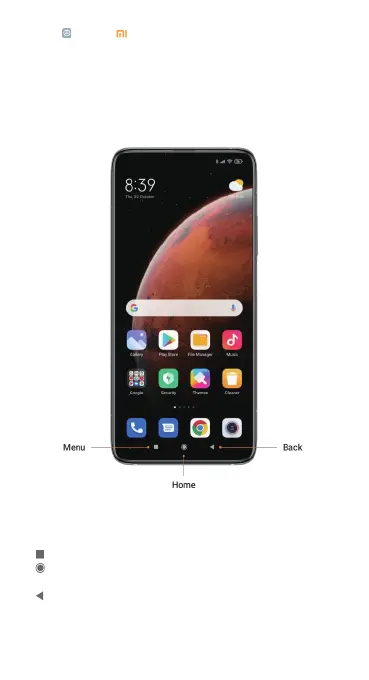
Navigation bar
You may navigate your device by using either the navigation buttons or full
screen gestures.
Navigation buttons
The following three navigation buttons appear at the bottom of the screen:
• Menu: Tap to open options relating to the screen you’re on.
• Home: Tap to return to the Home screen. Tap and hold to launch the
Google Assistant app.
• Back: Tap to open the previous screen that you were working in, even if
it was in a different app. Once you back up to the Home screen, you can’t go
back any further in your history.


 To Next Page