14 15
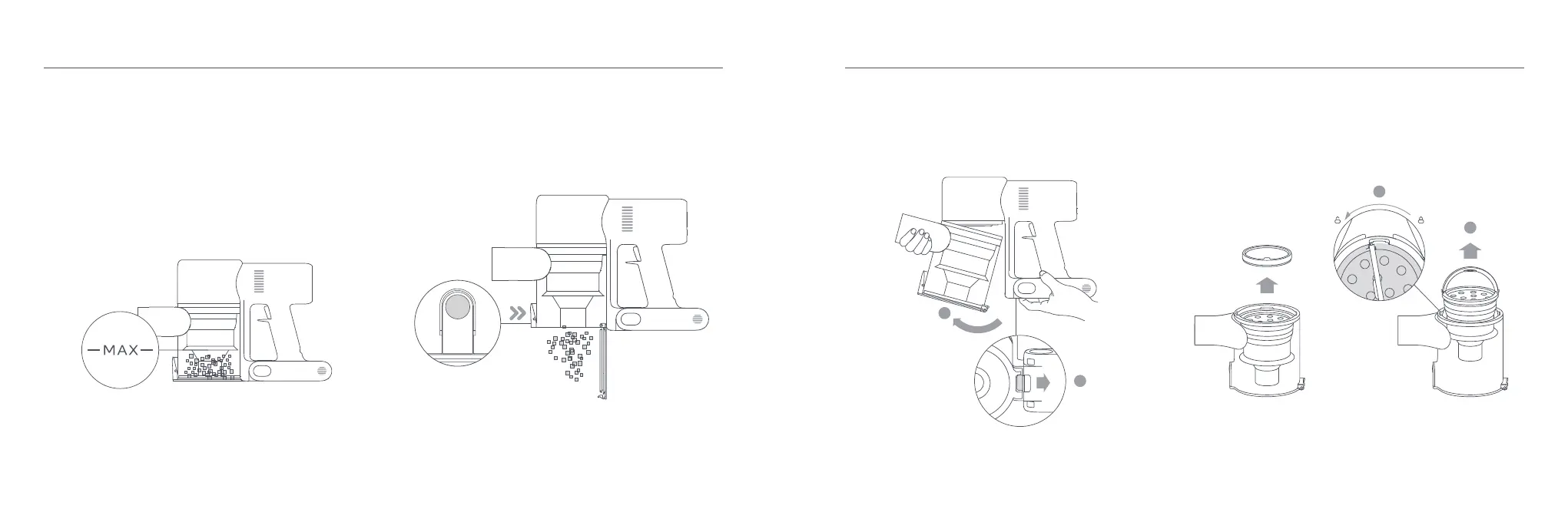
3. Push the dust compartment release switch in the direction
indicated by the arrow, then gently remove the dust compartment
from the vacuum cleaner.
Care & Maintenance
Cleaning the Dust Compartment, Pre-filter, and
Cyclone Assembly
2. Press the dust compartment bottom cover release button, then
empty the contents.
4. Remove the pre-filter first, then lift the handle of the cyclone
assembly and turn to counterclockwise until it stops, then pull to
lift out the cyclone assembly.
1. The vacuum cleaner's cleaning ability will be reduced if the dust
compartment is filled to the "MAX" mark. To regain performance,
empty the dust compartment in a timely manner. Before emptying
the compartment, make sure the vacuum cleaner is disconnected
from the power, and do not press its power button.
1
2
Dust Compartment Release Switch
1
2
Pre-filter


 To Next Page