Copyright © 2009-2018 Micca. All rights reserved. 180201
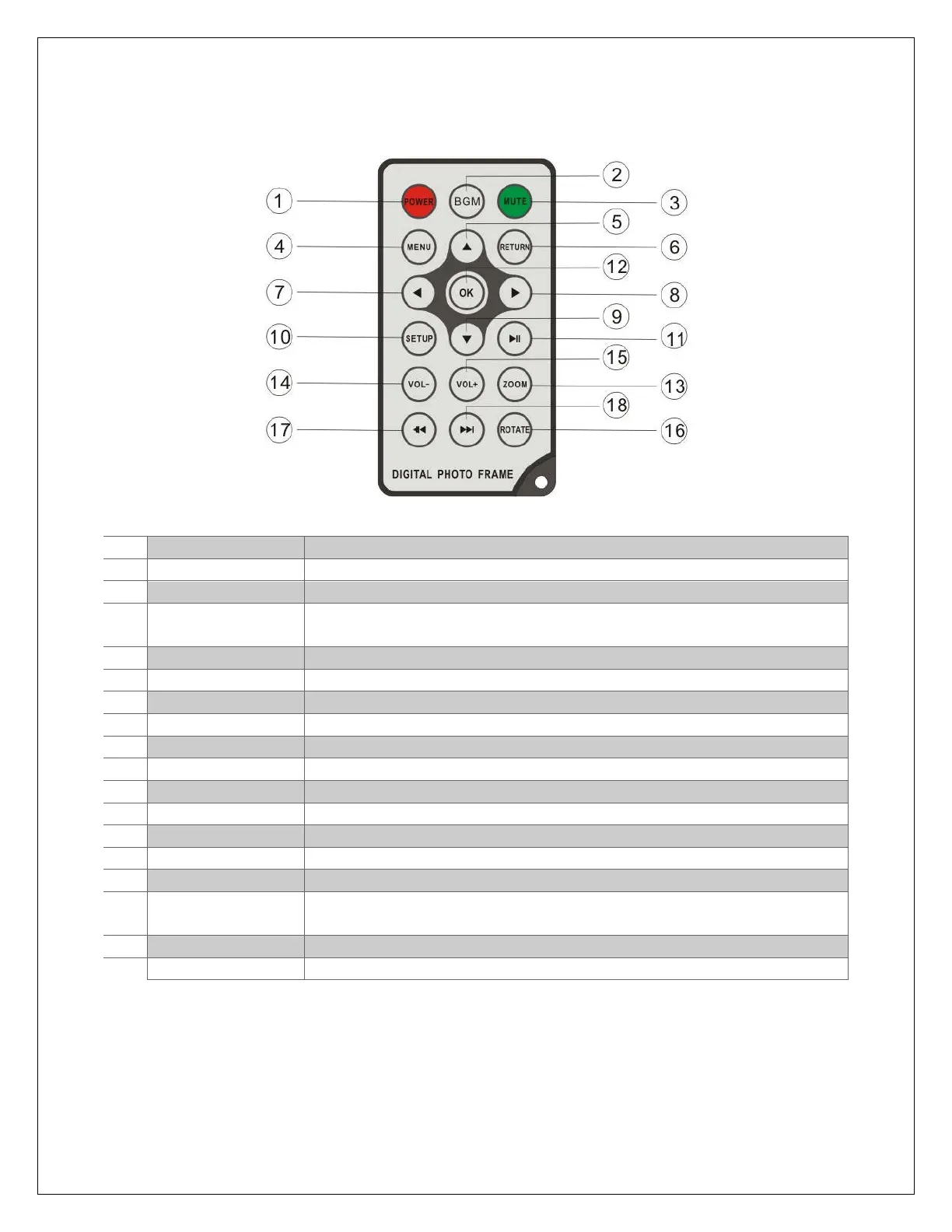
3.3 Remote Control
1
Power Turn the photo frame on or off
2
BGM Start a slideshow with background music
3
Mute Mutes the sound output. Press again to unmute.
4
Menu Behavior is different depending on context, either brings up an
operations menu or displays the main menu.
5
Up Move cursor up
6
Return Go back to the previous step
7
Left Move cursor left
8
Right Move cursor right
9
Down Move cursor down
10
Setup Go to the setup menu
11
Play/Pause Play or pause photo slideshow, music, or video
12
OK Play or pause photo slideshow, music, or video
13
Zoom Zoom in when viewing a photo (slideshow must be paused)
14
Volume- Decrease the volume for music or video playback
15
Volume+ Increase the volume for music or video playback
16
Rotate Rotate a photo clockwise 90 degrees. Press Play to resume
slideshow.
17
Previous Go to previous photo, music, or video file
18
Next Go to next photo, music, or video file



 To Next Page