18
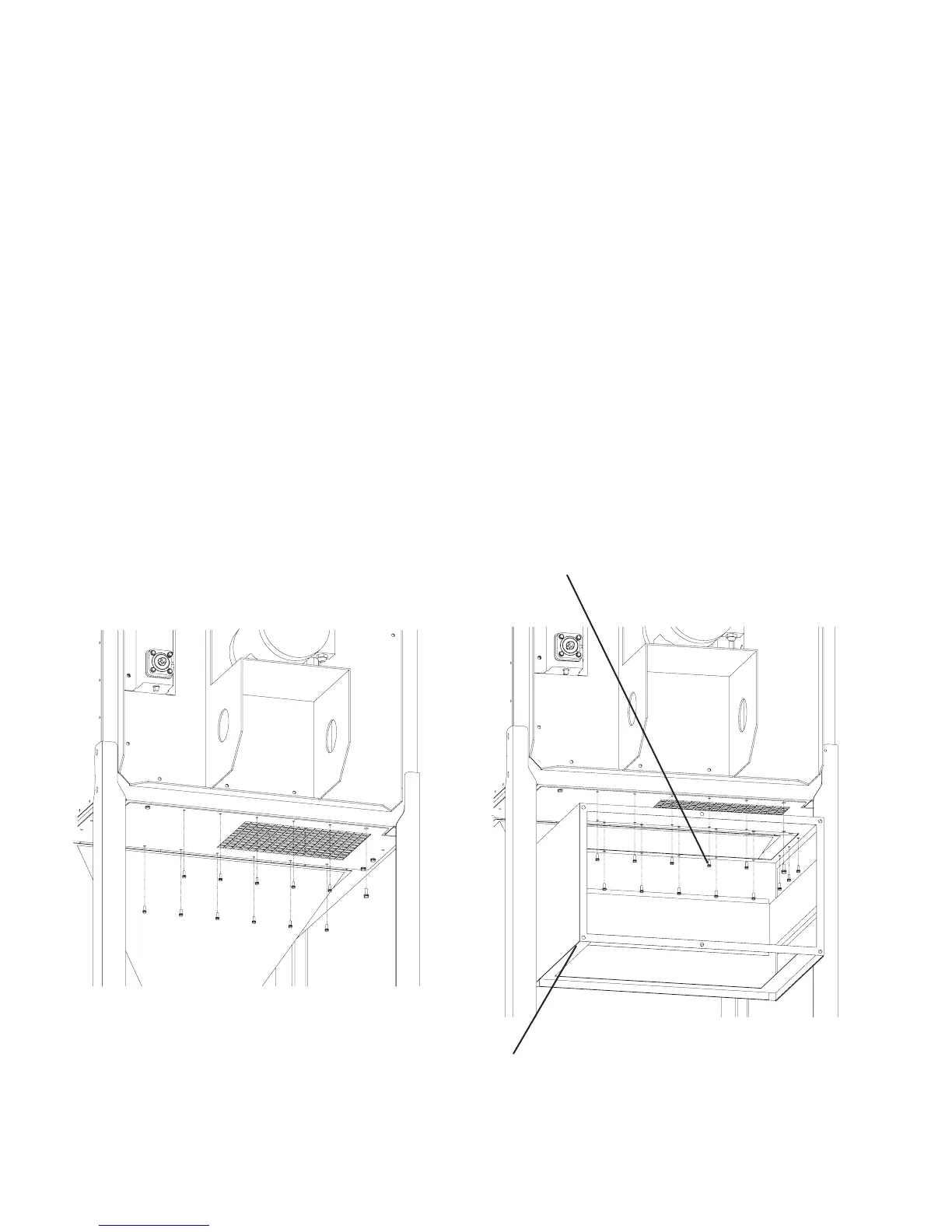
FIGURE 16A
FIGURE 16B
This Kit Includes:
1 ea. 38364-01 After Filter Assembly
1 ea. P3639 Hepa Filter
1 ea. Hardware Package - Containing:
6 ea. P3543 1/4” X 1” Self-Tapping Screw
INSTALLATION:
1. Remove parts from package and inspect for any possible damage incurred during shipping.
2. Remove leg supports from back of unit.
3. Remove the bolts and screws from exhaust grille (see Figure 16A).
4. Align holes from After Filter with holes located on the exhaust grille.
5. Attach After Filter with existing bolts, screws, and the six (6) self-tapping screws provided (see Figure
16B).
6. Re-attach the leg supports.
7. Discard extra screws.
RP DUST COLLECTOR
AFTER FILTER KIT INSTALLATION
AFTER FILTER ASSEMBLY
SELF-TAPPING SCREWS
TYP. 6 PLCS.


 To Next Page