EasyManua.ls Logo

Micro Matic PREMIUMPLUS - User Manual

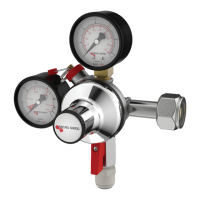
Micro Matic PREMIUMPLUS
7 pages
Print Icon
To Next Page IconTo Next Page
Loading...
49
.
2
Ø
3
4.8
Ø
B
2
4
Ø
8
20
.
5
4
9
.5
Ø
9.1 0
9.8
2
0.
8
0.6 X 45°
54°
4
9
.
5
3.75
3.5
21
.5
70°
1
5
.
9
105°
50°
65°
65°
45°
45°
11.02-2016
SERVICING OF
PremiumPLUS
PremiumPLUS

Other manuals for Micro Matic PREMIUMPLUS

Question and Answer IconNeed help?

Do you have a question about the Micro Matic PREMIUMPLUS and is the answer not in the manual?

Summary

SERVICING OF PremiumPLUS

Disassemble of PremiumPLUS

Remove lid and bonnet

Remove the lid and unscrew the bonnet using the service kit tools.

Remove diaphragm, cartridge, and baffle plate

Remove the diaphragm, cartridge, and baffle plate as instructed.

Mounting of PremiumPLUS

Mount flow washer and baffle plate

Install the new flow washer and reinstall the baffle plate.

Mount new cartridge

Install the new cartridge from the service kit into the reducer.

Tighten cartridge and mount diaphragm

Tighten the cartridge to 4.5 Nm and install the new diaphragm.

Mount washer, lock ring, spring, and cap

Install the re-used washer, new lock ring, spring, and cap.

Mount and tighten bonnet, adjust pressure

Mount and tighten the bonnet to 30 Nm, then adjust pressure and install lid.

Micro Matic PREMIUMPLUS Specifications

General IconGeneral
BrandMicro Matic
ModelPREMIUMPLUS
CategoryController
LanguageEnglish