IM-LIPOTOWER Rev G8
INSTALLING THE IV/TUMESCENT POLE
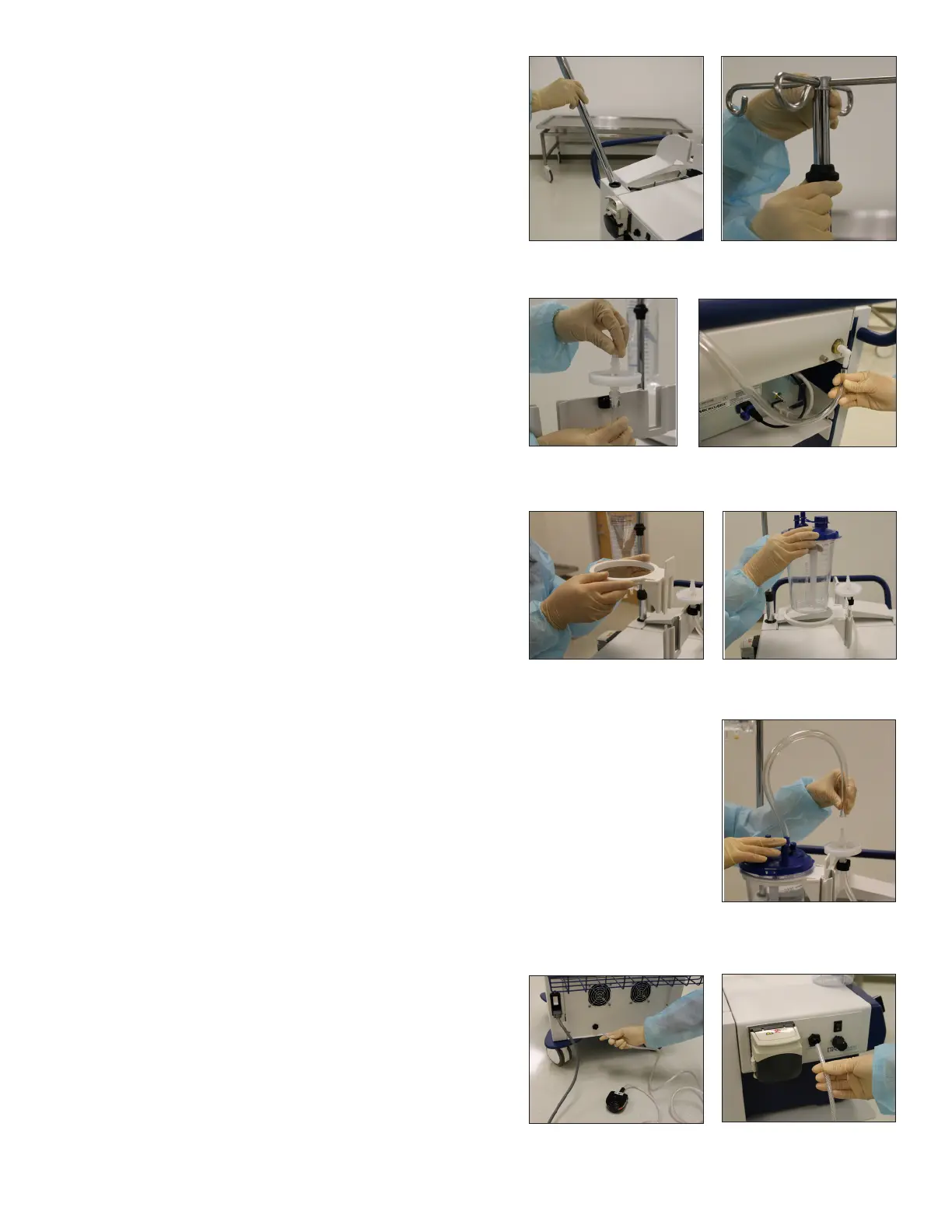
1. Insert the IV/Tumescent Pole into the receptacle on
the top of the cart, in the rear left corner. Make sure
that the sheathed wires within the recptacle are
positioned toward the front of the cart while lowering
the pole carefully into position. (Figure 8)
2. Turn the pole clockwise to thread it into position, and
stop turning when it is snug.
ADJUSTING THE HEIGHT OF THE IV/TUMESCENT POLE
1. Move the locking collar upwards; then the pole can
be adjusted up or down. The pole will stay in position
once the locking collar is released. (Figure 9)
CONNECTING THE BIOFILTER
1. Locate the small black Tubing Clip on the side of the
Canister Rack.
2. Push the Biolter tube into the Tubing Clip so it is
secured in place with the Biolter resting upon the
clip, with the tubing exiting downward. (Figure 10)
3. Guide the loose end of the Biolter tubing toward
the rear of the cart, beneath the Canister Rack, and
connect it to the Main Vacuum Connection. (Figure 11)
ATTACHING WASTE CANISTERS
1. Locate the Canister Rack on the top of the cart. Slide
one or more Waste-Canister Rings (REF ASP-RNG-1200
or REF ASP-RNG-2000) into any of the four available
canister slots. These slots also accept various wall-
mount style waste canisters. (Figure 12)
2. Insert appropriately sized Waste Canister into Ring. (Figure 13)
3. Connect Waste Canister to the Biolter using REF ASP-TB-VAC Non-Sterile Vacuum
Tubing. (Figure 14)
WARNING: Use only canisters that are rated appropriately for the vacuum pressure that
will be used.
CONNECTING FOOT SWITCHES
1. Connect a Foot Switch to the lower rear of the cart to
control the ON/OFF function of the vacuum pumps
when the CONTROL SWITCH is set to FOOT SWITCH.
(Figure 15)
2. Connect a Foot Switch to the Tumescent Pump
module on the side of the cart, (where applicable) to
control the ON/OFF function of the Tumescent Pump
when the Tumescent Switch is in the ON position.
(Figure 16)
Figure 8 - Install IV Pole Figure 9 - Adjust pole height
Figure 11 - Connect vacuum
Figure 10 - Install Biolter
Figure 12 - Install waste
canister rings
Figure 13 - Insert canister
Figure 15 - Connect Foot
Switch to rear of cart to
control vacuum pumps
Figure 16 - Connect Foot
Switch to side of cart to
control inltration
Figure 14 - Connect short
tube from canister to lter


 To Next Page