Section 2: VPViewer and Origin Software
2.4 ITC Controls Window
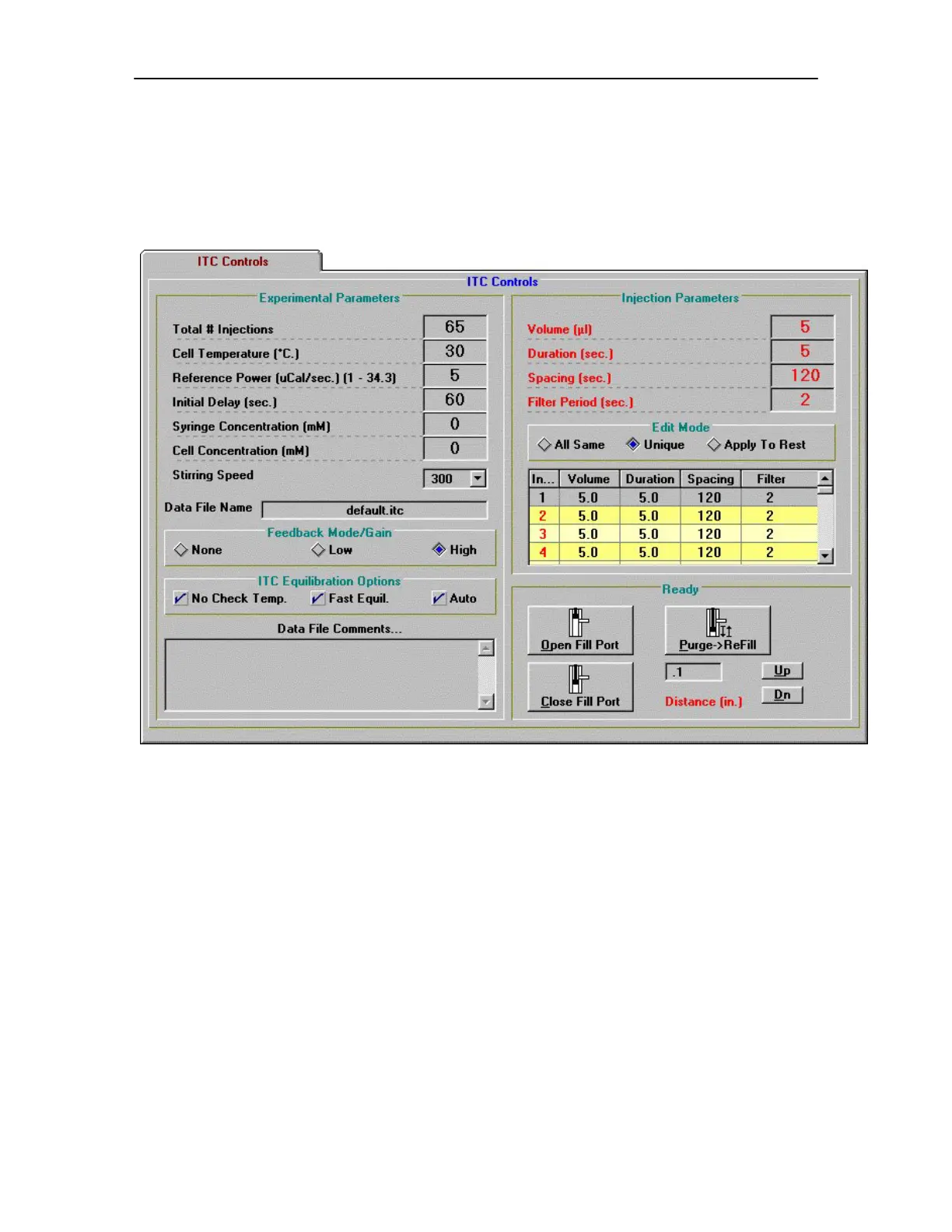
The ITC Controls window (shown below) is the main access point for operating the VP-ITC
instrument.
Below is a description for each of the run parameters displayed in the ITC Controls window.
Experimental Parameters
Total # Injections
Enter the total number of injections (500 is the maximum) for the titration (ITC) experiment.
Cell Temperature (° C)
Enter the desired temperature for the experiment.
If there is a check mark next to the No Check Temp. option in the ITC Equilibration Options
group (see below), the entered temperature will be ignored and the experimental temperature will
take place at the current cell temperature. If there is no check mark, then the cell will scan to the
entered temperature and equilibrate before the experiment will start. Please Note: When the
instrument is programmed to scan to a new temperature (i.e. there is not a check mark next to the
No Check Temp. option), the sample should be cooled (before loading into the cell) below the
experimental temperature, so that after loading, the temperature of the sample in the cell will be
21


 To Next Page