Section 2: VPViewer and Origin Software
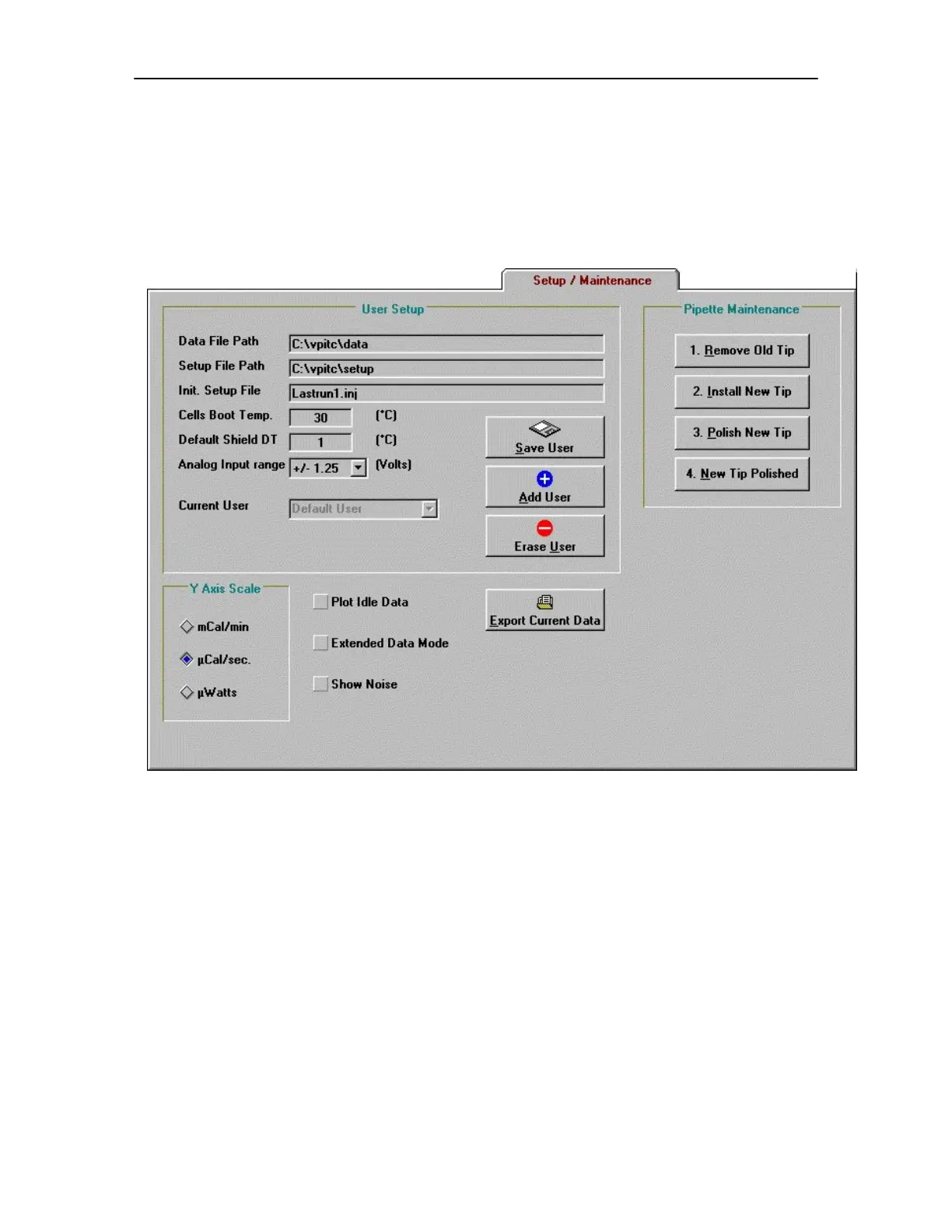
2.6 Setup/Maintenance Window
The Setup/Maintenance window allows access to change user preferences for the default settings
of run parameters. Systems having multiple users may benefit from having customized settings.
User Setup
Data File Path: Indicates the path (excluding file name) where VP-ITC data files will be saved.
The path should be located on a local hard drive and not on any floppy or CD-ROM
drive. This setting may only be changed while the VP-ITC is in the idle state,
Thermostatting. To change the current data file path, double click on the existing path
text and a dialog box will open allowing you to change the path. The desired data
directory must already exist in order to select it from the dialog box. Note: In order to be
read into Origin for data analysis the path cannot contain any spaces.
Setup File Path: Indicates the path (excluding file name) where VP-ITC setup files will be saved
and loaded. The specified path should be located on a local hard drive and not on any
floppy or CD-ROM drives. To change the current setup file path, double click on the
existing path text and a dialog box will open allowing you to change the path. The
desired setup directory must already exist in order to select it from the dialog box.
27


 To Next Page