Section 2: VPViewer and Origin Software
2.8 Real Time Data Display in Origin
Data Display Project Window Overview (VPITCPLOT.OPJ)
When VPViewer is opened, it will open the Origin
TM
project window VPITCPLOT.OPJ.
VPITCPLOT.OPJ has been customized for real time data display. This project of Origin is
dedicated for data display only, and should not be used for data analysis. Users should open a
separate copy of Origin for ITC, to perform data analysis.
This section is intended to detail those features that are contained in the VPITCPLOT.OPJ data
display project of Origin. Please refer to the Origin User Manual for a complete description of
Origin. For details on ITC data analysis, refer to the ITC Data Analysis in Origin Tutorial Guide.
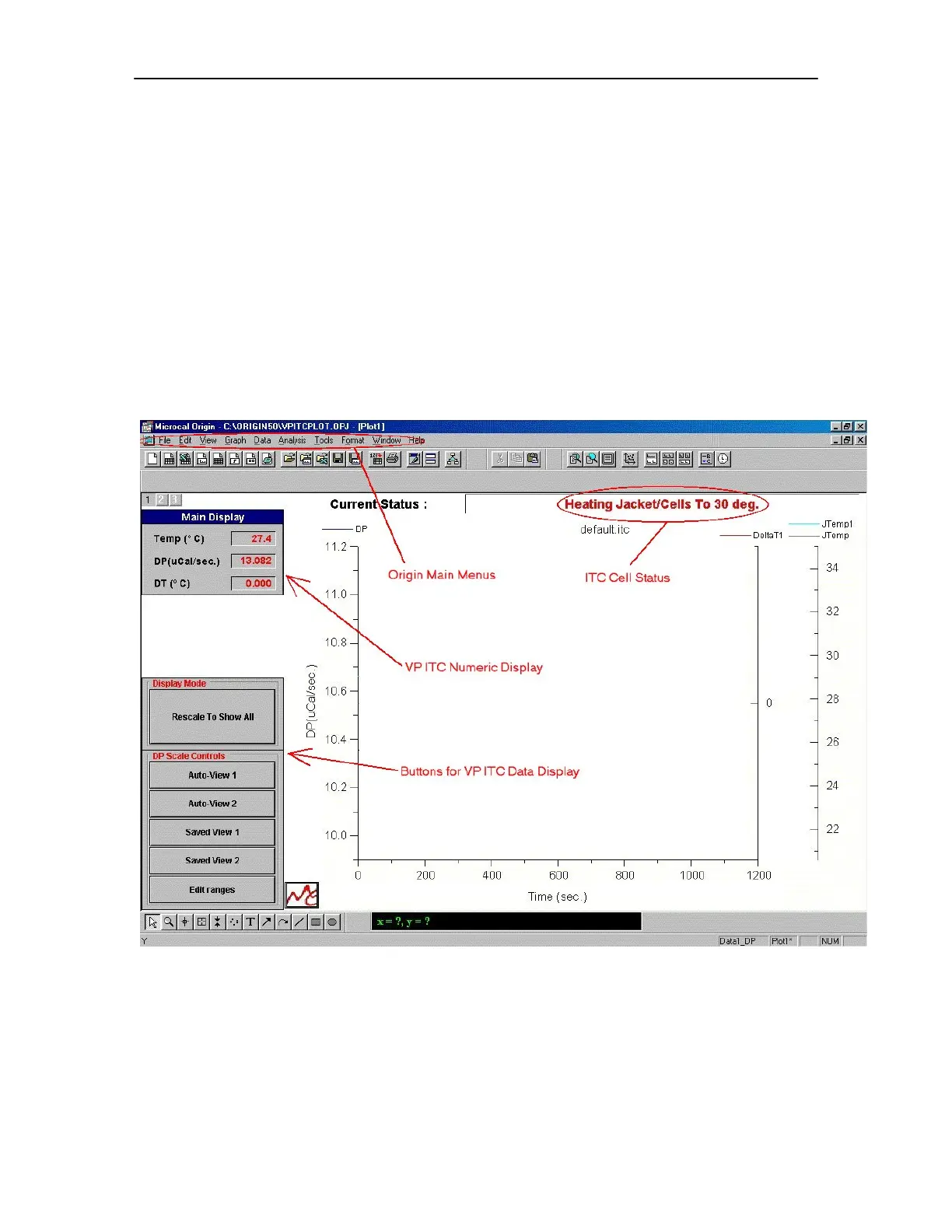
Pictured below is the main Origin window for VP-ITC data display.
The ITC Cell Status, the VP-ITC Numeric Display and the Buttons For VP-ITC Data tools (as
indicated above) have been added for user convenience in viewing data generated by the VP-ITC.
Following is a description of each of these sets of tools.
31


 To Next Page