RESTORE PROGRAMMING AND CALIBRATION PARAMETERS
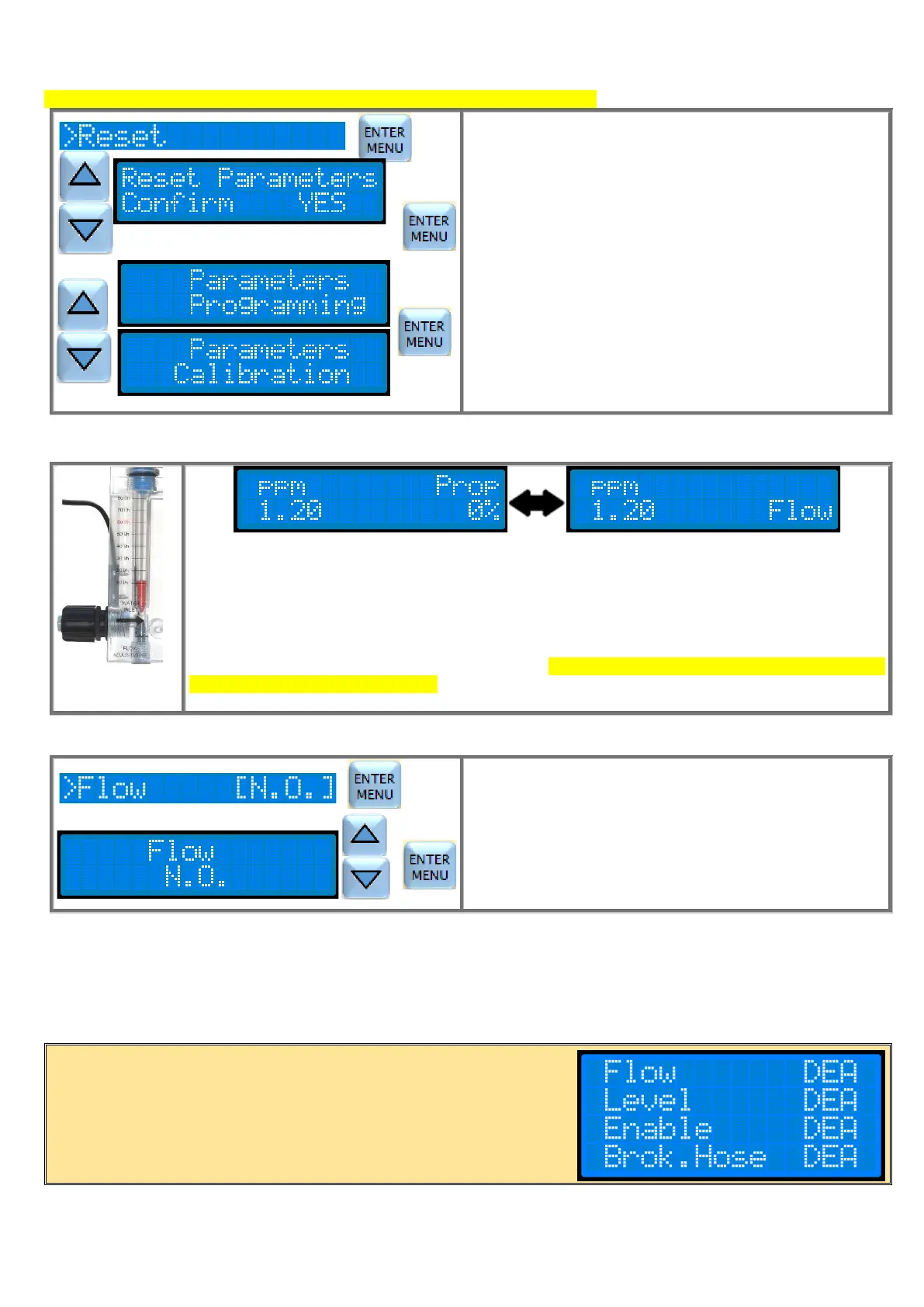
Attention: the Programming Reset has no influence on Language and Password.
In the Utility Menu, select "Reset" by the cursor and press
ENTER.
Use the ▼ ▲ keys to display "Yes" on Confirm. Press
ENTER.
With ▼▲ keys choose to restore the "Programming
Parameters" or the "Calibration Parameters". Press
ENTER.
Automatically the pump restores the factory settings.
Press the ESC button for 3 seconds to exit programming.
The closing (or opening, this dipends on the programming in Utility menu, default is Normally Open
contact) of the flow input contact, free of tension, will cause:
1) the pump stops dosing
2) the green ON led blinks
3) The display shows “Flow” on the second line which alternates with the writing of the operating
mode and the flow rate
When the flow contact returns in normal position, the pump exits from the Flow Alarm state and start
the working mode compatible with the actual inputs. If a Delay on has been set, at the end of the Flow
Alarm the pump will go on Delay on.
NOTE: The flow alarm resets the counting of the Alarm Time.
PROGRAMMING OF THE FLOW SENSOR
In the Utility Menu, select "Flow" by the cursor and press
ENTER.
Use ▼ ▲ buttons to select the type of functioning of the flow
sensor. Press ENTER to confirm.
N.O= Normally Open (default value)
N.C= Normally Close
Press the ESC button for 3 seconds to exit programming.
MENU RELAY (OPTIONAL)
The relay output indicates the presence of an alarm. It is a dry contact. The relay reports an alarm by closing the contact
or by opening it (default is N.O). See the following paragraph, "Alarm". In the Relay menu it is possible to decide which
alarms can be reported by the relay.
IMPORTANT NOTE:
Flow, Level, Enable and Brok. Hose sensor are optional. If on your
pump they are not present you can not access the respective
submenus and in the menu will appear:


 To Next Page