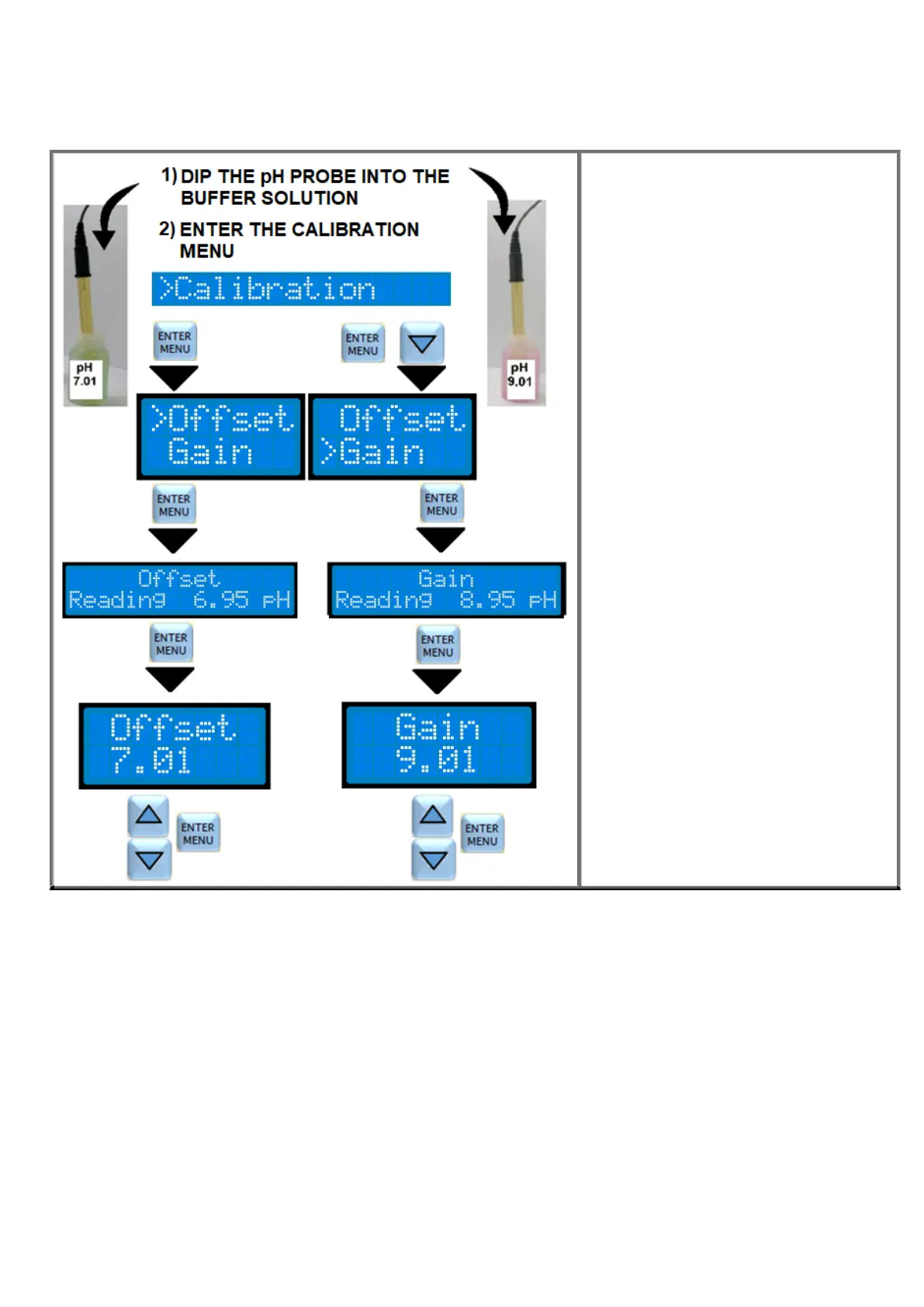
pH PROBE CALIBRATION
WARNING, make sure that the buffer solutions used in the calibration correspond to the indicated value and that they
are not polluted. Temperature compensation during pH calibration is excluded.
OFFSET CALIBRATION
Immerse the pH probe in the pH 7 buffer
solution. Wait for the reading stabilization on
the display. Press ENTER / MENU for 3
seconds and then use the ▼ ▲ keys to
move the cursor to Calibration and press
ENTER. Choose Offset by the cursor and
press ENTER. The current reading of the
probe is shown on the display. Press
ENTER and adjust (if necessary) the buffer
reading value with the ▼ ▲ buttons and
then confirm by ENTER.
GAIN CALIBRATION
Clean the probe with water and then
immerse it in the buffer solution at pH 9 or 4.
Wait for the reading stabilization on the
display. Press ENTER / MENU for 3
seconds and then use the ▼ ▲ keys to
move the cursor to Calibration and press
ENTER. By the ▼ button, move the cursor
to Gain and press ENTER. The display
shows the current reading. Press ENTER
and then adjust (if necessary) the buffer
reading value with the ▼ ▲ buttons and
then confirm with ENTER.



 To Next Page