PC
Mp3 \ Mp4
Media p lay er
CD\ VCD \ D VD
Illustrations
3
4
Connections and Operations
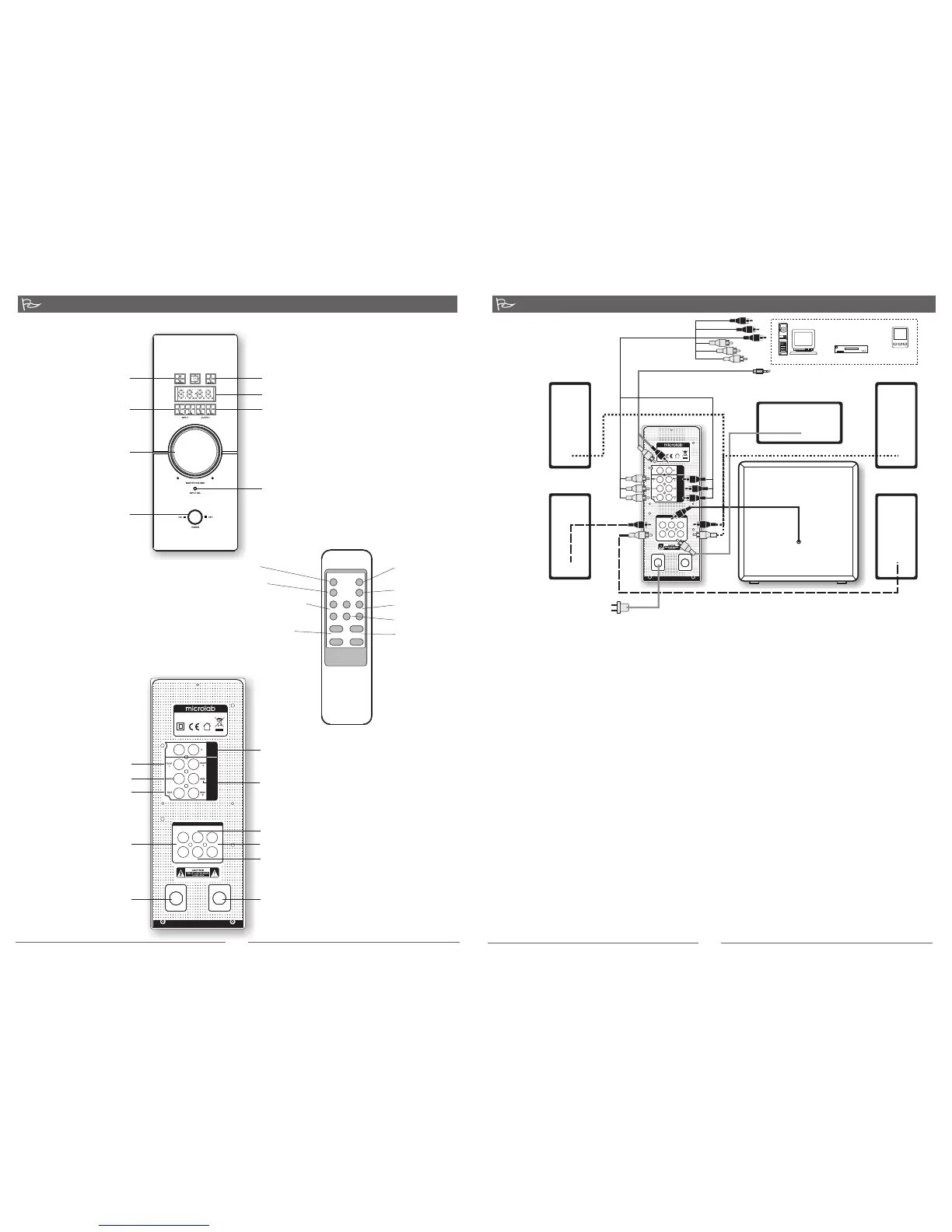
Front panel
Connections
Rear panel
To stereo source
Left satellite
Right satellite
Subwoofer
AC power supply
AC 220 V - 240 V ~ 50 Hz, 380 mA or
AC100 V - 120 V ~ 60 Hz, 720 mA
Connections
1. Connect the front satellites to the left and right RCA sockets.
2. Next connect the rear satellites to the surround left and right RCA sockets.
3. Connect the subwoofer to the SW input jack.
4. Place both front satellites on extreme sides and forward of the listening position. Place both
surround satellites on the extreme sides and rear of the listening position.
5. Last place the subwoofer on the floor with its back close to a wall. Subwoofer produces low
frequency sound thus it can be placed in any position relative to the listener.
6. Connect the playback device to the rear input RCA sockets of the amplifier with the included
cables, or to the front 3.5mm stereo input jack.
7. The amplifier should be placed near a power source and near the playback device such as
CD/DVD, Mp3/Mp4 player or TV.
8. Last, connect the AC power cable at the rear of the amplifier to the AC power supply source.
Please ensure the AC power supply match the power requirement printed at the rear panel.
Operations
1. Ensure the master volume is set at the lowest level.
2. Turn on the main AC power and switch on the amplifier.
3. Start the playback device and song.
4. Slowly adjust the master volume to your preferred volume level and enjoy. This can be adjusted
with the main master volume on the amplifier or remote control.
5. This system features 2 input types; stereo and 5.1 channels, and 2 output types; 2.1 and 5.1
channels. These options are available in the remote control. Create your own sound effects
with these options according to the movie effects and room.
Center
Rear Left
Rear right
AC IN FUSE
T800mAL250V
AUDIO OUTPUT
FRONT BASS REAR
CENTER
R
L
R
L
AUX
INPUT
5.1
INPUT
L
MULTIMEDIA SPEAKER
MADE IN CHINA
MODEL: FC360 / 5.1
AC IN: 220V-240V~ 50Hz 380m A
Stereo input; from stereo playback
sources such as CD/DVD, Mp3/Mp4
players
5.1 input: bass jack
5.1 input:
Front jacks
Center jack
Rear jacks
Front jacks:
to front
satellites
Bass jack: to subwoofer
Rear jacks: to rear satellites
Center jack: to center satellite
AC cord: to
AC power supply
Fuse: T800AL250V
+
-
Power LED
Mute LED
Volume LED
Output LED: 2.1 and 5.1 channels
Input LED:
5.1 and 2.0 channels
Master volume
Input selector: select between 2.0 and 5.1
channel inputs
Power button
ST-BY MUTE
INPUT SEL MODE
SURR+ CENTER+ SUB-W+
SURR- CENTER- SUB-W-
VOLUME+ BALANCE R
VOLUME- BALANCE L
Stand by
Input select
2.0 / 5.1 Channels
Surround fine adjustment
Master volume control
Mute
Output mode: 2.1 / 5.1
Channels
Bass fine adjustment
Center fine adjustment
Balance adjustment
Remote Control
Amplifier
Amplifier
AC IN FUSE
T800mAL250V
AUDIO OUTPUT
FRONT BASS REAR
CENTER
R
L
R
L
AUX
INPUT
5.1
INPUT
L
MULTIMEDIA SPEAKER
MADE IN CHINA
MODEL: FC360 / 5.1
AC IN: 220V-240V~ 50Hz 380mA
To 5.1 channel source
80-FC360 51-97-0001-01 2010-10-11


 To Next Page
 Loading...