LR
LR
FL
FL
FR
FR
CEN
CEN
SW
SL
SL
SR
SR
C
D
A
U
X
5
.1
C
H
IN
P
U
T
A
U
D
IO
O
U
T
P
U
T
ON
OFF
AC IN
FUSE
T1.25AL250V
LR
LR
FL
FL
FR
FR
CEN
CEN
SW
SL
SL
SR
SR
C
D
A
U
X
5
.1
C
H
IN
P
U
T
A
U
D
IO
O
U
T
P
U
T
ON
OFF
AC IN
FUSE
T1.25AL250V
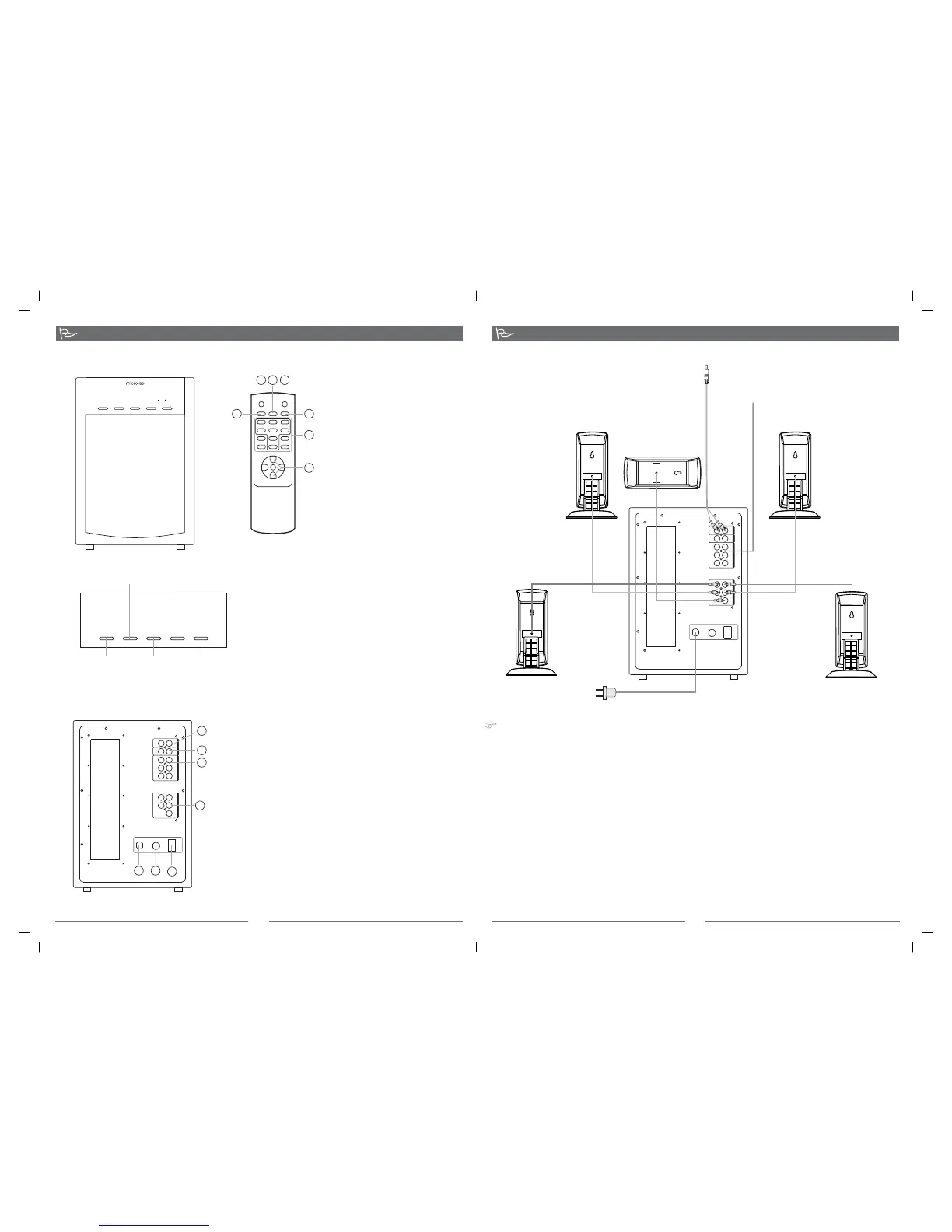
*Front View of the Subwoofer
*Back View of the Subwoofer
Function Instruction
*Front View of
Remote control
1.CD INPUT: 2RCA input jacks
2.AUX INPUT: 2RCA input jacks
3.5.1CH INPUT: 5.1 channel (6RCA) audio input jacks
4.AUDIO OUTPUT: 5.1 channel (5 RCA) audio output
jacks
5.
6.FUSE
7.POWER CORD
POWER: Press the switch ON or OFF
3
1. Connect the front left/right, center, surround left/right speaker cables into the appropriate 5.1CH
output jacks on the back of the subwoofer.
2. While connecting to VCD, DVD, etc, please use the audio cables with double RCA ends. Connect
one end of the audio cables into the appropriate 5.1CH INPUT jacks on the back of the subwoofer,
the other end into the appropriate output jacks on the VCD, DVD, etc.
3. While connecting to the stereo audio source, please use the audio cable(3.5mm-2RCA). Connect the
RCA plugs of the audio cable into the CD or AUX audio input jacks on the back of the subwoofer, and
then the other end into the audio output on stereo audio source.
4.
5. Check the connection and make sure every cable is correctly connected, then connect power plug to
the right AC outlet. The shape of the plug and power outlet depends on the country of use.
* Statement indicating that the socket-outlet shall be installed near the equipment and shall be
easily accessible.
* .
System Connection:
Remarks: the jacks and plugs are color-coded. Be sure to attach each color-coded plug to a matching
color coded jack.
The highest environmental temperature suitable for this product is 40 C
o
System Connection
4
ST-BY MUTE
INPUT-SEL RESET
MODE
+++
_
__
+++
_
__
FRONT CENTER REAR
TREBLE
S.W.
BASS
VOL+
VOL-
STANDBY
INPUT-SEL
MODE VOLUME
VOLUME
Standby
Mode Volume+
Volume-
Input select
1
2 3 4
5
6
7
1.INPUT-SEL: select Input mode
2.ST-BY:Standby
3.
select put mode
VOLUME CONTROL: Adjust the
speaker system's volume to your
desired level
Reset: press this key to return to
the Start situation
4.Mute: press the key to make the
system in muting
5.MODE: Out
6.Channel volume trimming keys
7.
1
2
3
4
5
6
7
SR SL
FR FL
CENTER
SUBWOOFER
To stereo audio source
To VCD, DVD, etc,
*Please note the correct placement of speaker is shown in the above picture.
STANDBY
STANDBY
INPUT-SEL
MODE VOLUME
VOLUME
2.1 5.1
MULTIMEDIA SPEAKER SYSTEM
OUTPUT
80-X14-97-0001-02 2008-06-12


 To Previous Page