12
Step 7: Connect cables and attach the front cover
WARNING: Cable routing
To reduce risks related to electrical shock, ensure cables are routed in such a way as to not become pinched, crushed or cut.
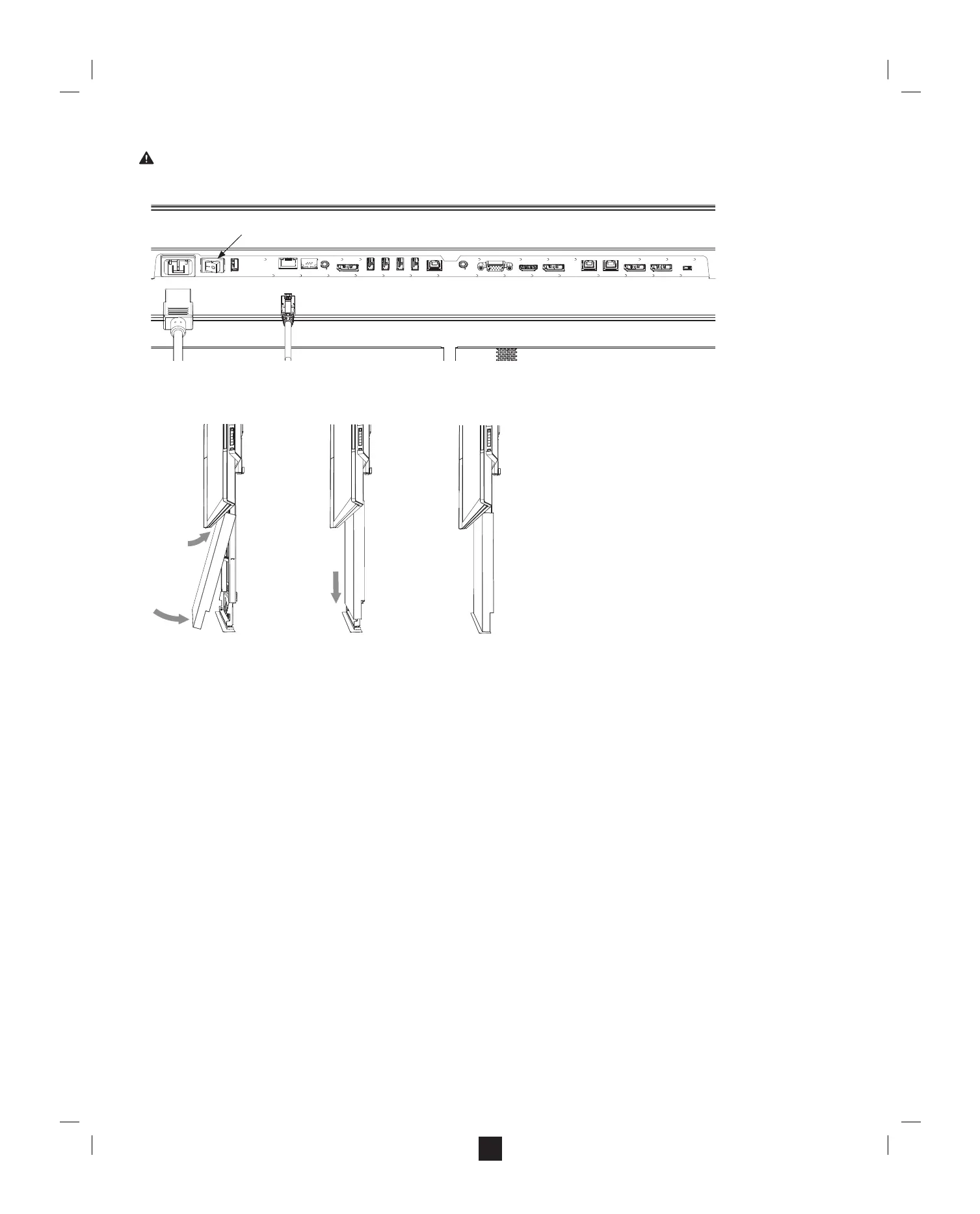
A. For both Surface Hubs, connect the power, network, and any optional cables.
B. Using the power switch next to the power cable, set the power to “On.”
C. Cover the cables by clipping the front cover to the base of the upright.
a. Lift the cover behind Surface Hub, with the front cover clips above the upright catches.
b. With the front cover ush against the upright, lower the front cover clips onto the catches on the upright.
Note: When you’re done, the bottom of the front cover should be ush with the base of the upright. No cables or gaps should be showing behind the front cover.
What’s next?
Your Surface Hub is mounted and ready to set up. See the Setup Guide in your Welcome Kit.
Power switch
K


 To Next Page