This section describes the operation relating to the USB CameraMate and digital film cards. To avoid
complications while attempting to use your USB CameraMate, Microtech recommends reading this
entire chapter. For installation information, refer to “Chapter 2: Connecting to a Macintosh” (page 9)
or “Chapter 3: Connecting to a PC Compatible” (page 14).
Digital film card compatibility
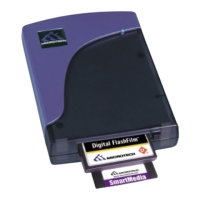
The USB CameraMate was designed to accept CompactFlash cards in the upper slot and
SmartMedia (SSFDC) cards in the lower slot.
The SmartMedia™ slot is compatible with both 3.3 Volt and 5 Volt SSFDC formats. The
SmartMedia slot can accept SmartMedia cards in capacities of up to 128MB.
The CompactFlash slot is compatible with all current CompactFlash™ cards available on the
market, as well as CFII and CF+ Type II formats, such as the IBM family of microdrives.
Inserting a SmartMedia card
Position the SmartMedia card in the direction as shown in the illustration on the next
page.
Insert the card into the lower slot with the gold contacts facing up.
Gently push the card in all the way until the card is locked in place. You will feel a slight
resistance as you insert the card into the spring-loaded slot. Note: The spring-loaded slot
is similar in concept to a retractable ball point pen.
WARNING: Be careful not to insert the SmartMedia card in the wrong direction. Be sure to
insert the SmartMedia with the gold contacts facing up. If it is forced in, the slot or the
SmartMedia may be damaged, or data on the card may be lost.
USER'S
MANUAL
USER'S
MANUAL
USB CameraMate
?
HELP
CONTACT
NEXTBACK
CONTENTS
21
1.
2.
3.


 To Next Page