13
Product Setup and Use
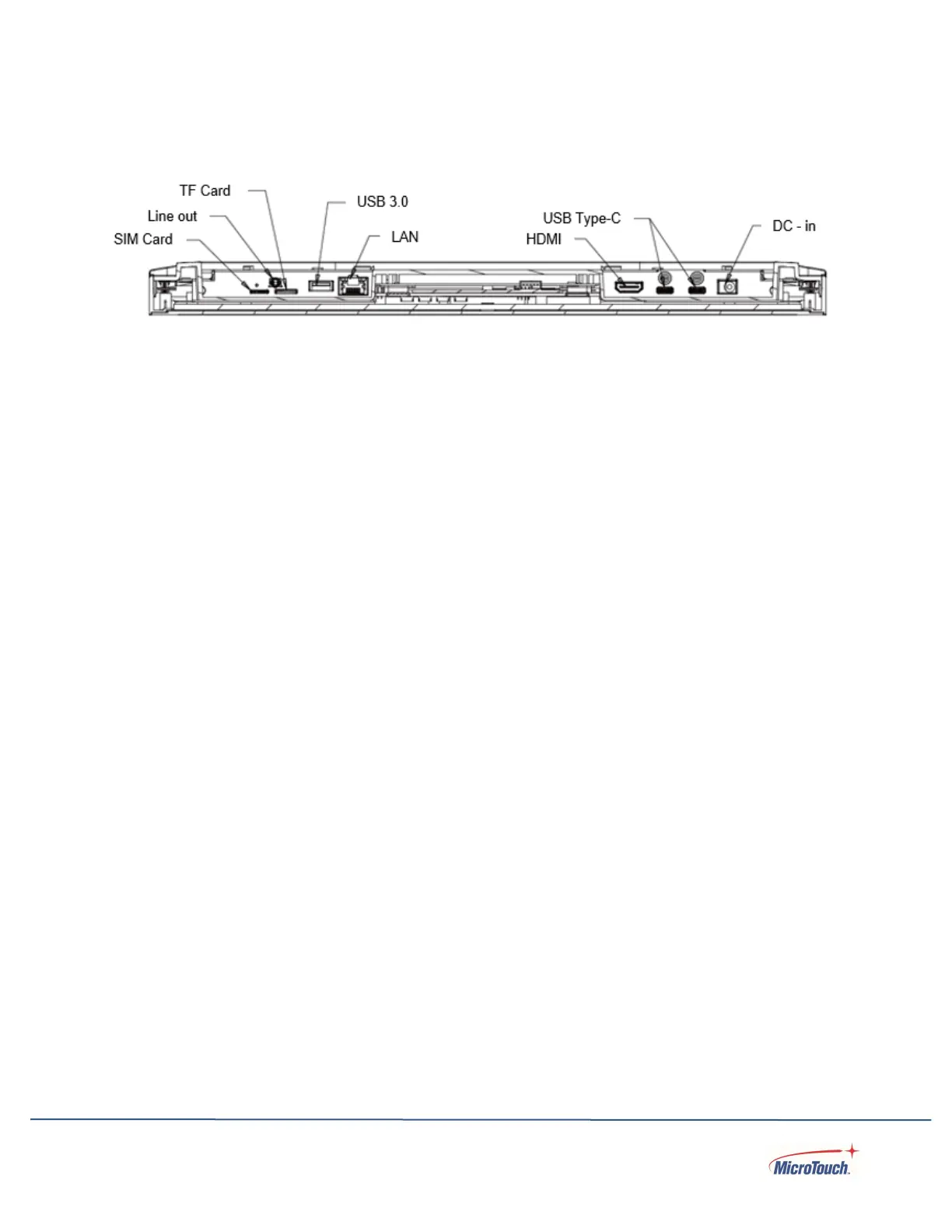
Input and Output Connectors
Power Connector
Power Input: DC - in (Center pin: + 12 VDC; Barrel: ground).
Communications Ports
USB 3.0 is a Type-A USB communications port
USB Type-C are Type-C USB communications ports.
Video Output
HDMI: Digital video output.
Removable Storage Media
TF Card and SIM Card are slots for removable storage
Network Connection
LAN is an Ethernet network connector
Peripheral Connection Points
There are four peripheral connection points, one on each side and the top and bottom sides.
Connection is by provided USB Type-C connectors. These peripheral points/potrs are for MicroTouch-
supplied accessories only.
Configuration and Cable Connections
Power is supplied by the included AC-to-DC power supply’s fixed 12 volt DC cable connector. Plug
the power adapter’s DC barrel connector into the DC jack on the touch computer. Plug the AC power
cable female connector into the receptacle on the power converter, then plug the male connector of
the AC cable into a wall outlet.
Connect your network cable to the LAN connector or WI FI. All other ports are optional I/O or outputs.


 To Next Page