Manual Number 9019161 Revision C, August 18, 2023 19
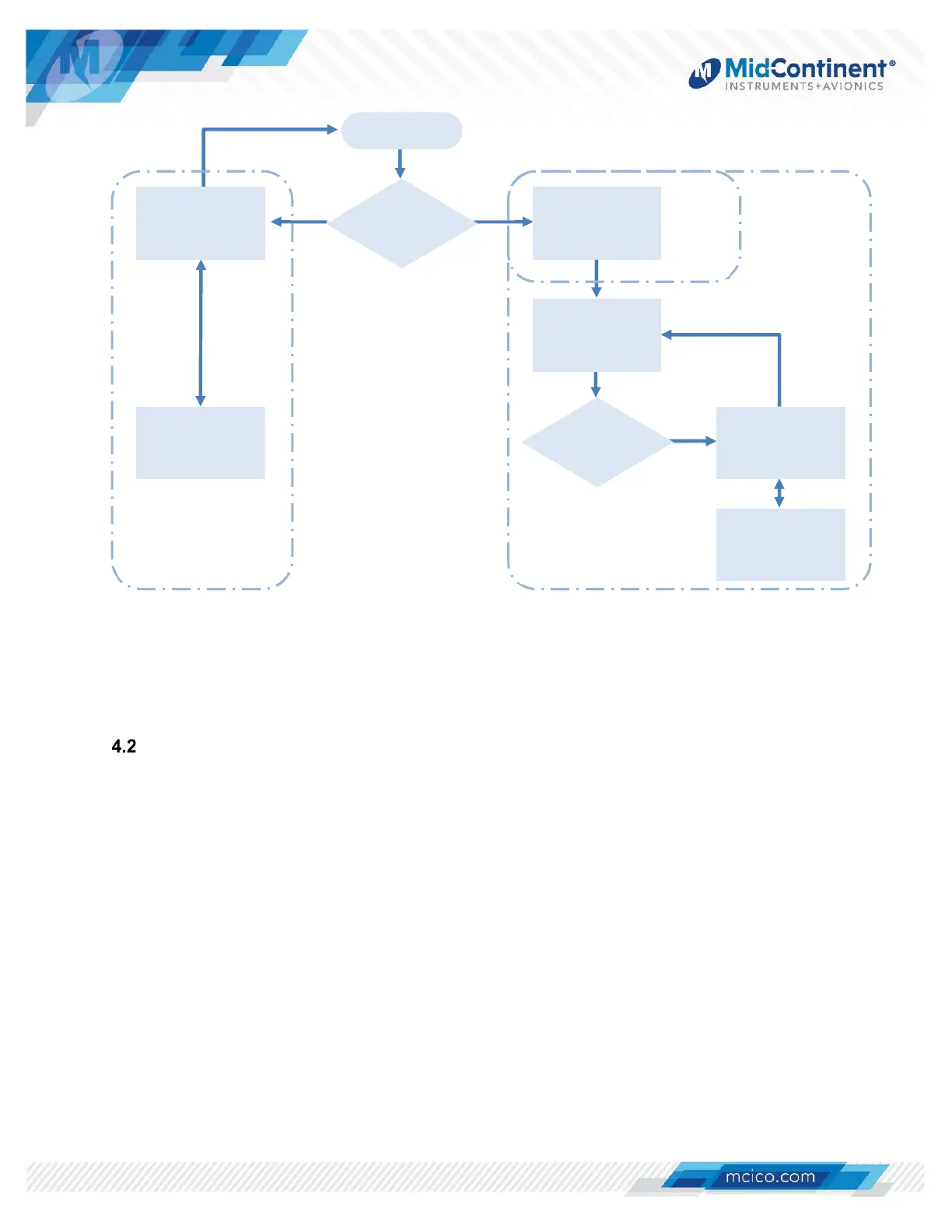
Figure 4.1 System Navigation Map
USER INTERFACE
The MD23 FLEX
CFD is designed for simple, intuitive operation for ease of use for all custom
applications. The Control Knob and Menu Operation are standard for all MD23 installations.
4.2.1 CONTROL KNOB
The central Control Knob is located at the bottom-center of the unit bezel. This is the only
user interface on the unit.
The Control Knob has two functions: push and turn.
The knob provides 16-detents per revolution and typically increments whatever element it is
controlling on the display one unit per detent. It can also be used to scroll between
controllable elements, menu options, or pages.
The push function is typically used to select the highlighted option in a menu, on the display,
and/or to enter and exit menus and control functions. The push function can also perform
certain operations with a push-and-hold action as described herein.
Hold
Knob
Introduction
Screen
Hold
Knob
Options Menu
User Options
Menu*
Normal
Operation
Config
Menu
User Config
Menu*
YES NO
FLIGHT MODE CONFIG MODE
PRE-FLIGHT MODE
Power On


 To Next Page