Manual Number 9019161 Revision C, August 18, 2023 24
CONFIGURATION MODE
Configuration Mode is used by the installer to configure aircraft specific requirements that are not
accessible in flight. This includes critical flight parameters that contribute to the safe and certified
operation of the unit and the aircraft as well as user preferences. Several safeguards are in place to
prevent a user from ever accessing the Configuration Mode while in flight. Only authorized installers
and trained personnel should access the Configuration Mode during initial installation or during
maintenance, adjustments, and updates.
Enter the Configuration Mode by pressing and holding the Control Knob while powering up the unit.
Continue to hold the Control Knob until the Configuration Menu appears.
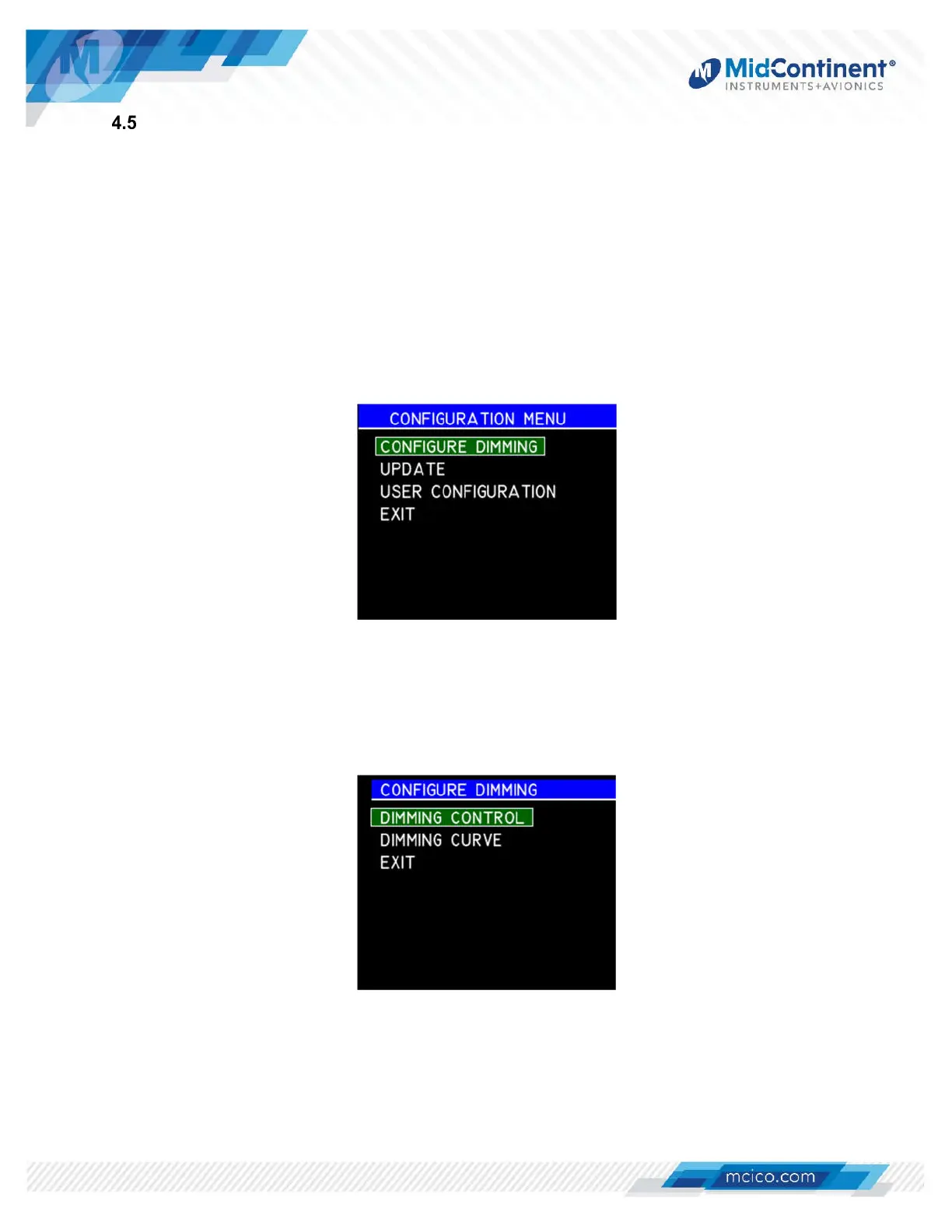
The Configuration Menu contains up to four standard options: Configure Dimming, Update, User
Configuration, and Exit. (Figure 4.6)
Figure 4.6 Configuration Menu
4.5.1 DIMMING CONFIGURATION
Within the Dimming Configuration Menu, there are two options: Dimming Control and
Dimming Curve. The EXIT selection will revert to the Configuration Menu. (Figure 4.7)
Figure 4.7 Configure Dimming


 To Next Page