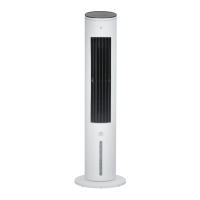
This document serves as a user manual for the Midea Air Cooler 6000 Series, Model 373019. It provides comprehensive instructions for safe operation, installation, usage, and maintenance of the appliance.
Function Description
The Midea Air Cooler is designed to provide a cooling effect, particularly beneficial in dry or hot weather conditions. It operates by drawing in air, which then passes through a wet curtain system where water evaporates, leading to a drop in air temperature. The unit also features an anion indicator light, which illuminates when the product is on and turns off when the product is off.
The appliance offers multiple operational modes and settings, controllable via both the machine body and a remote control. Key functions include:
- Power On/Off: The primary button to start or stop the unit.
- Oscillation (Swing): A dedicated button to activate or deactivate the air swing function, allowing for wider air distribution.
- Wind Speed Adjustment: Users can select from low, medium, or high wind speeds to suit their comfort preferences.
- Wind Type Selection: The air cooler provides three distinct wind types:
- Normal Wind: Offers three gears of wind speed.
- Sleep Wind: Provides two gears of gentler wind, suitable for nighttime use.
- Baby Wind: A single gear of very gentle wind, designed for sensitive users.
- Timer Function: This feature allows users to set a timed shutdown or a reserved startup time. The timer can be set in increments (e.g., 1-2-3...7-0-1 cycle) for both power-on and standby states.
- Cool Air Function (Humidification): This function can be turned on or off to enhance the cooling effect, especially in dry or hot environments. If the indicator light for this function flashes, it indicates a low water level, and water needs to be added before the function can be activated.
Usage Features
The air cooler is designed for household and indoor use. It emphasizes safe operation and user convenience.
- Water Tank Management:
- Feeding Water: The water tank can be easily pulled out, filled with water (ensuring the level does not exceed "max" and stays above "min" during humidification), and then pushed back into the fuselage.
- Disassembly and Washing: The water tank can be completely removed for cleaning. The water pump module can be separated from the tank by unscrewing a rotary knob, allowing access to clean the water pump filter. Regular cleaning (recommended every 3 months) is advised to extend service life.
- Moving the Unit: When the water tank is filled, the unit should be moved slowly from the side to prevent water overflow.
- Ice Crystal Box Usage: The unit comes with an ice crystal box, which can be frozen and placed in the water tank to further enhance the cooling effect. Ice blocks can also be used as an alternative. The ice crystal box is made of eco-friendly and toxic-free materials and can be safely refrigerated. Users should ensure the ice crystal box remains closed to prevent damage and liquid leakage.
- Remote Control: A remote control is provided for convenient operation from a distance (within 5 meters and a 30-degree deviation angle from the front of the product). It uses AAA manganese or alkaline batteries (1.5V) and rechargeable batteries should not be used. The remote control mirrors most of the functions available on the machine body, including air swing, power, wind type, timer, wind speed adjustment, and cool wind activation.
Maintenance Features
Proper maintenance is crucial for the longevity and safe operation of the Midea Air Cooler.
- Cleaning Procedures:
- Power Disconnection: Always disconnect the power before cleaning the product and wait for two minutes after shutdown.
- Exterior Cleaning: Use a soft cloth moistened with mild soap to wipe the exterior parts, then wipe again with a dry cloth. Avoid using abrasive detergents, solvents (like gasoline or thinner), or corrosive cleaning agents, as these can scratch the surface.
- Internal Cleaning (Wet Curtain Parts): Disassemble the wet curtain parts and wash them with a soft brush. Ensure they are cleaned and dried before reinstallation.
- Water Tank Cleaning: Clean up any accumulated water at the bottom of the water tank when the product is not in use. Empty and clean the appliance before storage and before next use.
- Motor Vents: Keep the vents at the rear of the motor free of dust to ensure adequate air circulation. Do not disassemble the fan to remove dust.
- Water Pump Module: Ensure the water pump module is fixed in position before startup to prevent abnormalities in the cool wind function.
- Water Replacement: After stopping the cool wind function for 2 minutes, the water tank can be pulled out to replace the water. This allows water in the pipeline and wet curtain to flow back into the tank.
- Humidity Management: Be aware that high humidity levels can encourage the growth of biological organisms. If dampness occurs, reduce the appliance's output. If the output cannot be reduced, use the appliance intermittently. Prevent absorbent materials (carpeting, curtains, drapes, tablecloths) from becoming damp.
- Battery Maintenance (Remote Control):
- Do not dispose of batteries in fire.
- Do not mix old and new batteries, or different types of batteries (alkaline, carbon-zinc, nickel-cadmium).
- Non-rechargeable batteries should not be recharged.
- Insert batteries with correct polarity.
- Remove exhausted batteries from the product.
- Remove batteries from the remote controller before scrapping it and dispose of them safely.
- General Maintenance:
- Do not insert fingers, pencils, or any other objects through the grille when the fan is running.
- Disconnect the fan when moving it.
- Ensure the fan is on a stable surface to prevent overturning.
- Do not use the fan in a window, as rain can create an electrical hazard.
- Do not place items on the unit or cover the outlet.
- Avoid placing the unit in inclined or uneven places.
- Do not knock or shock the unit body forcibly when it is running.
- Product repair must be carried out by a designated agency. Non-specialized personnel should not repair or modify the machine.
- Unplug the power cord if the unit is not in use for a long time.


 To Next Page
 General