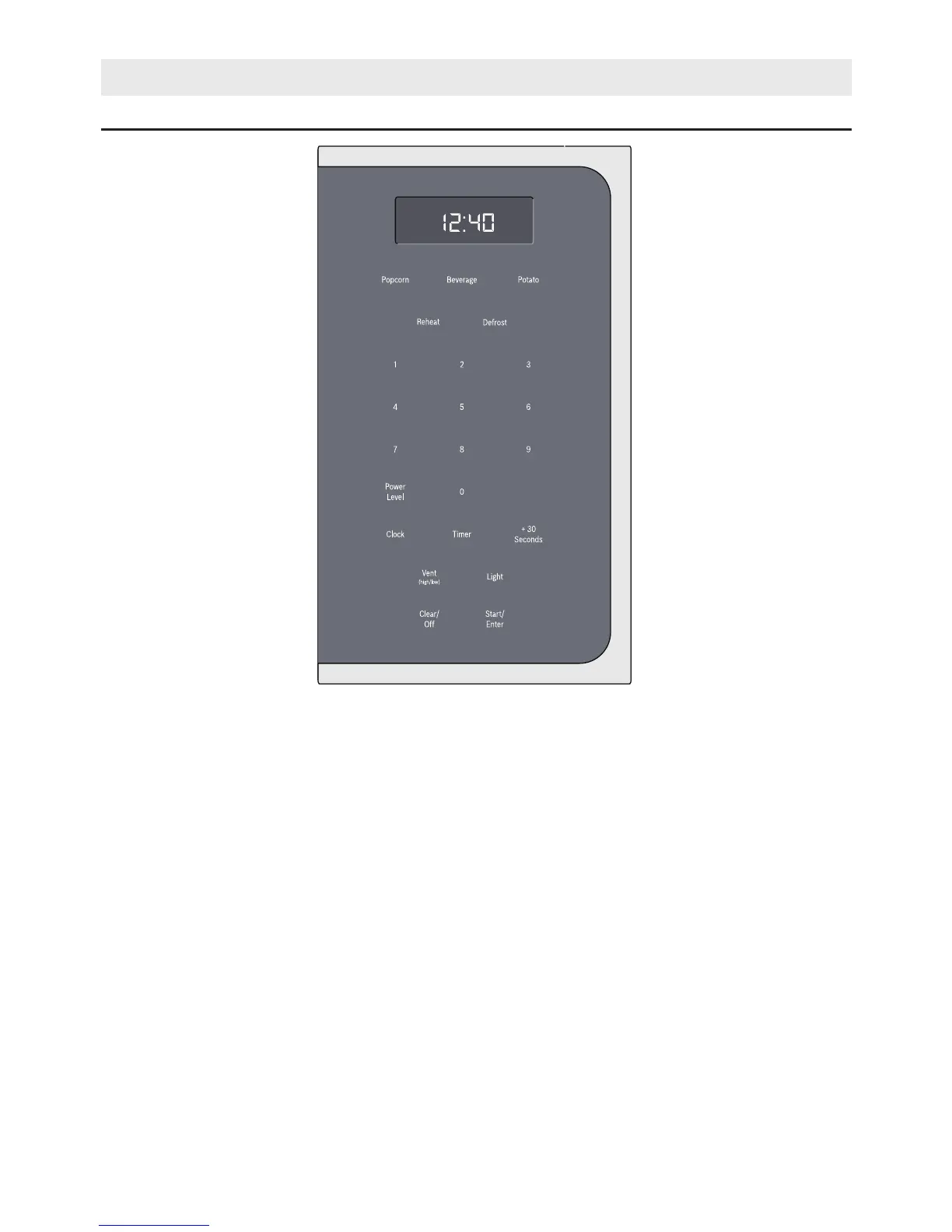
Control Panel and Features
9
OPERATION
Touch keys
You can activate a function by briefly touching the
corresponding touch key. Each time you touch a key a
short beep will sound. A long beep will tell you that you
have made an invalid input.
1 Popcorn Select popcorn packet size
2 Beverage Heat beverage, select beverage size
3 Potato Cook potatoes
4 Reheat Reheat food with automatic settings
5 Defrost Defrost food with automatic settings
6 0 - 9 Use the number keys to enter customized values
7 Power Level Set power level for microwave operation
8 Clock Set time of day
9 Timer Set cook time
10 +30 sec Add 30 seconds to microwave timer
11 Vent (high/low) Turn kitchen ventilation feature on/off
12 Light Turn surface light on/off
13 Clear/Off Clear entered value/turn appliance off
14 Start/Enter Confirm input, start operation




 To Next Page