This document is an instruction manual for a microwave oven, model EM048K6DM-P. It provides essential information for safe and effective operation, including precautions, specifications, operating instructions, and troubleshooting.
Function Description
The microwave oven is designed for cooking, reheating, and defrosting food using microwave energy. It features various cooking modes, including one-touch cook functions for specific food items, auto cooking, and auto defrosting. The oven is equipped with a turntable to ensure even cooking and a vent fan to manage steam and odors.
Important Technical Specifications
- Model: EM048K6DM-P
- Rated Voltage: 120V~60Hz
- Rated Input Power (Microwave): 1550W
- Rated Output Power (Microwave): 1000W
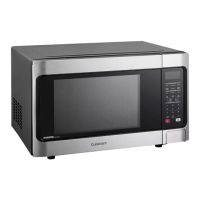
The oven includes several components:
- Microwave oven door with see-through window
- Door hinges
- Waveguide cover
- Turntable motor shaft
- Microwave oven light
- Safety door latches
- Handle
- Light hi/lo/off pad
- Vent hi/lo/off pad
- Auto-Touch control panel
- Time display
- Ventilation openings
- Removable turntable
- Removable turntable support
- Light cover
- Grease filters
- Menu label
Usage Features
Safety Precautions:
- Avoid exposure to excessive microwave energy.
- Do not attempt to operate the oven with the door open, damaged door, or if the safety interlocks are not functioning.
- Do not place any object between the oven front face and the door or allow soil or cleaner residue to accumulate on sealing surfaces.
- Do not operate the oven if it is damaged, especially the door, hinges, latches, or seals.
- Only qualified service personnel should adjust or repair the oven.
- Do not overheat liquids, as they can suddenly boil over.
- Use extreme care when inserting a spoon or other utensil into the container after heating.
- Do not operate any heating or cooking appliance beneath the appliance.
- Do not mount unit over or near any portion of heating or cooking appliance.
- Do not mount over sink.
- Ensure proper ventilation and clean grease filters regularly.
- Do not store flammable materials near the oven.
- Do not immerse cord or plug in water.
- Keep cord away from heated surfaces.
- Do not let cord hang over edge of table or counter.
- Clean surfaces of door and oven that come together on closing the door with mild, nonabrasive soaps or detergents.
- To reduce the risk of fire in the oven cavity:
- Do not overcook food.
- Remove wire twist-ties from paper or plastic bags.
- If material inside the oven ignites, keep oven door closed, turn oven off, and disconnect the power cord.
- Do not use the cavity for storage purposes.
- Liquids, such as water, coffee, or tea, can be overheated beyond the boiling point without appearing to be boiling. Visible bubbling or boiling when the container is removed from the microwave oven is not always present.
Grounding Instructions:
The appliance must be grounded to prevent electric shock. It is equipped with a 3-blade grounded plug and a 3-slot receptacle. Consult a qualified electrician if grounding instructions are unclear. Do not use an extension cord unless it is a 3-wire extension cord with a 3-blade grounded plug, and the marked rating of the extension cord is equal to or greater than the electrical rating of the appliance.
Radio Interference:
The microwave oven may cause interference to radio, TV, or similar equipment. To reduce interference:
- Clean door and sealing surface of the oven.
- Reorient the receiving antenna of radio or television.
- Relocate the microwave oven with respect to the receiver.
- Move the microwave oven away from the receiver.
- Plug the microwave oven into a different outlet so that microwave oven and receiver are on different branch circuits.
Utensils:
- Microwave-safe: Browning dish, dinnerware, glass jars, glassware, oven cooking bags, paper plates and cups, paper towels, parchment paper, plastic, plastic wrap, thermometers, wax paper.
- Avoided: Aluminum tray, food carton with metal handle, metal or metal-trimmed utensils, metal twist ties, paper bags, plastic foam, wood.
Control Panel:
The control panel features a 7-digit Interactive Display and various pads for setting cooking time, power level, and specific functions. Key display indicators include:
- Display: Shows time, cooking settings, power, quantities, and cooking functions.
- SENSOR: Indicates sensor cooking.
- TIMER: Indicates timer is being set or running.
- COOK: Indicates starting microwave cooking.
- DEFR: Indicates defrosting food.
- LOCK: Indicates control lock.
- PRESS AGAIN FOR OPTIONS: Indicates when additional options are available.
- PRESS START: Indicates when a valid function can be started.
- kg, oz, lb: Indicates when choosing weight.
- FILTER: Indicates PureAir® Filter.
- VEGGIES, POPCORN, POTATO, SNACK MENUS, MEIT/SOFTEN, AUTO COOK, POWER LEVEL, COOK TIME, TIMER(On-Off), DEFROST, CLOCK, STOP/CLEAR, USER PREF, START/+30SEC, Exhaust (High/Low/Off), Surface Light (High/Low/Off), Numeric pads (0 thru 9).
Manual Cooking:
- Time Cooking: Set cooking time (99 minutes 99 seconds max) and power level (10% to 100%).
- Using One Touch Start: Quickly start cooking for 30 seconds by pressing the "START +30Sec" pad.
- Using Add 30 Sec: Add 30 seconds to cooking time by pressing the "START +30Sec" pad.
- Setting Timed Cooking With Power Level: Set specific cooking time and power level.
- Setting Two-Stage Cooking: Program two power levels and cooking times for different stages.
Manual Defrost:
The oven allows for manual defrosting based on food type and weight.
- Power Level: Eleven preset power levels (100% to 0%).
- Using the Rack: The rack allows for cooking and reheating at one time. It can be used with SENSOR COOKING or AUTO COOKING.
- Manual Defrost: Defrost food by entering weight. The oven automatically calculates defrosting time.
- Defrosting Tips:
- Enter weight in pounds and tenths of pounds.
- Remove any metal twist-ties or elastic bands.
- Open containers, such as cartons, before placing in the oven.
- Slit or pierce plastic pouches or packaging.
- If food is foil wrapped, remove foil and place food in a suitable container.
- Slit the skin of skinned food, such as sausage.
- Bend plastic pouches of food to ensure even defrosting.
- Always underestimate defrosting time.
- Turn over food during defrosting or standing time.
- Break apart and remove food as required.
One Touch Cook:
- Popcorn: Cook popcorn by selecting ounces (3.3 oz, 3.0 oz, 1.75 oz).
- Veggies: Cook fresh or frozen vegetables by selecting cups.
- Snack Menu: Cook frozen MW pizza, hot dogs, meal in a cup, or frozen kid's meal.
- Potato: Cook 1 to 4 baked potatoes.
- Pizza: Cook pizza by selecting ounces (6.0 oz, 8.0 oz).
- Setting Melt/Soften: Melt butter, chocolate, soften ice cream, or soften cream cheese.
Auto Cooking:
- Auto Cook: Cook bacon, frozen dinner, rice, or frozen breakfast by selecting slices, ounces, or cups.
Auto Defrost:
The auto defrost feature provides a built-in beep mechanism that reminds you to check, turn over, separate, or rearrange the food in order to get the best defrost results. Three different defrosting levels are provided:
- MEAT: For meat items.
- POULTRY: For poultry items.
- FISH: For fish items.
- Weight Conversion Table: Provides conversion from ounces to decimal weight and common fractions of a pound.
- Auto Defrost Table: Provides specific settings and instructions for various meat, poultry, and fish items, including ground beef, steaks, chops, chicken, turkey, crab meat, lobster tails, shrimp, and scallops.
Convenient Features:
- User Pref: Set clock, control lock, volume, weight (lb/kg), clock display on/off, and demo mode.
- Setting Clock: Set the clock to the correct time.
- Audible Sound Low/Med/High/Off: Adjust the volume of audible signals.
- Setting Weight Lb/Kg: Toggle between pounds and kilograms.
- Clock Display on/off: Turn the clock display on or off.
- Setting Demo Mode On/Off: Turn demo mode on or off.
- Setting Kitchen Timer: Use the microwave as a kitchen timer for up to 99 minutes 59 seconds.
- Using Cooktop Light: Control the cooktop light (high, low, off).
- Setting Turntable On/Off: Turn the turntable on or off.
- Using Vent Fan: Control the 2-speed vent fan (high, low, off).
Maintenance Features
Troubleshooting:
The manual provides a troubleshooting guide for common issues:
- Oven will not start: Check if the electrical cord is plugged in, the door is open, or if the wrong operation is set.
- Arcing or sparking: Check if materials to be avoided in microwave oven were used, if the oven is operated when empty, or if spilled food remains in the cavity.
- Unevenly cooked foods: Check if materials to be avoided in microwave oven were used, if food is not defrosted completely, if cooking time/power level is not suitable, or if food is not turned or stirred.
- Overcooked foods: Check if cooking time/power level is not suitable.
- Undercooked foods: Check if materials to be avoided in microwave oven were used, if food is not defrosted completely, if oven ventilation ports are restricted, or if cooking time/power level is not suitable.
- Improper defrosting: Check if materials to be avoided in microwave oven were used, if cooking time/power level is not suitable, or if food is not turned or stirred.
Cleaning:
Regular cleaning of the oven cavity, door, and seals is recommended to prevent food buildup and ensure proper operation. Grease filters should be cleaned regularly.

 Need help?
 General


 To Next Page