4
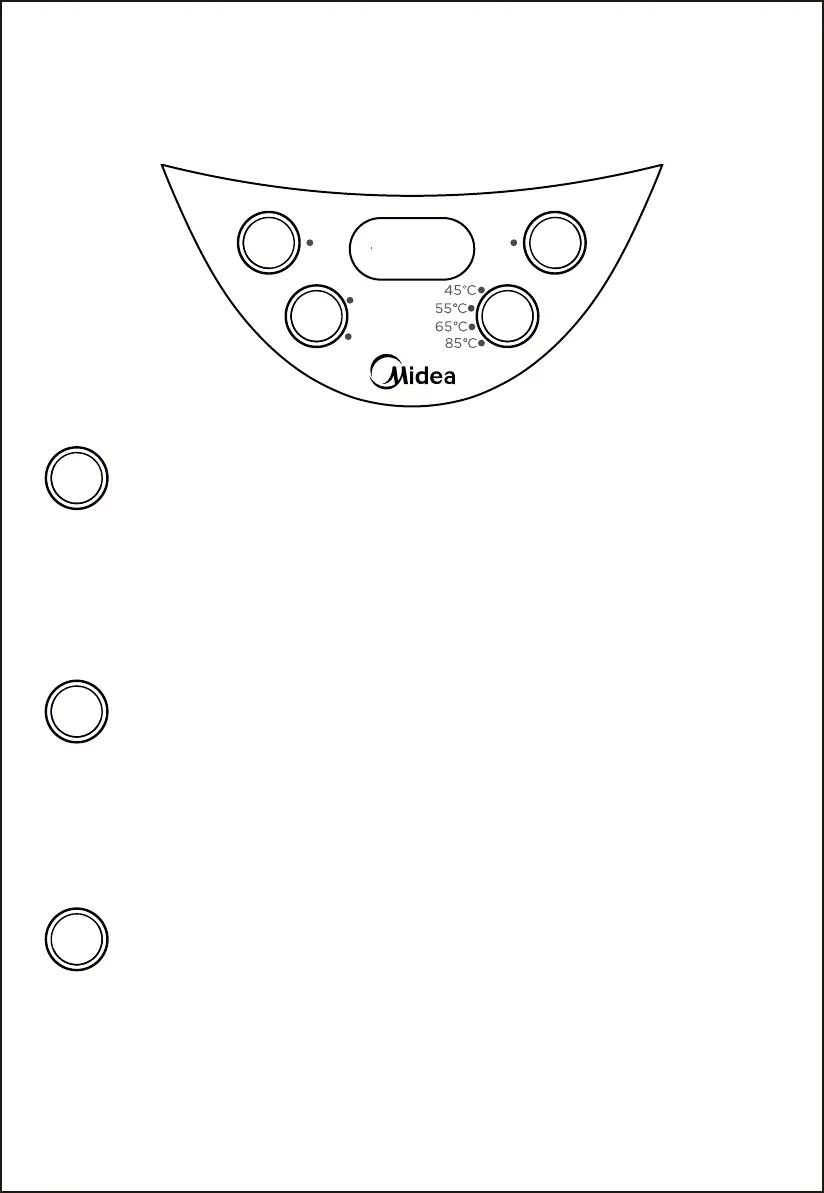
Operation panel
• Tap Water
(Dechlorination)
• Purified
Water
Boiling
Tap Water
(Dechlorination)
Purified Water
Boiling
On/Off
Keep
Warm
Unlock
pour out water
Boiling
Keep
Warm
1. In standby state, click the “Boiling” button, select the “Tap Water” function (the “Keep Warm” function is
on by default). The “On/Off” button indicator light is on constantly. The “Tap Water” function indicator
light and the “Keep Warm” indicator will flash for 5 seconds, after 5 seconds, the “Tap Water” function
indicator light will light up constantly, the “Keep Warm” indicator will keep on flashing, and the kettle
starts to work at the same time. After starting work, click the “Boiling” button to switch between “Tap
Water” and “Purified Water” functions;
2. After starting to boil water, single click “Keep Warm” button to select the “Keep Warm” temperature;
3. After water is boiled and switches into “Keep Warm” mode, when the water temperature drops to the
pre-set temperature, the “Keep Warm” indicator will be switched from flashing to constant light up.
1. In standby state, click the “Boiling” button, select the “Purified Water” function (the “Keep Warm”
function is on by default). The “On/Off” button indicator light is on constantly. The “Purified Water”
function indicator light and the “Keep Warm” indicator will flash for 5 seconds, after 5 seconds, the
“Purified Water” function indicator will light up constantly, the “Keep Warm” indicator will keep on
flashing, and the kettle starts to work at the same time. After starting work, click the “Boiling” button to
switch between “Purified Water” and “Tap Water” functions;
2. After starting to boil water, single click “Keep Warm” button to select the “Keep Warm” temperature;
3. After water is boiled and switches into “Keep Warm” mode, when the water temperature drops to the
pre-set temperature, the “Keep Warm” indicator will be switched from flashing to constant light up.
1. In standby state, click on “Keep Warm” button to select the required temperature, and turn on the “Purified
Water” function to boil water (Only single click on the “Keep Warm” button in standby mode is valid). The
“Purified Water” indicator and the corresponding “Keep Warm” indicator will flash for 5 seconds. After 5
seconds, the kettle starts to work. The “Purified Water” indica
tor will light up constantly, and the “Keep
Warm” indicator will keep on flashing. When the water is boiled to the pre-set temperature, the “Keep
Warm” indicator will turn on constantly.
2. Selection range of warm keeping temperature: 45°C, 55°C, 65°C, 85°C, cycle selection.


 To Next Page