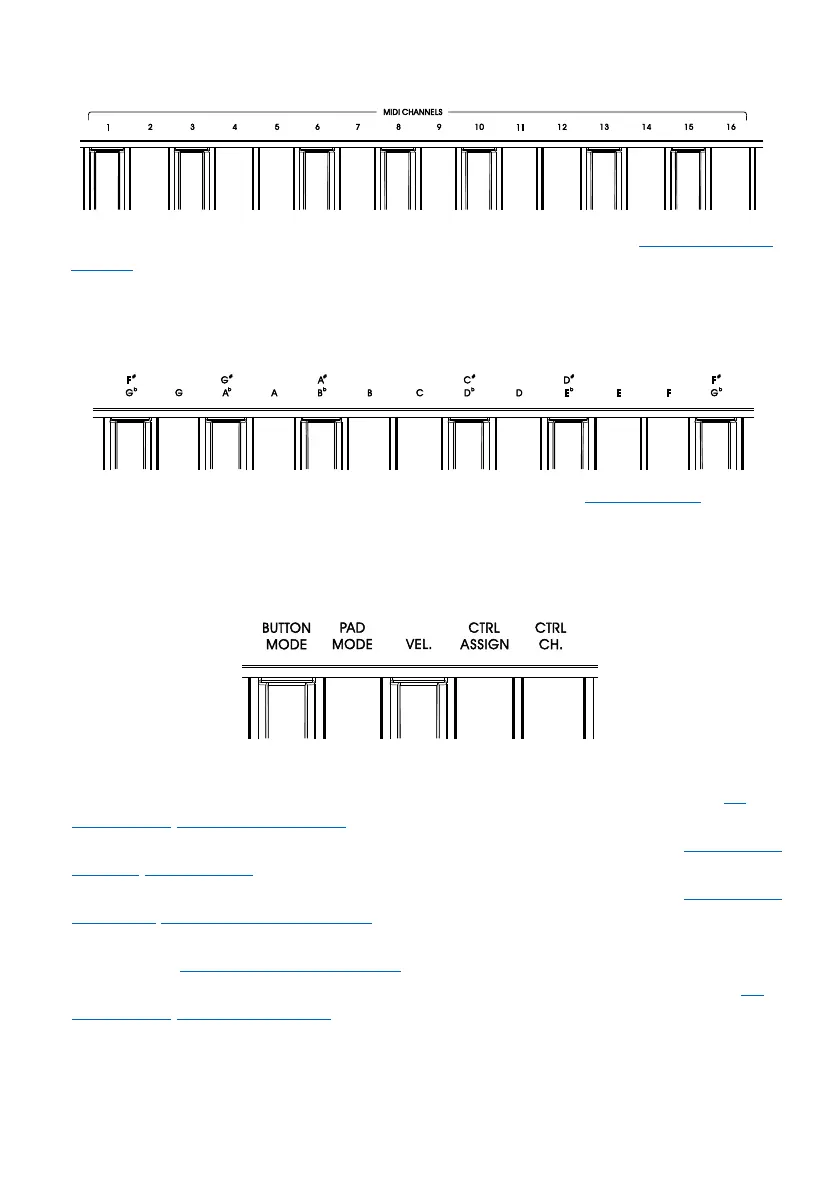
2.10.1 MIDI Channels Keys
Used for changing the MIDI channel of keyboard in Edit mode. Please refer to 3.1 Changing MIDI
Channel for details.
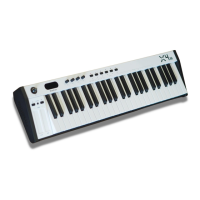
2.10.2 Transpose Keys
Used for changing the transposition setting in Edit mode. Please refer to 3.2 Transposition for details.
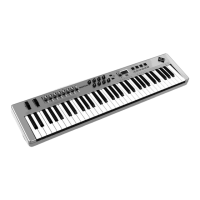
2.10.3 Other Functions Keys
Used for changing other advanced functions in Edit mode:
BUTTON MODE: Change the B1 to B8 buttons’ mode. For detailed operation, please refer to 3.3
Changing The "B1 ~ B8" Buttons' Mode.
PAD MODE: Change the P1 to P8 pads’ mode. For detailed operation, please refer to 3.4 Changing
The "P1 ~
P8" Pads' Mode.
VEL.: Change the velocity response curve of the keyboard. For details, please refer to 3.5 Changing
The Velocity Response Curve Of Keyboard.
CTRL ASSIGN: Select to customize the controllers (knobs, buttons, pads). For detailed operation,
please refer to 3.6 Customizing The Controllers.
CTRL CHL: Select to change the channel of controllers. For detailed operation, please refer to 3.7
Changing The Channel Of Controller.
9



 To Next Page