http://www.midiplus.com.tw
(4) Functions overview:
4.1 Fader potentiometer (S1,S2):
Fader potentiometer to send specific controller information, you can use MIDI Editor software editing a
CC value
4.2 Unlimited rotation data regulator (K1,K2):
Unlimited rotation data regulator to send specific controller information, you can use MIDI Editor
software edit a CC value
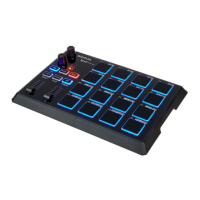
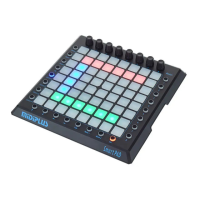
4.3 Drum PAD:
Drum PAD: According to the current mode , to send specific MIDI information and light up LED , you
can use MIDI Editor software edit a CC value.
4.4 “PAD/CC” Key
“PAD/CC” key has two modes, one kind is “PAD”, another kind is “CC”.
“PAD” mode: Drum PAD will send a message like keyboard MIDI “0x90 0x40 0x7f”. The key and PADs
LED will lights green, you can use MIDI Editor software edit the “PAD” mode LED color.
“CC” mode: When the “SET” key is pressed , press the “PAD/CC” key , enable the “CC” state . Drum
PAD will send a message like controller MIDI “0xb0 0x40 0x7f”. The key and PADs LED will lights blue,
you can use MIDI Editor software edit the “CC” mode LED color.
4.5 “PROG/RESET” Key
“PROG/RESET” key has two modes, one kind is “PROG”, another kind is “RESET”.
“PROG” mode: Drum PAD will send a message like Sound MIDI “0xc0 0x40”
The key and PADs LED will lights red, you can use MIDI Editor software edit the “PROG” mode LED
color.
“RESET”: When the “SET” key is pressed , press the “PROG/RESET” key , enable the “RESET” state .
Restore factory parameters, xPAD will restart the boot state
4.6 “BANK-(1/2/3)” Key:
“BANK-(1/2/3) key” toggles the PAD group of the 1/2/3.
Group 1: In between 1-16 PAD , Led 1 light up
Group 2: In between 17-32 PAD , Led 2 light up
Group 3: In between 33-48 PAD , Led 3 light up
4.7 “CHANNEL/SAVE” Key:
“CHANNEL/SAVE” key has two modes, one kind is “CHANNEL”, another kind is “SAVE”.
“CHANNEL”: Press 1~48 PADs will change a midi channel
(PAD mode/CC mode/PROG mode )
In PAD mode , press “CHANNNEL/SAVE”, the key and Drum PAD Led will light the color same as PAD
mode , like green. And “PAD/CC” key will light down.
In CC mode , press “CHANNNEL/SAVE”, the key and Drum PAD Led will light the color same as CC
mode , like blue. And “PAD/CC” key will light down.
In PROG mode , press “CHANNNEL/SAVE”, the key and Drum PAD Led will light the color same as
PROG mode , like red. And “PAD/CC” key will light down.


 To Next Page