13
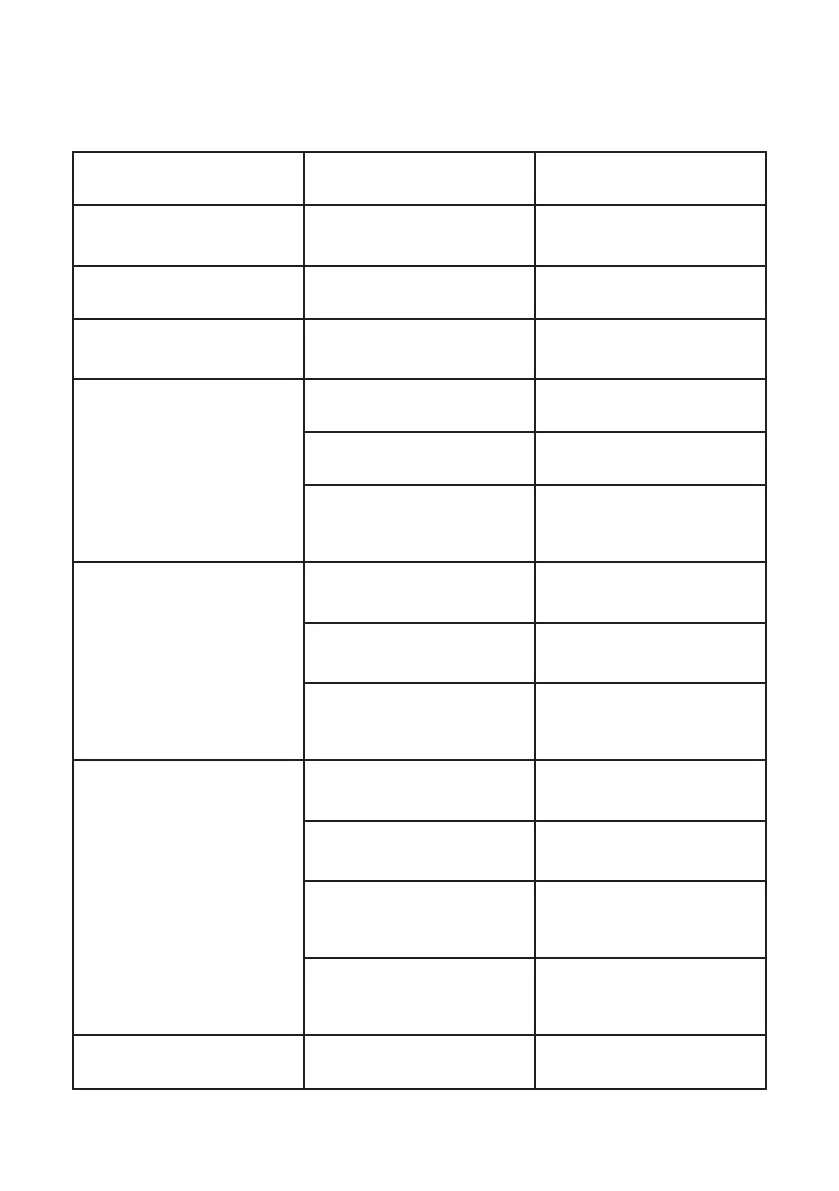
Troubleshooting
Problem Possible Cause Solution
The radio doesn’t switch on. The battery pack is discharged and/
or has not been installed correctly.
Verify that the battery pack is
charged and that it has been
correctly installed.
The radio switches off shortly after it
has been switched on.
Discharged battery pack. Recharge the battery pack.
The battery pack does
not recharge.
The battery-charger has not been
connected or installed correctly.
Inspect the connections of the
battery-charger and the installation
of the batteries.
The radio switches on but is unable
to receive signals.
The site of installation is
too shielded.
Move to another area.
The volume is too low. Adjust the volume level.
Incorrect CTCSS or DCS. Check that the CTCSS tone or DCS
code corresponds to the one set by
the parties you are
communicating with.
It is not possible to communicate
with other parties.
An incorrect radio channel has
been selected.
Select the same radio channel used
by the parties you are
communicating with.
The radio is installed in a shielded
area or is too far from the party you
are communicating with.
Move to another area.
Incorrect CTCSS or DCS. Check that the CTCSS tone or DCS
code corresponds to the one set by
the parties you are
communicating with.
Reception is fragmented and/
or disturbed.
The signal is very weak. Try temporarily to disable the
Squelch by means of the
Monitor feature.
The transmission distance is
excessive and/or there are
obstacles in the transmission path.
Move closer to the party you are
communicating with or to
another area.
Other parties are using the
same channel.
Check the traffic on the radio
channel by means of the Monitor
feature and select another channel
if required.
The radio has been installed too
close to equipment that causes
interference (televisions,
computers, etc)
Increase the distance between the
radio and this equipment.
The autonomy of the battery pack
is limited.
Transmission time is too long. Try to reduce the transmission time.


 To Next Page