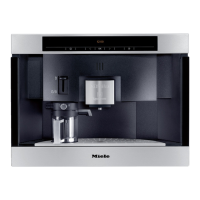
The following notes should help you get to know your coffee
machine before starting to use it.
Controls
This machine has sensors controls which react to touch. To
operate the machine you only need to touch the relevant
sensor. There are five sensors:
–
s On/Off sensor for switching the coffee machine on
and off
–
< Left arrow, for scrolling through the various
programme options
–
OK sensor, for confirming the selection of a
programme option and for saving a setting
– > Right arrow, for scrolling through the various
programme options
– / Drink selection sensor (coffee or espresso)
Display
COSI o Espresso
K1 K2 K3 K4 K5 L onG k C
The basics are shown in the display, such as:
–
Drink selection: Up to 5 different coffee types K, Steam L
and Hot water o.
–
User profile n for up to 9 different users,
–
Important maintenance programmes: Rinsing G and
Descaling k,
–
Selecting Settings C for customising your machine.
^
The arrow sensors are used to select a programme option
in the display. Touch the OK sensor when the option you
want appears highlighted in the display.
This makes it easy to use the coffee machine.
Using the coffee machine - first steps
13


 To Next Page