Selecting further settings
31
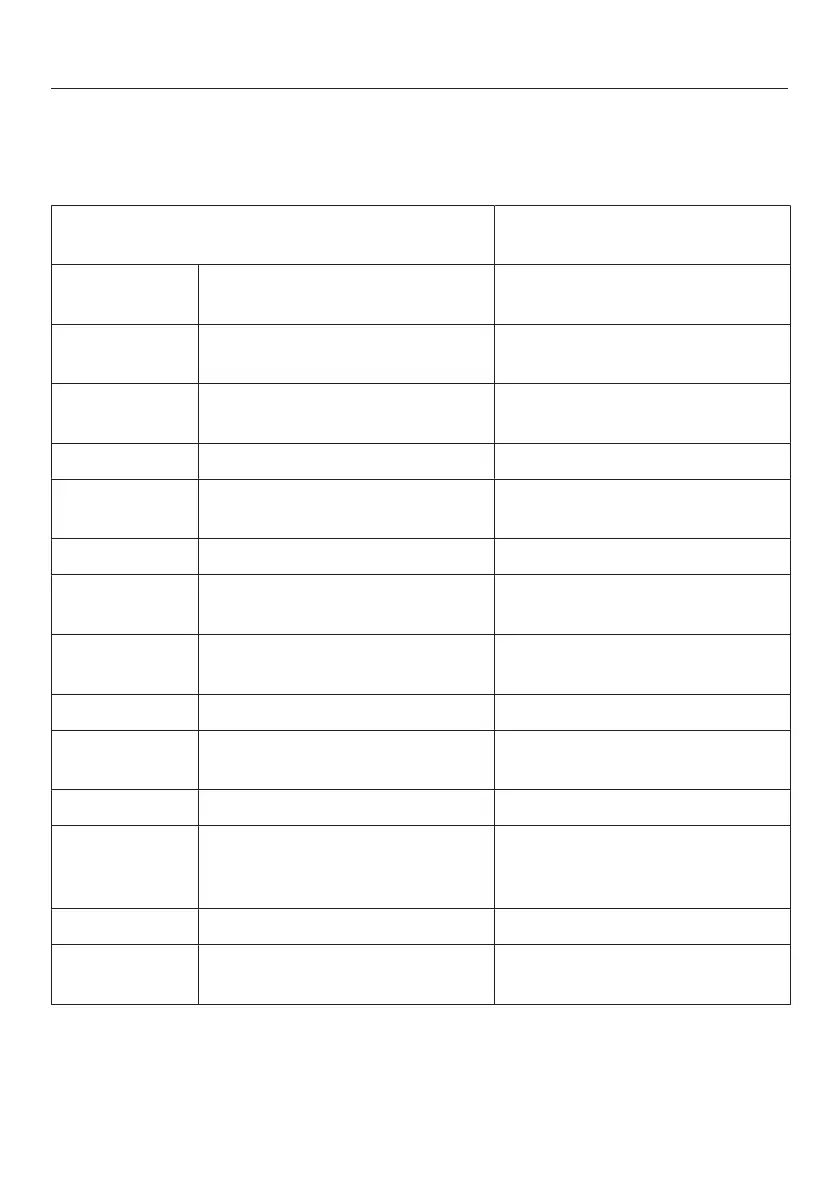
Settings overview
The following settings can be activated or changed. Default settings are shown in
bold or as marked level in the segment bar.
Setting Selection/factory default
setting
Use minute minder
(QuickCool Timer)
0:00–9:59 h:min
Switching the ice cube maker
on and off
On (symbol orange) / Off
/ Activate/deactivate the safety
lock
On/off
Switch appliance off OK
Change the time before the
door alarm is triggered
Level1–7 (level1 = 30sec)
(level2 = 1min)
/
Switch keypad tone on/off On/off
/ Set volume/switch off alarms
and audible tones
Off – level7
Set the display brightness Level 1–7
°C Change the temperature unit °C/°F
Demo mode (only visible when
switched on)
Off
Reset default settings
Access information about your
refrigeration appliance
Display (important when
reporting a fault to Miele
Service)
Clean ventilation grille reminder On (orange symbol)/off
Cleaning (only appears when
the ice maker is switched on)
On (symbol orange) / Off



 To Next Page