,
To reduce the risk of electric
shock, disconnect this appliance
from the power supply by shutting
off the power main or tripping the
circuit breaker.
Changing the light bulb
^
Remove the runners.
^
Spread a dishtowel on the oven floor
to protect the enamel, in case the
light cover falls.
^
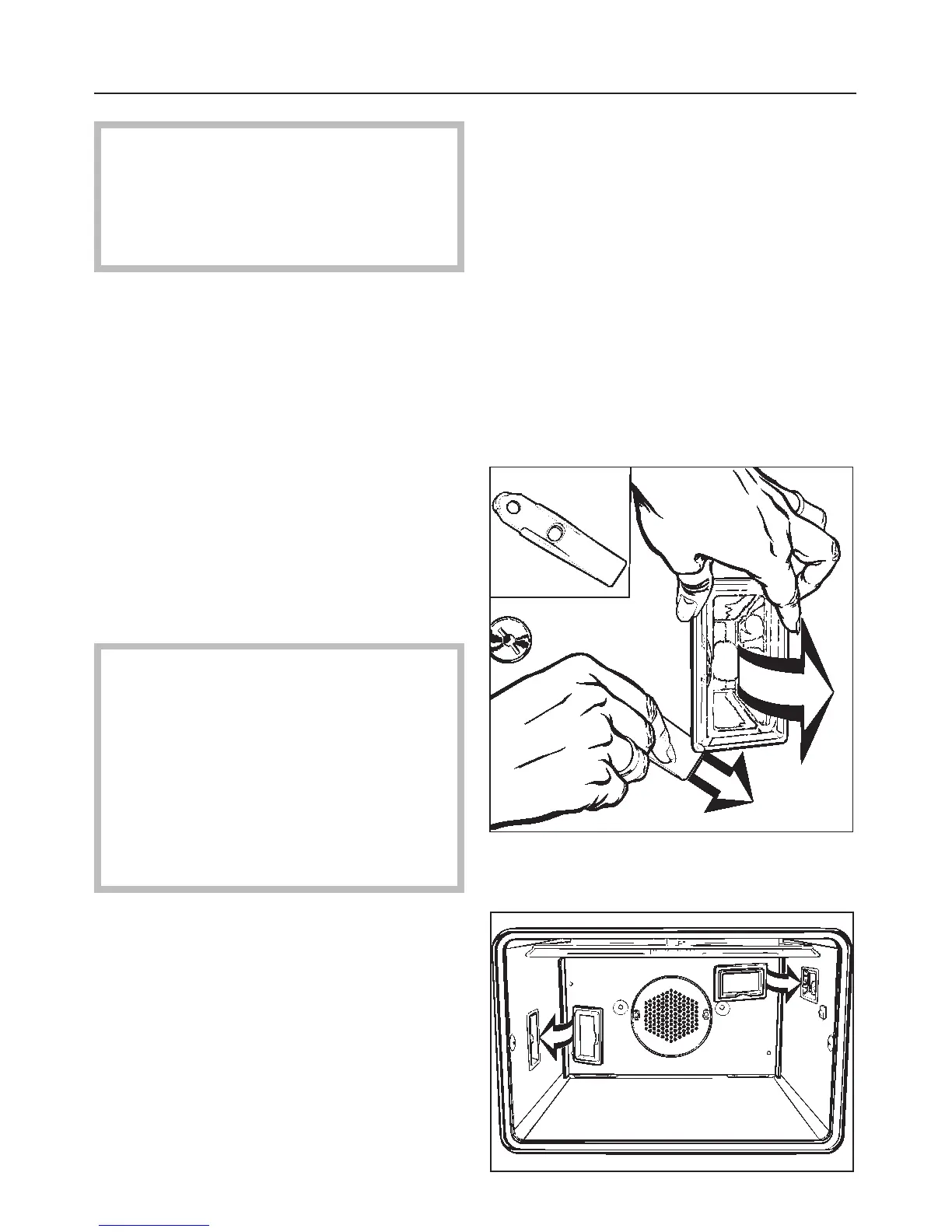
Remove the lamp cover.
Use the supplied slide opener to pry
the lamp out of the side panel.
^ Replace the halogen bulb.
Only use the following light bulb:
12 V, 10 W, 572 °F (300 °C) heat
resistant, socket G4, type 64418
made by Osram.
Do not touch the new light bulb with
your fingers; touching the bulb will
reduce its life. Follow the bulb
manufacturer’s instructions.
^
Press the lamp back into the sidewall
of the oven and reinsert the cover.
Reassemble in the reverse order,
making sure that all the parts are in
place.
^
Reassemble the runners.
Changing the light bulb
61



 To Next Page