Operating the tumble dryer
18
Control panel
a
Control panel
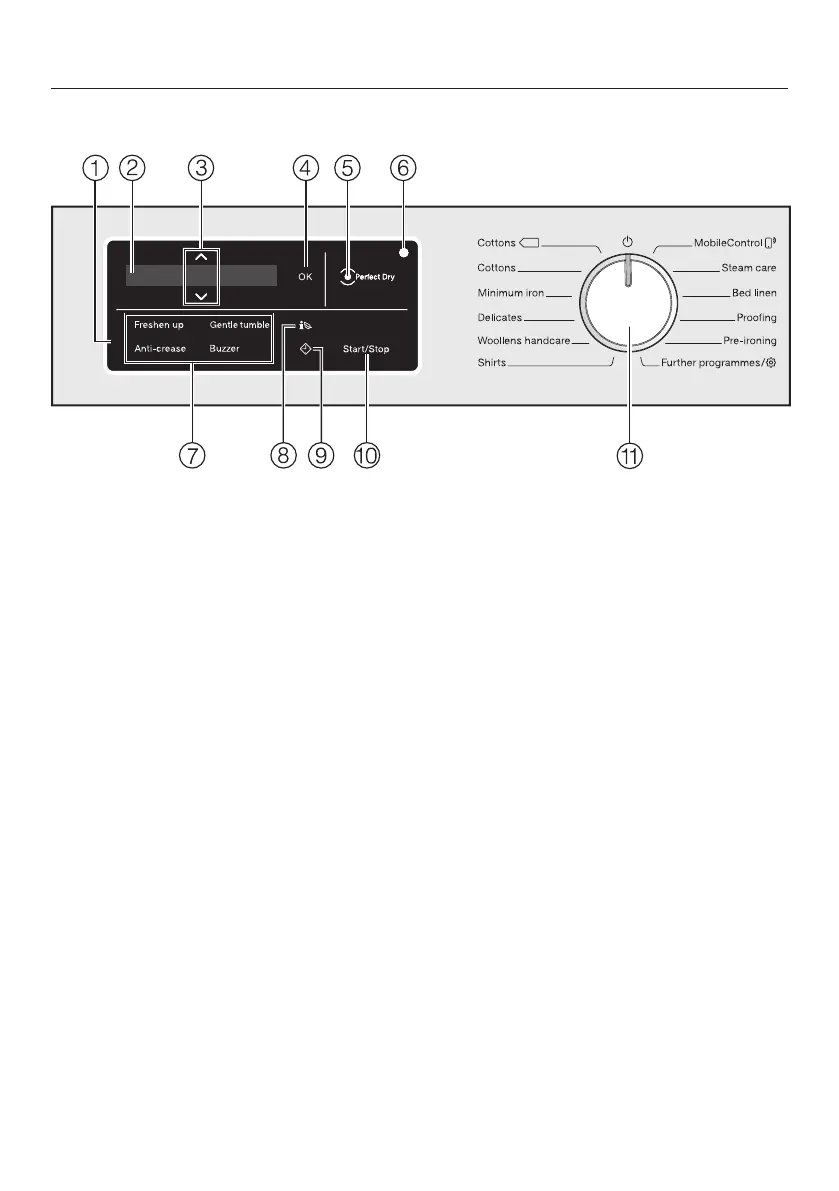
The control panel consists of a
display and various sensor controls.
The individual sensors are explained
in the following.
b
Display
The following values are shown in
the display and/or selected from it:
1. The programme names, the drying
level and the duration of the
selected programme.
2. The individual values of the
selection lists for settings.
c
Sensor controls
Values shown in the display can be
changed with the sensors. The
sensor increases the value or
moves the selection list up; the
sensor decreases the value or
moves the selection list down.
d
OK sensor
Confirm selected values with the OK
sensor.
e
Perfect Dry indicator
With programmes with a selectable
drying level, the Perfect Dry system
calculates the residual moisture
present in the laundry to ensure a
precise drying result.
The Perfect Dry indicator . . .
. . . flashes after the programme has
started and goes out when the
programme duration appears in the
display.
. . . lights up when the selected
drying level is reached near the end
of the programme.
. . . remains dark with the following
programmes: Woollens handcare,
Silks handcare, Cool air, Warm air,
Basket programme.


 To Next Page
 Loading...