Operating the washing machine
13
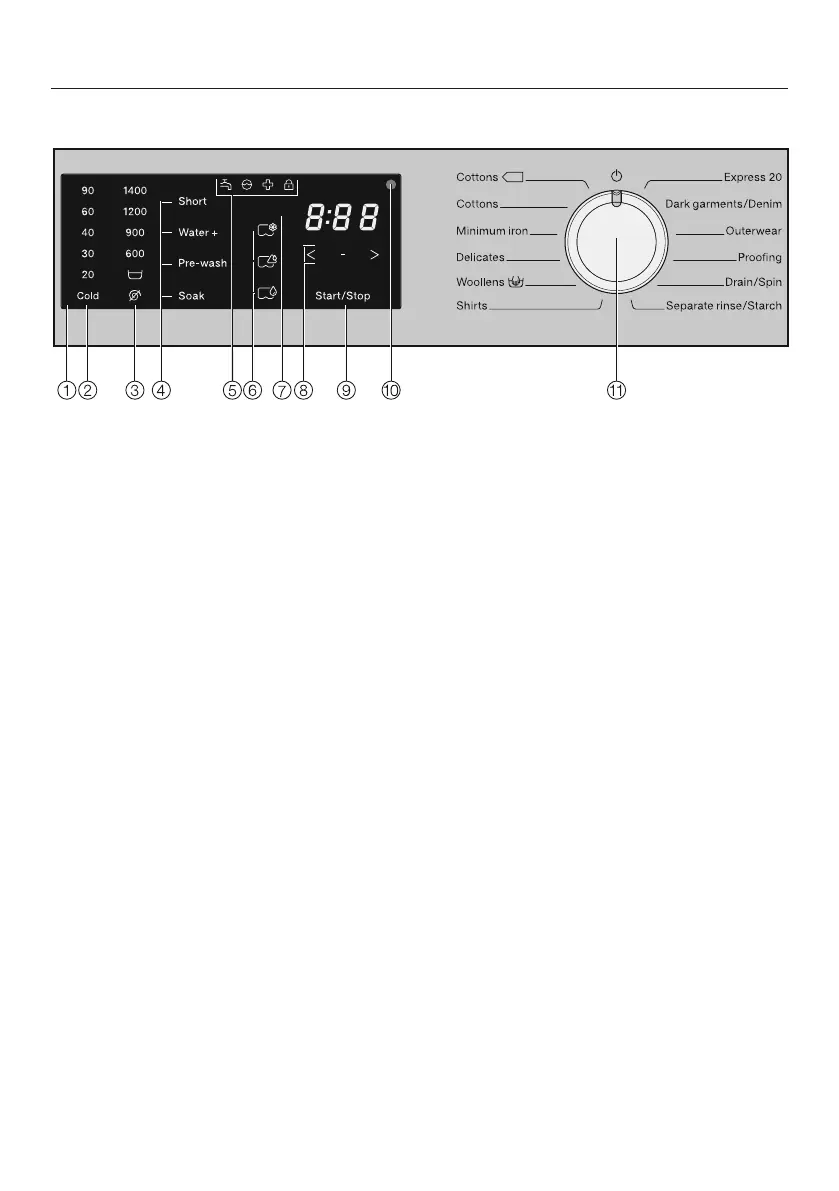
Control panel
a
Control panel
b
Sensor controls – temperature
for selecting the temperature.
c
Sensor controls – spin speed
for selecting the spin speed.
d
Sensor controls – extras
various options can be added to the
wash programmes.
e
Indicator lights
light up when necessary
f
Sensor controls – CapDosing
g
Time display
for the programme duration
h
Sensor controls
for programmable functions
i
Start/Stop sensor
for programme start/cancellation
j
Optical interface
for service technicians
k
Programme selector
for selecting programmes and for
switching off. The washing machine
is switched on when you select a
programme, and switched off by
turning the programme selector to
the position.



 To Next Page