Operating the washing machine
14
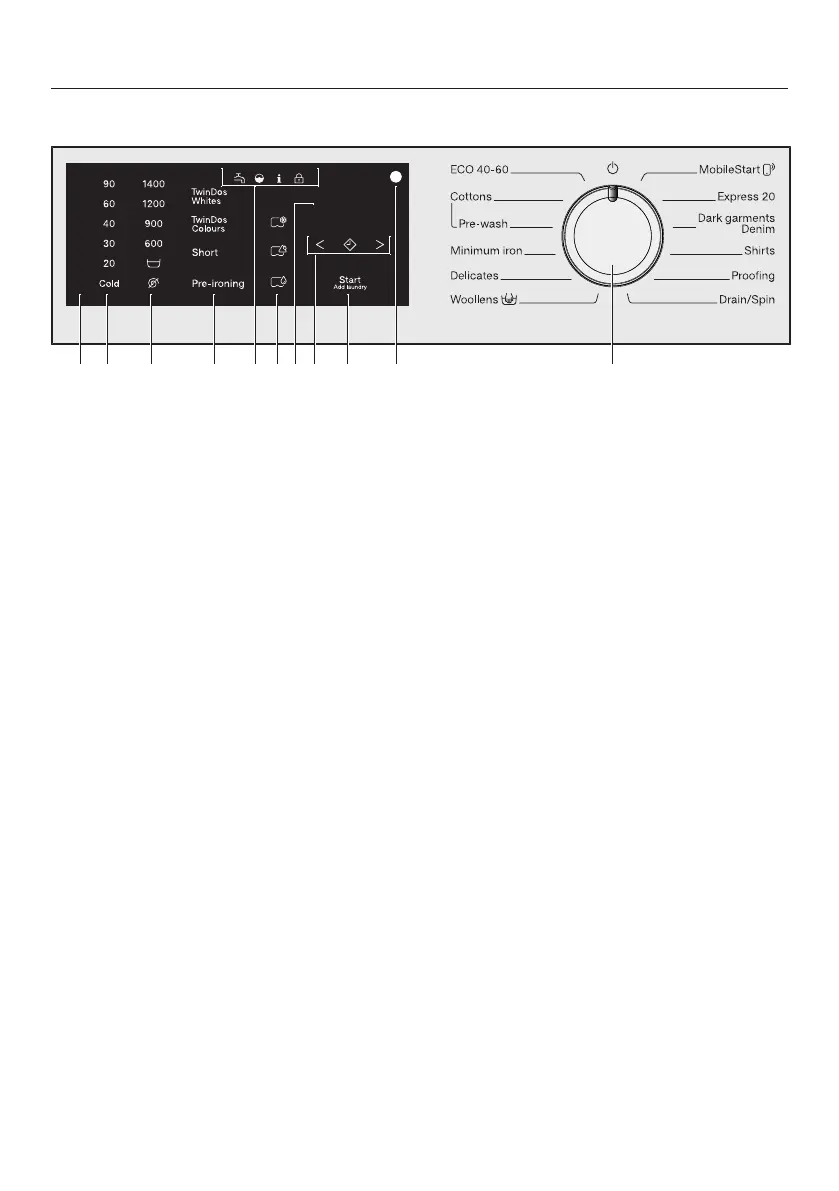
Control panel
a
Control field
The control field consists of a time
display and various sensor controls.
The individual sensor controls are
explained in the following sections.
b
Sensor controls – temperature
for selecting the temperature.
c
Sensor controls – spin speeds
for selecting the spin speed.
d
Sensor controls for TwinDos and
extra options
You can activate TwinDos dispens-
ing for a wash programme and add
extra options to the programme.
When a wash programme is selec-
ted, the sensor controls for the
TwinDos dispensing option and extra
options light up dimly.
e
Indicator lights
Lights up if there are faults af-
fecting the water inlet and
drainage.
Lights up if excess detergent
was used.
Lights up together with in the
time display as a reminder
about hygiene information.
Lights up together with in the
time display as a reminder
about TwinDos cleaning.
The Add laundry function can-
not be selected.
f
Sensor controls – CapDosing
CapDosing of fabric care
products (e.g. fabric condi-
tioner, proofing agent)
CapDosing of additives (e.g.
detergent enhancer)
CapDosing of detergent (for the
main wash only)



 To Next Page