EasyManua.ls Logo

MikroTik RouterBOARD 750 - User Manual

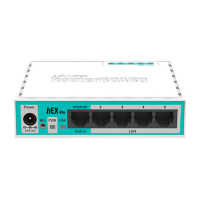
MikroTik RouterBOARD 750
2 pages
Print Icon
To Next Page IconTo Next Page
Loading...
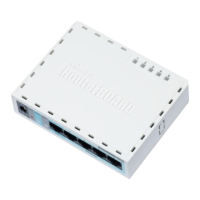
RouterBOARD 750
Quick Setup Guide and Warranty Information
First use
1. Connect your WAN cable to port 1, and LAN computers to ports 2-5
2. Set LAN computer IP configuration to automatic (DHCP)
3. RB750 Default IP address from LAN is 192.168.88.1 or http://router
Powering
The board accepts powering from the power jack or from the first ethernet port (Passive PoE):
direct-input power jack (5.5mm outside and 2mm inside diameter, female, pin positive plug) accepts 8..28V DC
first ethernet port accepts passive Power over Ethernet accepts 8-28V DC
Normally the power consumption of this device is 2.4W, under maximum load - 3.6W
Booting process
This device doesn't come fitted with a Serial Port connector, so initial connection has to be done via the Ethernet cable, using
the MikroTik Winbox utility. Winbox should be used to connect to the default IP address of 192.168.88.1 with the username
admin and no password.
In case IP connection is not available, Winbox can also be used to connect to the MAC address of the device. More
information here:
http://wiki.mikrotik.com/wiki/First_time_startup
In case you wish to boot the device from network, for example to use MikroTik Netinstall, hold the RESET button of the
device when starting it until the LED light turns off, and RB750 will start to look for Netinstall servers.
Extension Slots and Ports
Five individual Ethernet ports, supporting automatic cross/straight cable correction (Auto MDI/X), so you can use
either straight or cross-over cables for connecting to other network devices. The Ethernet port accepts 8..28 V DC
powering from a passive PoE injector.
Buttons and Jumpers
ROS reset jumper hole (on the bottom of case, behind one of the rubber feet) resets RouterOS software to
defaults. Must short circuit the metallic sides of the hole (with a screwdriver, for example) and boot the device. Hold
screwdriver in place until RouterOS configuration is cleared.
RouterBOOT reset button (RESET, front panel) has two functions:
Hold this button during boot time until LED light starts flashing,
release the button to reset RouterOS configuration (same result as with reset hole)
Hold this button during boot time longer, until LED turns off,
then release it to make RB750 look for Netinstall servers.
See www.routerboard.com for more information. Contact support@mikrotik.com for support questions. rev. A (6-Jul-2009)
Question and Answer IconNeed help?

Do you have a question about the MikroTik RouterBOARD 750 and is the answer not in the manual?

Summary

First Use and Initial Setup

Device Powering Options

Booting Process and Network Booting

Initial Ethernet Connection

Connect via Ethernet using MikroTik Winbox utility to default IP 192.168.88.1 or MAC address.

Netinstall Network Boot

Hold RESET button until LED turns off to look for Netinstall servers.

Hardware Interfaces and Controls

Ethernet Ports

Five ports supporting Auto MDI/X, accepting 8-28V DC passive PoE.

Reset Functions

Features ROS reset jumper hole and RouterBOOT reset button for configuration reset or Netinstall.

Copyright and Warranty Information

Overview

The RouterBOARD 750 is a compact and versatile networking device designed for various routing and network management tasks. It functions primarily as a router, enabling network connectivity and traffic management for both small office and home environments. Its design emphasizes ease of use and flexible deployment, making it suitable for users who need a reliable and configurable network solution.

Function Description

The core function of the RouterBOARD 750 is to act as a central point for network connectivity. It facilitates the connection of a Wide Area Network (WAN) to multiple Local Area Network (LAN) devices. This allows for internet access sharing among connected computers and other network-enabled devices. The device supports automatic IP configuration for LAN computers via DHCP, simplifying network setup. Its default IP address of 192.168.88.1 or http://router provides a straightforward access point for initial configuration and management.

The RouterBOARD 750 is powered by MikroTik RouterOS, a robust operating system that offers extensive networking capabilities. This includes advanced routing protocols, firewall rules, Quality of Service (QoS) management, VPN support, and various other features essential for sophisticated network control. The device's ability to run RouterOS (starting from version 3.26) ensures a wide range of functionalities and customization options, catering to both basic and advanced networking requirements.

Usage Features

The RouterBOARD 750 is designed for simple initial setup and flexible operation.

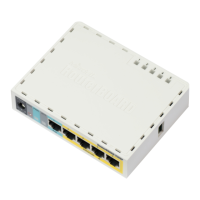
  • Connectivity: It features five individual Ethernet ports. Port 1 is typically designated for WAN connectivity, while ports 2-5 are used for connecting LAN devices. These ports support automatic cross/straight cable correction (Auto MDI/X), eliminating the need for specific cable types and simplifying connections to other network devices.
  • Powering Options: The device offers dual powering methods for enhanced flexibility. It can be powered directly via a power jack (5.5mm outside, 2mm inside diameter, female, pin positive plug) that accepts 8-28V DC. Alternatively, it supports passive Power over Ethernet (PoE) on its first Ethernet port, also accepting 8-28V DC. This PoE capability is particularly useful in deployments where a power outlet is not readily available near the device, allowing it to draw power directly from the Ethernet cable connected to a PoE injector. The typical power consumption is low, ranging from 2.4W to a maximum of 3.6W under full load, making it an energy-efficient choice.
  • Initial Configuration: For initial setup and management, the RouterBOARD 750 relies on the MikroTik Winbox utility. Since it does not come with a serial port connector, all initial connections are made via an Ethernet cable. Winbox can connect to the device using its default IP address (192.168.88.1) with the default username "admin" and no password. In scenarios where an IP connection is not immediately available, Winbox also supports connection via the device's MAC address, providing a reliable fallback for access.
  • Network Booting: The device supports network booting, which is useful for advanced scenarios like using MikroTik Netinstall to reinstall or upgrade the RouterOS. This feature is activated by holding the RESET button during startup until the LED light turns off, signaling that the RB750 is looking for Netinstall servers on the network.
  • Extension Slots and Ports: The five Ethernet ports are a key feature, providing ample connectivity for small to medium-sized networks. The Auto MDI/X capability on all ports simplifies cable management and connection to various network devices without concern for cable type (straight-through or crossover). The PoE capability on the first Ethernet port further enhances its utility, especially in remote or space-constrained installations.
  • RouterOS Features: The device leverages the full power of MikroTik RouterOS, allowing for advanced network configurations. Users can implement complex routing policies, set up secure VPN connections, manage bandwidth with QoS, and configure robust firewall rules. The operating system's comprehensive feature set makes the RouterBOARD 750 adaptable to a wide array of networking challenges, from simple internet sharing to more intricate enterprise-level setups.

Maintenance Features

The RouterBOARD 750 includes several features designed to facilitate maintenance, troubleshooting, and recovery.

  • RouterOS Reset Jumper: A physical ROS reset jumper hole is located on the bottom of the case, behind one of the rubber feet. This allows users to reset the RouterOS software to its default configuration. To activate this, a metallic object (like a screwdriver) must short-circuit the metallic sides of the hole while the device is booting. The screwdriver should be held in place until the RouterOS configuration is cleared, effectively restoring the device to its factory settings. This is a critical feature for recovering from misconfigurations or forgotten passwords.
  • RouterBOOT Reset Button: In addition to the jumper, a RouterBOOT reset button is located on the front panel, offering two distinct functions for maintenance and recovery:
    1. Reset RouterOS Configuration: Holding this button during boot time until the LED light starts flashing, then releasing it, will reset the RouterOS configuration to its defaults. This achieves the same result as using the reset jumper hole but offers a more accessible method.
    2. Netinstall Mode: Holding the reset button for a longer duration during boot time, until the LED turns off, then releasing it, will make the RB750 look for Netinstall servers. This is essential for network-based reinstallation of RouterOS, providing a robust recovery mechanism in case of severe software issues or for upgrading the operating system from a network source.
  • Winbox Utility: The Winbox utility, used for initial configuration, also serves as a primary tool for ongoing maintenance and monitoring. Its graphical interface simplifies the management of RouterOS settings, allowing users to easily adjust configurations, monitor network traffic, and diagnose issues without needing command-line expertise.
  • Online Resources and Support: MikroTik provides extensive online resources, including a wiki (http://wiki.mikrotik.com/wiki/First_time_startup) for initial setup guidance and an RMA portal (http://rma.mikrotik.com) for warranty and repair procedures. Direct support is available via support@mikrotik.com for any questions or issues, ensuring users have access to assistance when needed. The device comes with a fifteen-month warranty from the shipping date, covering defects in materials and workmanship under normal use, with specific conditions for damage. For products purchased from a reseller, warranty and repair issues are handled by the reseller, while direct purchases from MikroTik Latvia follow the RMA procedure outlined on their website.

These features collectively ensure that the RouterBOARD 750 is not only a powerful networking device but also one that is easy to deploy, manage, and maintain throughout its lifecycle.

MikroTik RouterBOARD 750 Specifications

General IconGeneral
RAM32 MB
Ethernet Ports5x 10/100 Mbps
Operating SystemRouterOS
Power Input8-30 V DC
Storage64 MB NAND
Dimensions113 x 89 x 28 mm
Weight129 g
CPU400 MHz

Related product manuals