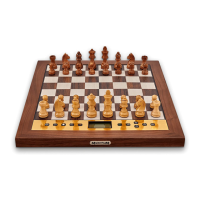
7. Functions of the control buttons
Note: The RED and GREEN buttons have various uses. Their functions in the current
situation are indicated in the bottom left and right corners of the screen.
RED Reverts to the previous LCD display. In normal playing mode, cycles
round three “info” displays:
• clock times
• the last few moves played
• analysis of the position.
Confirms a position that the user has been “setting up”.
Cancels a change of “level”.
The button’s current function is indicated at the bottom left of the
LCD; “i” denotes “info”.
GREEN Accesses the main menu.
• Selects an item from the menu or other list.
• Confirms a change of “level”.
Current function is indicated at the bottom right of the LCD.
Starts a new game.
? Displays “help” text, stating what the user may do next.
At any time, if unsure what to do next, you may press this button to
see a “scrolling” explanatory message.
Regulates the “backlight” of the LCD.
The backlighting of the LCD can be adjusted by repeated presses on
this button. (Low brightness means increased battery life.)
If powered by fresh batteries, the display is automatically “dimmed”
after 5 minutes in which the user has not pressed the membrane
chessboard or a control button. With low batteries, the dimming
occurs after one minute. The lighting is restored by the next press.
Retracts a move, or:
• Decreases a parameter number.
• Alters a parameter setting.
• In “Set up” mode: cycles through the various piece types.
Can be held down to “auto-repeat”.
Replays a move that was retracted, or:
• Increases a parameter number.
• Alters a parameter setting.
• In “Set up” mode: cycles through the various piece types.
Can be held down to “auto-repeat”.



 To Next Page