EasyManua.ls Logo

Milnor Phase 7.2.2 - Page 65

Milnor Phase 7.2.2
92 pages
Print Icon
To Next Page IconTo Next Page
To Previous Page IconTo Previous Page
Loading...
63
7
5
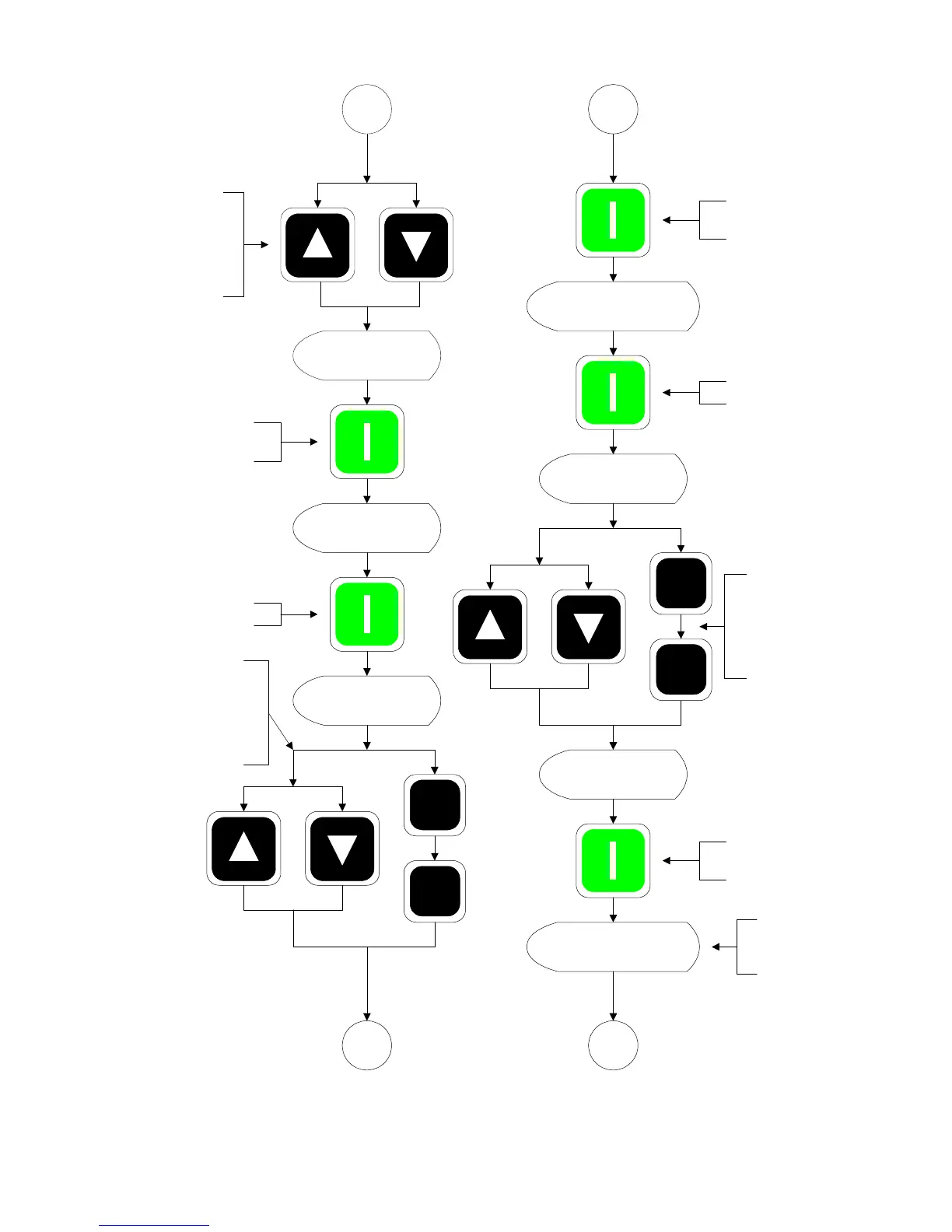
1: ENTER DRY TIME
0 TO 99 MINUTES
30
70
3: ENTER CYCLE
ADJUSTMENT
EXTRA DRY
4
5
45
2: ENTER DRY TEMP
100 TO 200 ºF
Press the up arrow key
to increment the value,
the down arrow key to
decrement the value or
enter the value
directly.
Press the up arrow
key to increment the
time, the down arrow
key to decrement the
time or enter the time
directly.
Press the up or
down arrow key to
adjust the dryness
level. FINISHING,
DRY OR EXTRA
DRY
Axial models will
display a maximum
temp of 160 ºF
From
Previous
(A)
From
Previous
(B)
Next
Page (A)
Next
Page (B)
Press ENTER to access
Press ENTER to store
new changes
Press ENTER to store
new changes
Press ENTER to store
new changes

Table of Contents