EasyManua.ls Logo

Milnor Phase 7.2.2 - Page 67

Milnor Phase 7.2.2
92 pages
Print Icon
To Next Page IconTo Next Page
To Previous Page IconTo Previous Page
Loading...
65
70
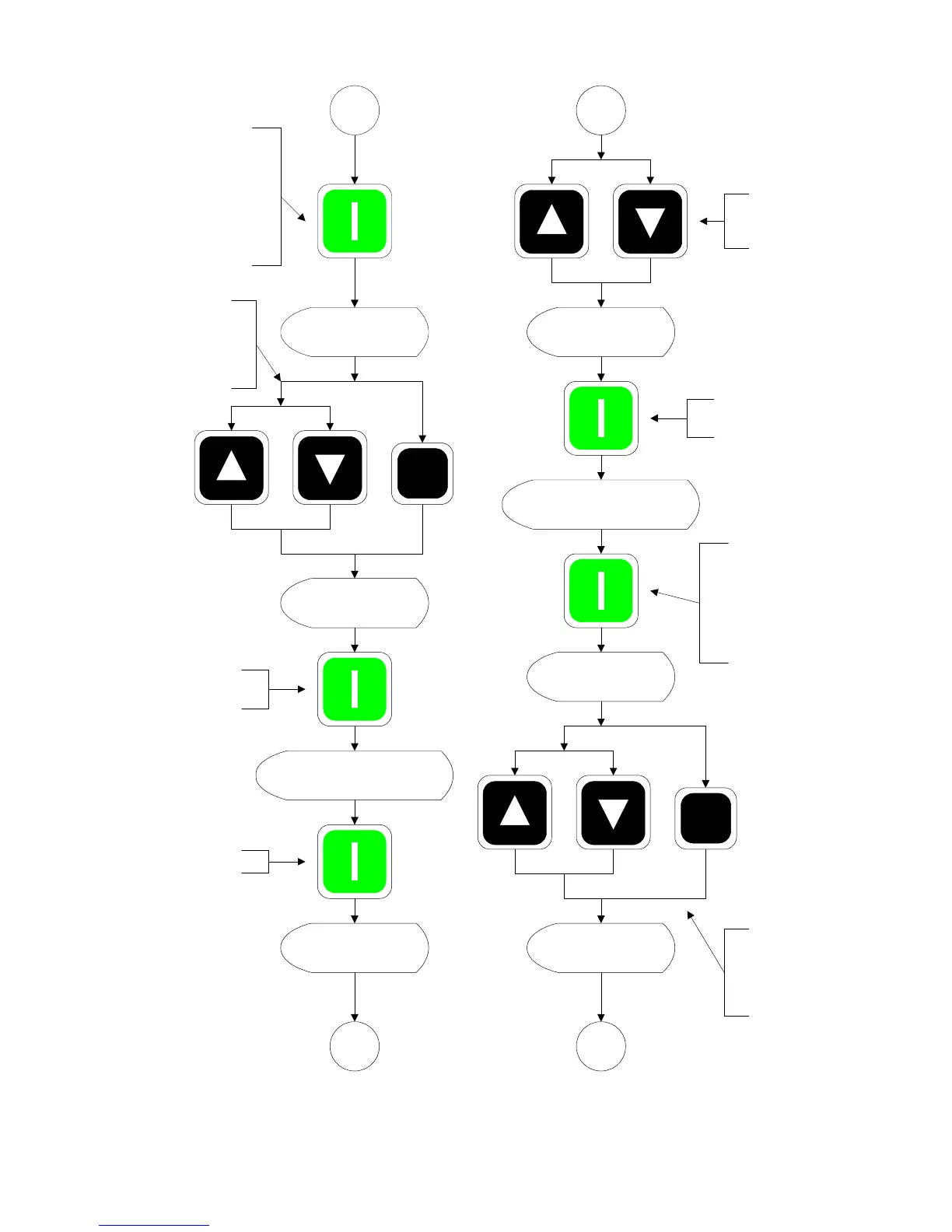
6: ENTER COOL DOWN
TEMP 70 TO 100 ºF
5
6
5
OFF
4: ENTER COOL DOWN
TIME 0 TO 99 MINUTES
6
5
Press the up arrow key
to increment the time,
the down arrow key to
decrement the time or
enter the time directly.
5
Press ENTER to store new
changes.
If CONTROLLED COOL
DOWN is ON, the program
will display NOT
AVAILABLE and jump to 6:
ENTER COOL DOWN
TEMP 70 TO 100 ºF.
Press the up or down
arrow key to turn the
option ON or OFF.
Press ENTER to access.
If CONTROLLED COOL
DOWN is ON the program
will display NOT
AVAILABLE and jump to 5:
ENTER COOL DOWN
TIME 0 TO 99 MINUTES.
From
Previous
(A)
From
Previous
(B)
Next
Page (A)
Next
Page (B)
Press ENTER to access
Press the up arrow key
to increment the time,
the down arrow key to
decrement the time or
enter the time directly.
Press ENTER to store
new changes
Press ENTER to store
new changes

Table of Contents