21
4-3-6. Calibration of zero point
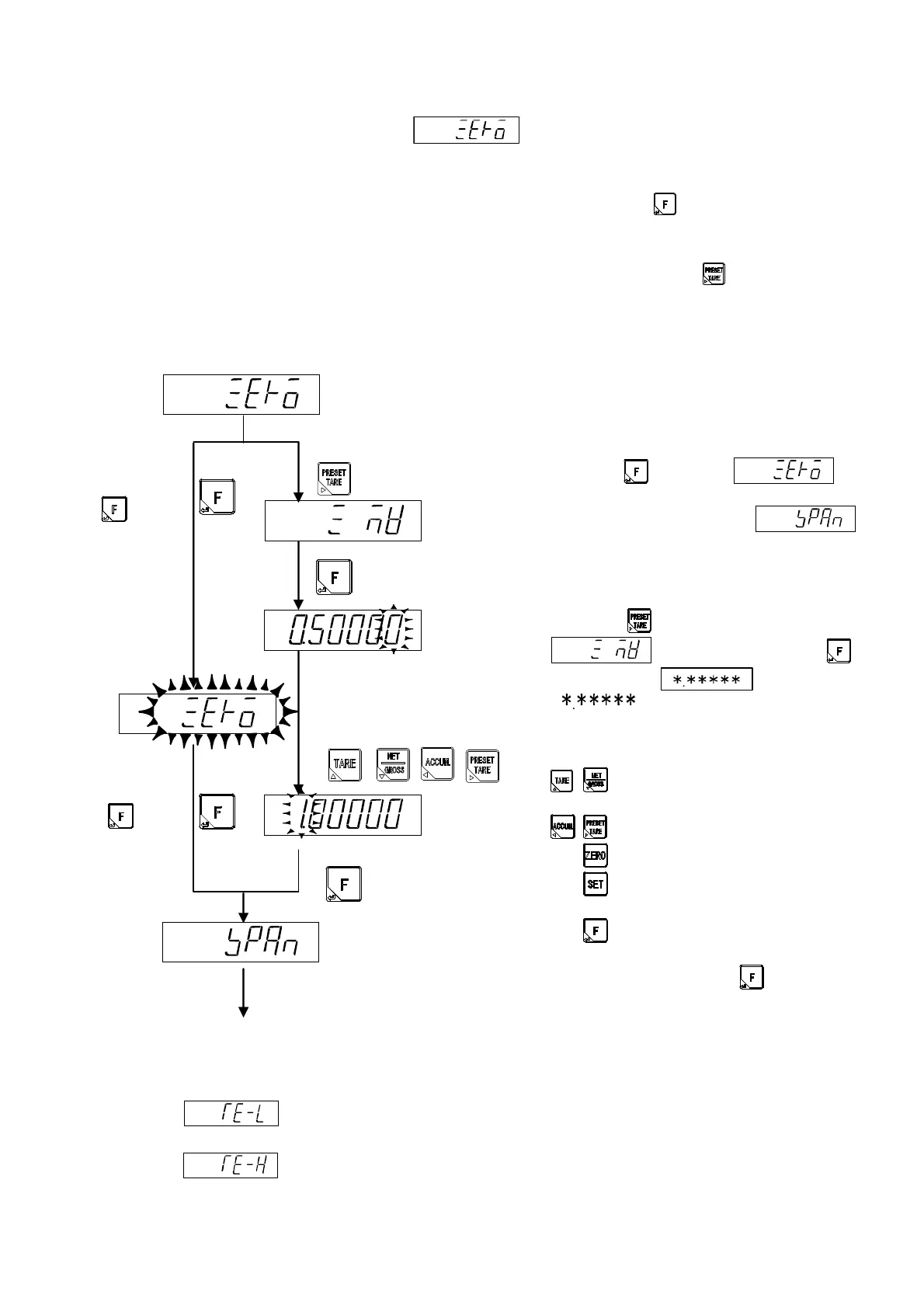
When the zero calibration starts, is displayed.
Please select the zero calibration method.
(1) Method by the measuring data (status of initial load) ⇒ Press the key, and execute the
operation of a).
Execute the calibration of zero with nothing put on the measuring section.
(2) Method by the numeric input of the load cell output voltage. ⇒ Press the key, and execute the
operation of b).
Execute the calibration of zero with inputting the output voltage value of the load cell when nothing is
put on the measuring section.
a) Method by the measuring data (status of
initial load)
Please make that nothing is put on the
measuring section.
Press the key when
display blinks, and the STABLE mark lights. The
zero point is memorized, and is
displayed.
b) Method by the numeric input of load cell
output voltage.
When key setting is pressed,
is displayed, and when
key is pressed, is displayed also.
[ ] is the memorized output voltage
of the load cell. Please set the load cell output
voltage in mV/V scale which correspond to the
zero point of the measurement.
: The value of changed digit is
changed.
: Changed digit is selected.
: The displayed value is changed to [0].
: Setting is interrupted and display
returns to CCAL.
: The display value is memorized, and
it proceed to the next step.
After the setting, press the key.
Error display in the calibration of zero point
: The display blinks for about two seconds when the output of the load cell is
-2.5 mV/V or less. (Refer to the paragraph 19. Error display)
: The display blinks for about two seconds when the output of the load cell is
2.5 mV/V or more. (Refer to the paragraph 19. Error display)
Move to the calibration of span.
m
m
Memorized load cell output voltage.
Set output voltage of the load cell.
Under the
calibration
of zero.
Press the
key,
after STABLE
mark lights on.
Press the
key,
with nothing on
the measuring
section.


 To Next Page
 Loading...


