33
5. C function mode
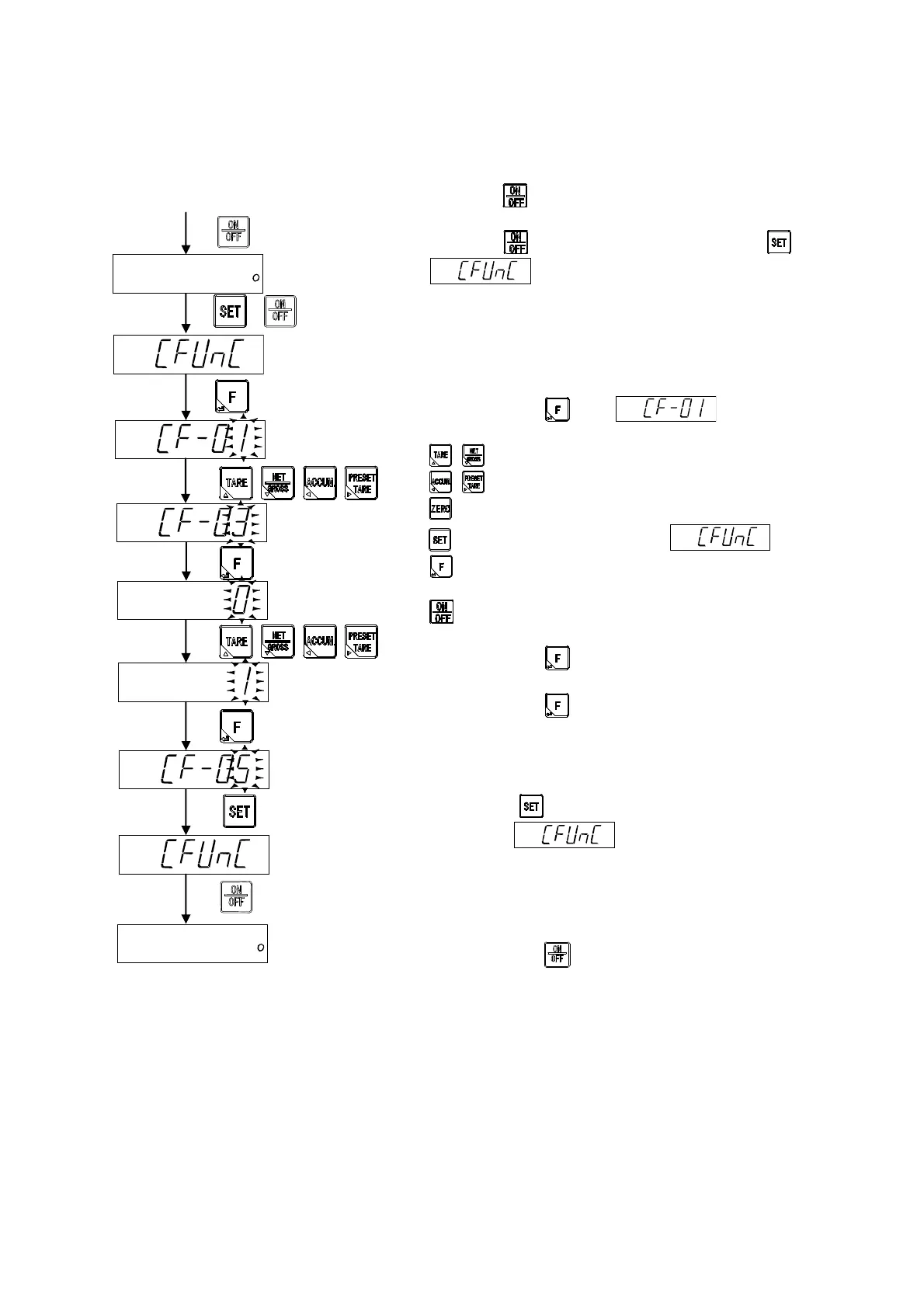
The various functions concerning to the calibration become effective by setting the C function
data.
5-1. Setting method of C function data
Press the key to change the condition from normal
measurement mode to stand-by condition.
When the key is pressed with pressing the key,
is displayed.
By pressing the key, is displayed.
Please select C function number which wants to change.
: The value of the changed digit is changed.
: Select the changed digit.
: Change the display value to [0].
: Return to the display of .
: Memorize the display value, and proceed to the next
step.
: Finish the C function mode without changing all setting.
By pressing the key, please change the setting value of
selected C function mode.
By pressing the key. The changed content is registered, and
the following changed C function number is displayed on the
panel.
Please select the changed C function number when you
continuously change the setting of the other C function numbers.
By pressing key is pressed after the registration is
completed, is displayed.
By pressing the key, set to the stand-by condition.
Measurement mode
Stand-by condition
+
Registration is
completed.



 To Next Page