miniDSP Ltd, Hong Kong / www.minidsp.com / Features and specifications subject to change without prior notice 21
6.2.3 Routing
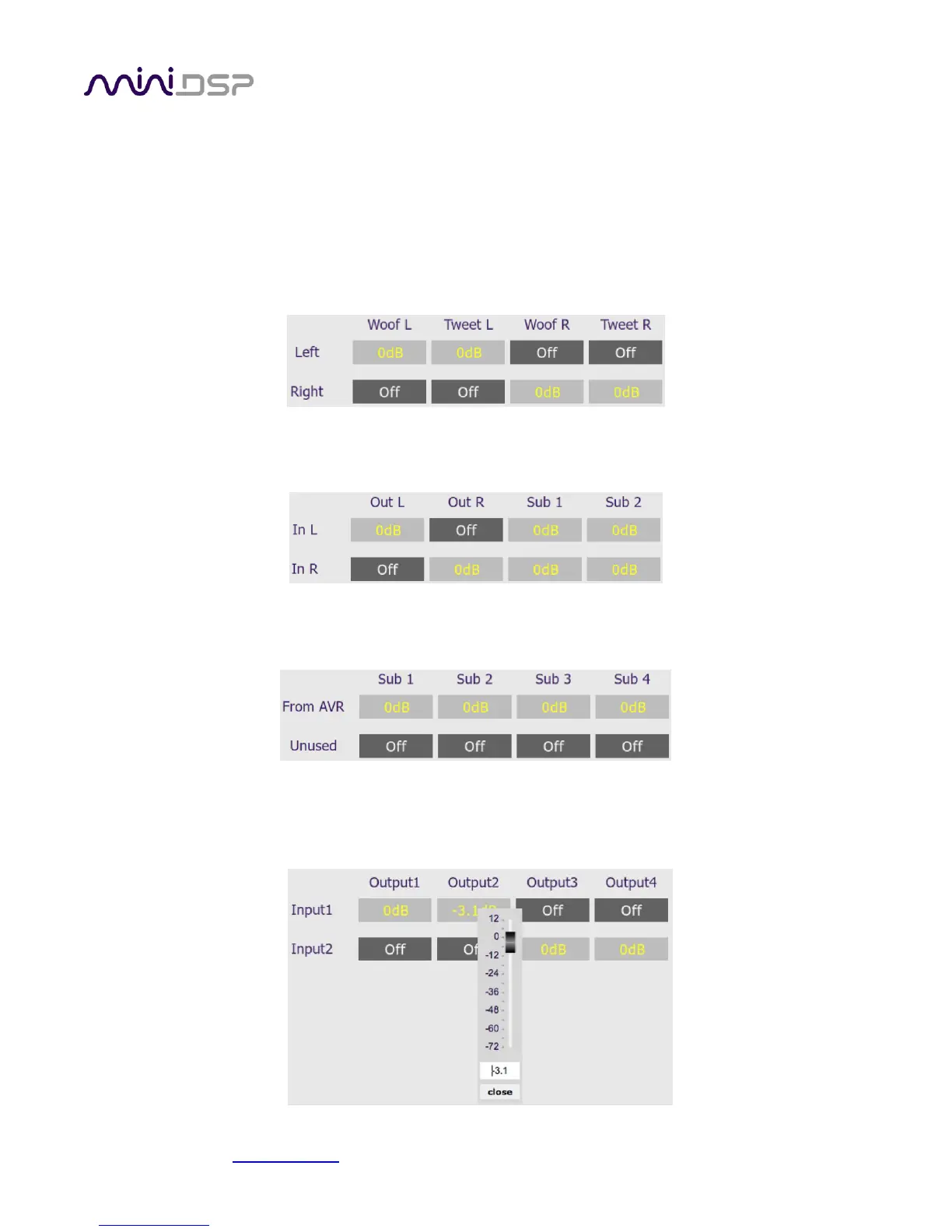
The Routing matrix mixer is used to direct input channels (along the left) to output channels (along the top). To
turn on routing for a crosspoint, click on that crosspoint. The display will change from “Off” to show the mix
level (0 dB by default).
The matrix mixer makes the 2x4 HD adaptable to many audio processing situations. Here is an example for a
two-way active loudspeaker, where the left input channel is routed to outputs 1 and 2 and the right input
channel is routed to outputs 3 and 4 (to change the input and output channel labels, see pages 20 and 22):
For subwoofer integration, the left and right inputs are routed to outputs 1 and 2. They are also summed and
routed to outputs 3 and 4 for use as mono subwoofer feeds:
For multisub control and integration, input 1 is connected to the AVR subwoofer output and is routed to all four
outputs:
At each cross-point, the gain of the signal being mixed can be adjusted to a value between -72 and +12 dB. To
adjust the gain, right-click on the crosspoint and a gain control will appear. Adjust the gain with the slider, or by
typing in the value directly, then click close:



 To Next Page