miniDSP Ltd, Hong Kong / www.minidsp.com / Features and specifications subject to change without prior notice 32
6.5 FIR FILTERING AND DESIGN
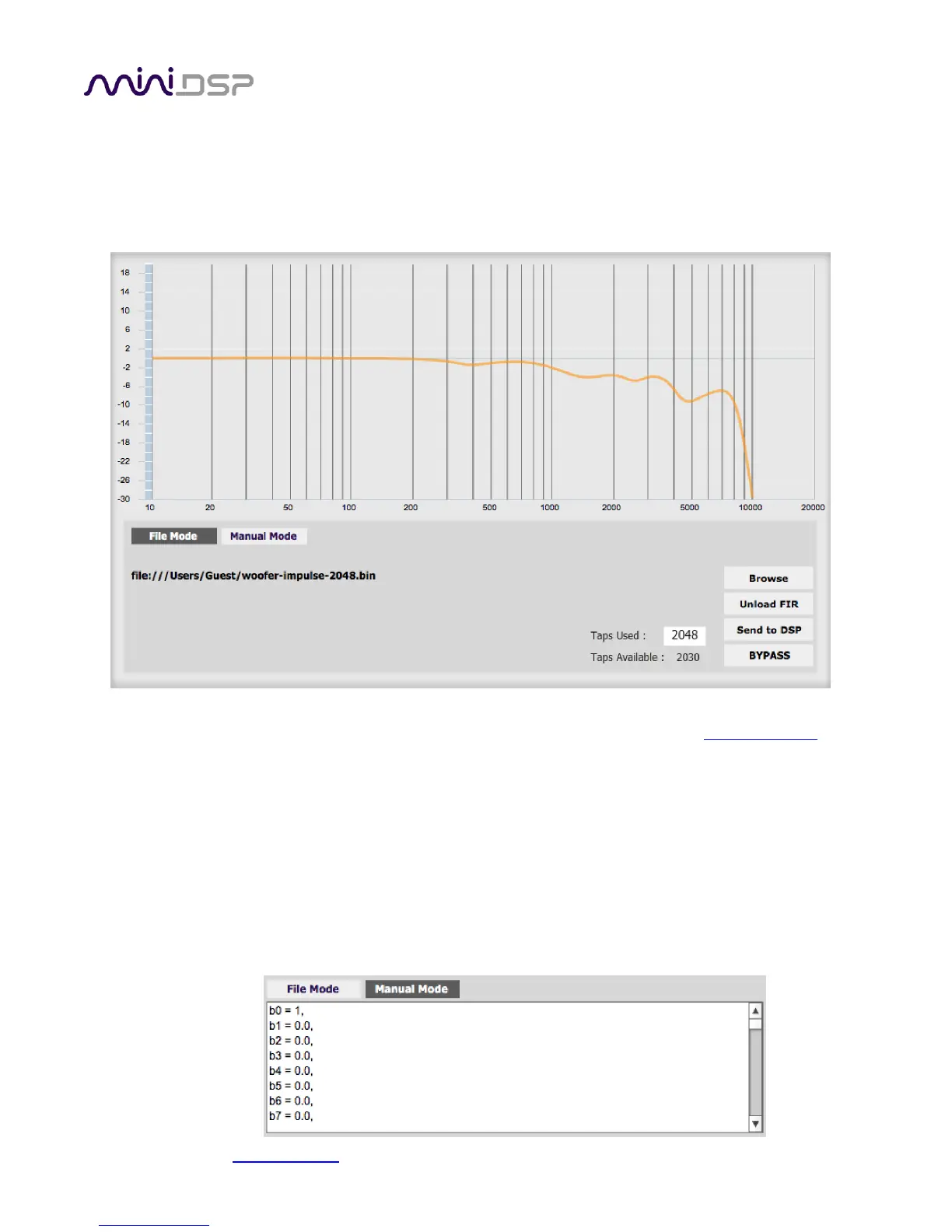
FIR filtering is a powerful and advanced feature of the 2x4 HD. It allows construction of complex arbitrary
equalization and crossover filters with independent control of amplitude and phase. The parameters of each FIR
filter are set in the FIR settings window:
Browse Opens a file browser to select a file containing FIR filter coefficients. (See Filter file format
below).
Unload FIR Deletes the currently loaded filter from the display and from the DSP memory.
Send to DSP Writes the currently loaded filter into the DSP memory.
BYPASS Disables the FIR filter. The filter is disabled when the button is "lit."
File Mode / Manual Mode
In File Mode, the window displays the Browse and Unload FIR buttons as shown above. In
Manual Mode, the display changes to allow direct text entry of the FIR filter coefficients, as
shown below. The coefficients can be pasted into the window from a text editor.


 To Next Page