4.
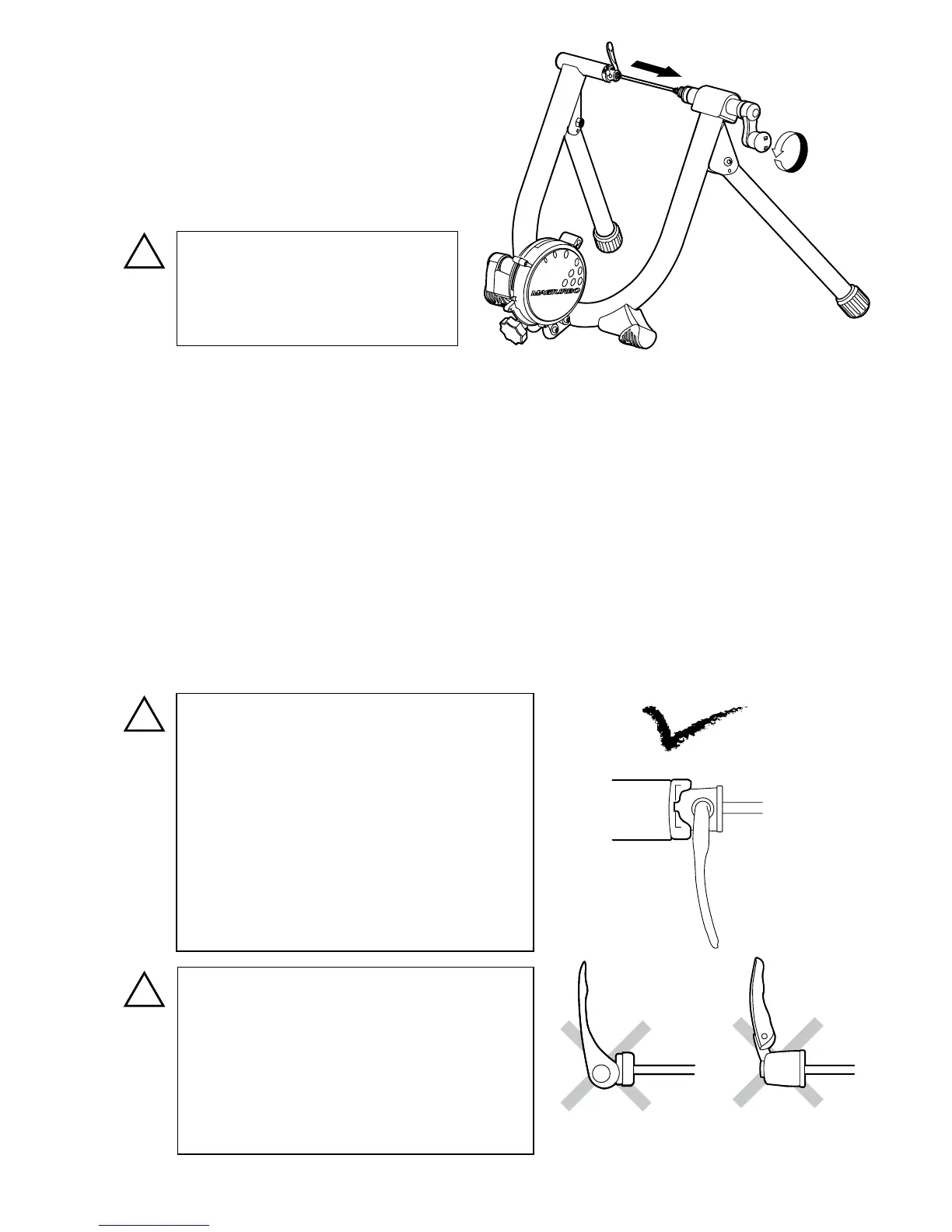
Place your rear wheel in between the couplings.
1)
Turn the Hub Handle in the direction of
counter-clockwise to make the enough space
between the couplings.
You should almost fully open the coupling
for easier wheel installation. (see Fig. C)
2)
Insert the left side (quick lever side) skewer into the left side coupling rst.
The quick lever shaft must be inserted into the cut-out on the coupling to hold the bike stable. Turn the
coupling to adjust the cut-out position prior to tightening the Hub Handle.
3)
While keeping this position, slowly come down the bike to align the right side acorn nut to the right
side coupling.
4)
Turn the Hub Handle clockwise to hold the rear wheel.
Once the rear wheel hub is stify caught between the couplings and you see the frame starts opening,
it's the bottom position. Stop tightening.
6)
Turn the Hub Handle two more rotations. Do not try to over-tighten the Hub Handle.
Both right and left side couplings are
designed to suit the supplied quick release
skewer. The left side coupling must t
perfectly in the skewer head to get correct
stability. (see Fig. D)
Any skewer type which lever is located on
the end of the axle (see Fig. E) or the lever
will not be bent over right angle (see Fig. F)
cannot be used on B60.
Do not try to over-tighten the Hub Handle
to keep the correct thightness of rear hub
clamping.
Too tight setting will cause damage to both
B60 and your bike frame.
Too loose setting may cause the bike to
come out of the trainer during use.
- Page 5 -
(Fig. C)
Be careful not to over-loosen the
Hub Handle. It will loosen the
inside nut and no longer proper
tightening can be expected.


 To Next Page