5
On-Line On-Battery Buck Boost
English
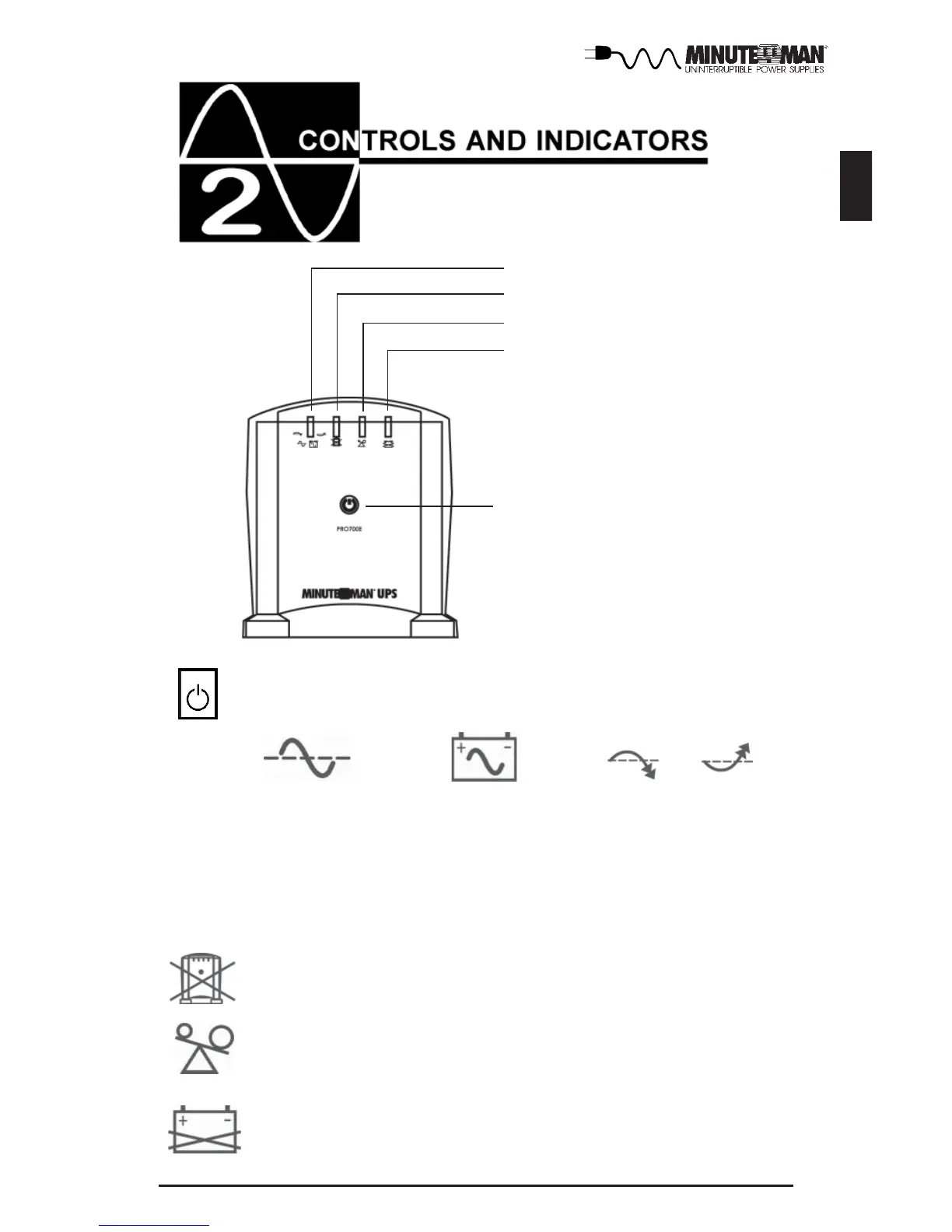
On-Line/On-Battery/Boost/Buck LED
Overload LED
Weak/Bad Battery LED
On/Off/Test Button
Fault LED
Press and release the ON/OFF/Test Button after 1 beep to turn the
UPS ON or OFF (see section 4).
The On-Line/On-Battery/Boost and Buck (green) LED illuminates in a steady
state when the UPS is on and supplying AC power to the load. The LED blinks
and the audible alarm sounds, when supplying battery power to the load. The
LED blinks and no audible alarm when the UPS is in either the boost or the
buck mode.
The Fault (red) LED illuminates when the UPS has detected an inter-
nal fault. (see section 5)
The Overload (yellow) LED illuminates when the loads connected to
the UPS exceeds the UPS power rating. (see section 5)
The Weak/Bad Battery (red) LED illuminates when the UPS has
detected that the batteries are Weak/Bad. Battery replacement might
be required. (see section 5)




 To Next Page