5
en
Knowing your device
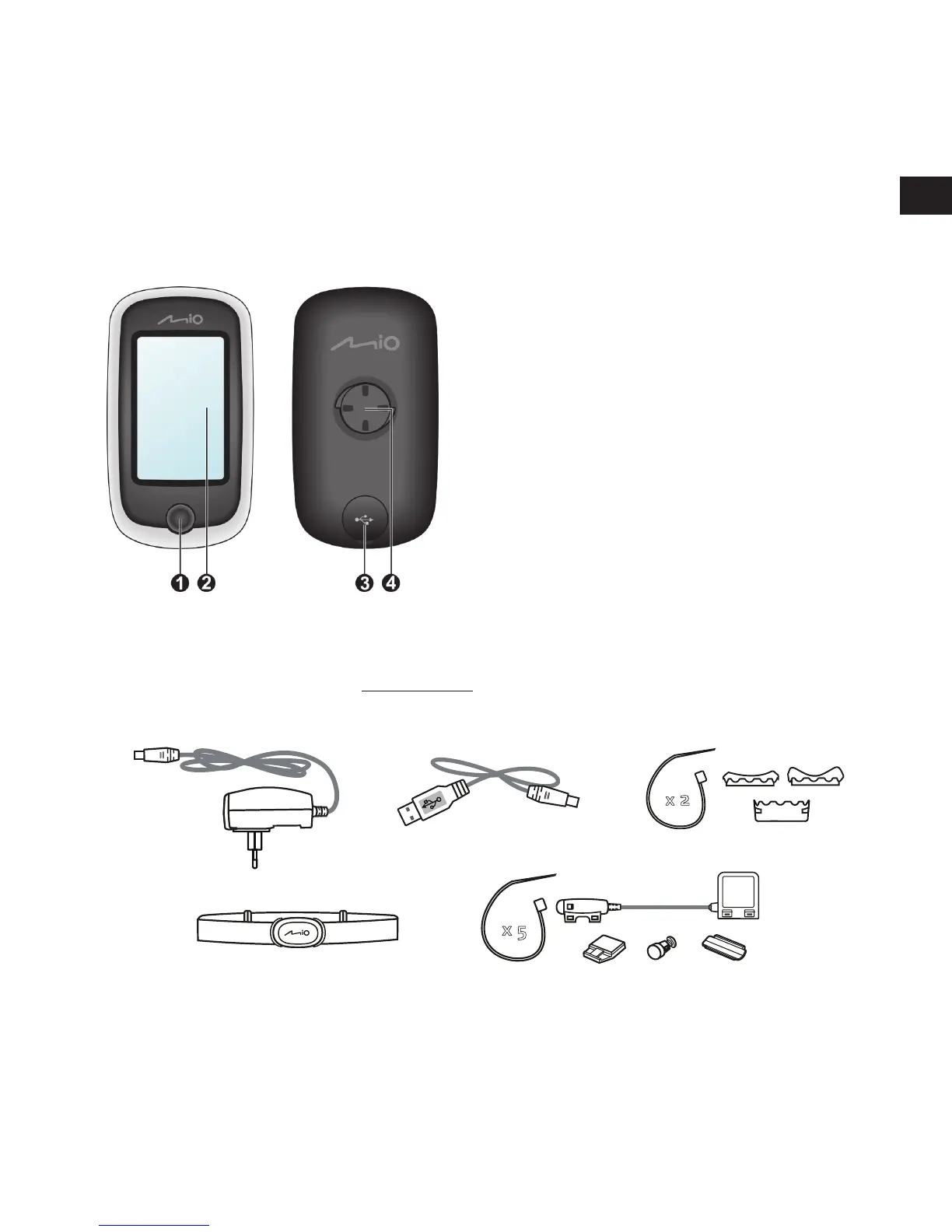
Main unit
1. POWER button
Turns your device on and off.
2. Touch screen
• Displays the output of your device.
• Tap the screen with your fingertip to select
menu commands or enter information.
3. Mini-USB connector
Connects to the charger or USB cable.
4. Bike mount socket
For the device mount.
Accessories
Your device comes with the following accessories. To use your device on a bike, ensure you use the
specific bike mount kit that came with your device. Mio may provide optional accessories for specific
models. Please visit Mio website (www.mio.com) for information.
Note: Depending on the specific model purchased, the colour and look of your device and accessories
may not exactly match the graphics shown in this document.
Bike mount kit
Power adapter
USB cable
x 5
Speed and cadence sensor kit*
Heart rate belt*
x
2
* may be sold separately



 To Next Page