3
Surprise Me™ ......................................................................................................14
Other navigating options .................................................................................15
Workout mode 15
Workout by distance .........................................................................................15
Workout by time ................................................................................................16
Workout by calories ..........................................................................................16
Customising your device 17
Maps .....................................................................................................................17
Routing ................................................................................................................. 17
Sound ...................................................................................................................18
Sensors .................................................................................................................18
Dashboard ...........................................................................................................18
Brightness ............................................................................................................18
Profiles .................................................................................................................19
GPS .......................................................................................................................19
Compass ..............................................................................................................19
Language ..............................................................................................................19
Date & Time ....................................................................................................... 20
Units .................................................................................................................... 20
Product Info ....................................................................................................... 20
Managing data on the device 21
Installing MioShare ............................................................................................21
Sharing your experience on the Internet .......................................................21
For more information 21
Online support ...................................................................................................21
Caring for your device .......................................................................................21
Troubleshooting .................................................................................................22
What is GPS? ......................................................................................................22
IPX7 notice ......................................................................................................... 23
Safety precautions ............................................................................................ 23
Regulatory information ................................................................................... 23
WEEE ................................................................................................................... 24
Knowing your device
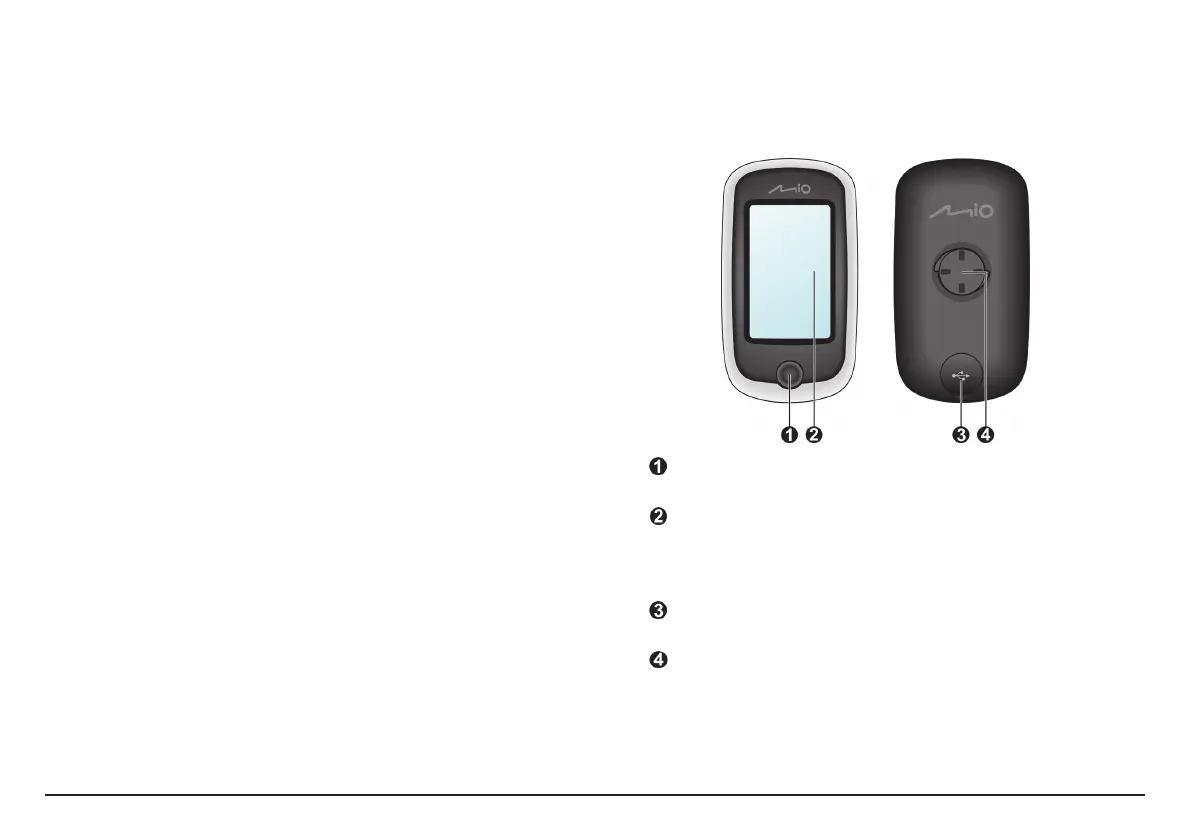
Main unit
POWER button
Turns your device on/off.
Touch screen
•Displays the output of your device.
•Tap the screen with your fingertip to select menu commands or enter
information.
Mini-USB connector
Connects to the charger or USB cable.
Bike mount socket
For the device mount.


 To Next Page